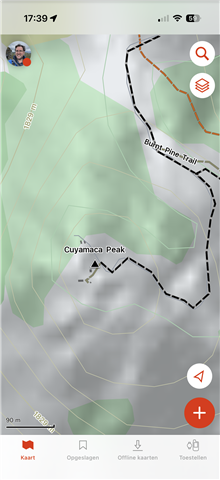
Lack of details on "Topo" map in iOS Explore vs. Explore Website

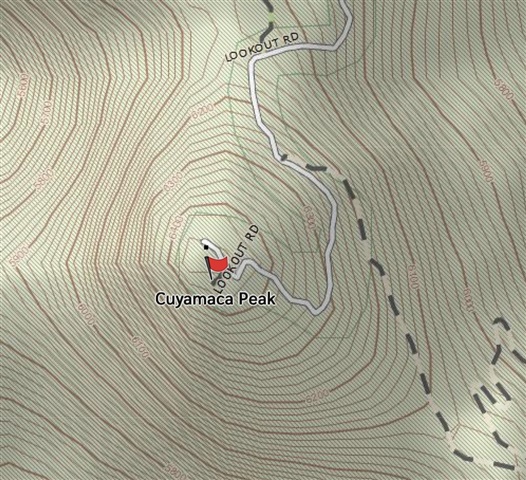
Here's an example of the map detail I see in explore.garmin.com/Map  - this location is Cuyamaca Peak in San Diego County:
Compared to the detail I see inside the Explore iOS app 
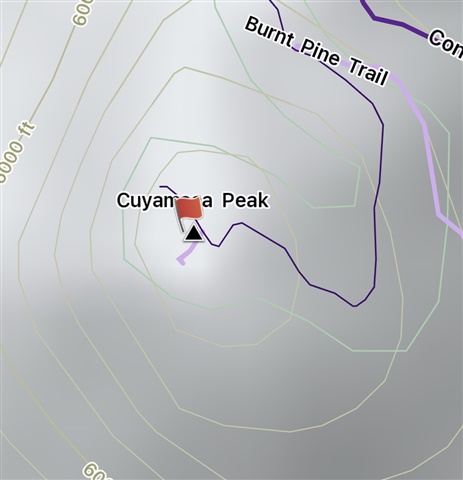
There is just a ton more detail in the Web map vs. the iOS map.

Is this something that I can fix?  Is this lack of detail something that https://www.garmin.com/en-US/p/893561/ improves?

  • Outdoor Maps+ will give you additional map layers on top of the default TopoActive maps in Explore app (and on a compatible Garmin device). Note that Explore web uses different mapping and is not compatible with Outdoor Maps+.

    As for an example of what the map in Explore app looks like with Outdoor Maps+ layers turned on, see this screenshot:


    This is with additional layers for buildings, tree species, contour lines and contour shading.

  • Thank you for that example.  There's more detail in what you are showing, but I still like the Web version best of all (one detail: it clearly shows that the trail to the peak is actually a paved road, vs. just a trail).   

    It's confusing with all these map options which differ between mobile and web versions.

  • Yes it is extremely irritating and I know of no solution, certainly not one that avoid spending lots of money to replace the old version of Explore that "just worked".  Add to this, their new fancy routing engine is broken for many trails that also used to "just work", and can no longer intelligently route on many common hiking trails here in California.  Garmin did us a major disservice by breaking these things, and they've been broken for years now.