
Heart rate zones in Garmin Connect Web

Hi all, I am trying to understand how the below values are being calculated. 
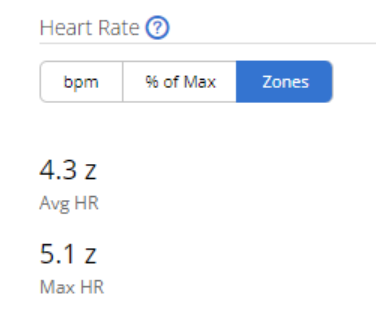
Just to make an example, have for today's run the following "time at zones" values:

Z5 0% 

Z4 26%

Z3 30%

Z2 32%

Z1 9%

And in this case, in the HR zones I can see 3,3 z ave HR, 4,9 z max HR. How these values are calculated?  

Thanks!

  • Just one point, how to define intervals. For example, for Z4 interval, why we consider (Z5 min - Z4 min) and not (Z4 max - Z4 min) it's more logical to me, without creating overlapping.

    Yes I agree that Z4 max - Z4 min is more logical. To explain why I used Z5 min - Z4 min instead, I will echo what trux said and add:

    Historically, Garmin has actually presented your zone BPM ranges in 2 ways: with and without overlapping.

    1) In the (old) HR zone settings [**] where you could see both % and BPM at the same time, with overlapping (without gaps). e.g. My real zones would've looked like this:

    Z1: 123-137
    Z2: 137-151

    2) In the time in zones chart, without overlapping (with gaps). e.g. For my real zones:

    Z1: 123-136
    Z2: 137-151

    It is worth noting that the new settings based on BPM show non-overlapping ranges as in 2).

    I think 1) (overlapping zones) makes more sense mathematically [*], but end users may find it confusing, which is why Garmin went with 2) (non-overlapping zones) for the time in zones chart.

    [*] For example, if my average HR is 136.5, then by 2), it is in neither zone 1 nor 2, but by 1) it is clearly in zone 1.

    If you use the overlapping zone ranges from 1), then Z4 max is the same as Z5 min, and Z4 max - Z4 min is the same as Z5 min - Z4 min, so it doesn't matter which one you use.

    If you use the non-overlapping zone ranges from 2), then you must use Z5 min - Z4 min for the Z4 calculation.

    I think Garmin actually uses overlapping zones internally (this can be seen in a few technical ways, by looking at the Connect IQ SDK or analyzing activity FIT files). Internally, zones actually look like this:

    Z1 min, Z1 max,  Z2 max, Z3 max, Z4 max, Z5 max (max HR)

    (Ofc these could also be interpreted as half open ranges - ultimately I don't think it matters.)

    --

    [**]

    The old HR zone settings (available on the Connect website for older devices) actually would've looked something like this, which pretty much shows overlapping zones:

           %HRR / BPM
        ...

       |--- 70% / 151
    Z2 |               
       |--- 60% / 137
    Z1 |             
       |--- 50% / 123

  • One problem with 1) (overlapping zones) is that if a value is on the border of 2 zones (like 137), which zone range is it in?

    If you use fractional zones, then the fractional zone for 137 is always 2.0 whether you assume 137 is in Z1 or Z2:

    Assume 137 is in Z1 and use the overlapping zones:

    Z1min + 1.0 + fractional_zone * (Z1max - Z1min) = 137
    fractional_zone = 1.0 + (137 - z1min) / (Z1max - z1min)
    fractional_zone = 1.0 + (137 - 123) / (137 -123)
    fractional_zone = 1.0 + 1
    fractional_zone = 2.0

    Assume 137 is in Z2 and use the overlapping zones:

    Z2min + 2.0 + fractional_zone * (Z2max - Z2min) = 137
    fractional_zone = 2.0 + (137 - z2min) / (Z2max - z2min)
    fractional_zone = 2.0 + (137 - 137) / (151 - 137)
    fractional_zone = 2.0 + 0

    fractional_zone = 2.0

    (Either calculation would also work if you used the non-overlapping zones, but ofc you'd have to adjust the formulas)

    In other words, in terms of fractional zones, 137 would be "100% into Z1",  "0% into Z2", or 2.0.

    If you use integer zones, you could just Garmin's non-overlapping presentation and say that 137 is in zone 2 (which also makes a lot of sense given that the fractional zone is 2.0)

  • I will also say that for fractional zones, there a couple of uncertainties:

    - For 0.x (HR lower than zone 1), it's not clear what "zone 0 min" is (I *think* it might be a fixed value like 30, the minimum hr that Garmin watches will measure)

    - For 6.x (HR higher than max HR), it's not clear what "zone 6 max" is. (Note that zone 5 max is your max HR in user profile). I *think* it might be 220 or some other arbitrary absolutely max HR.

    If you ever have examples of these (0.x should actually be easy because your recovery HR "fractional zone" will almost certainly be less than 1.0 *), you can calculate these unknown constants yourself.

    [*] Ofc it makes little sense to present recovery HR as a "fractional zone", since it's not an absolute HR measurement but a relative calculation (the difference between HR measurements when you stop exercising and 2 minutes later), and HR zones only make sense for absolute HR measurements, but Garmin does it anyway....

    EDIT I did the math and it looks like:

    - "zone 0 min" is actually 0 (or maybe 1)

    - there is no zone 6 max, because if you exceed your max HR, Garmin just displays 6.0 anyway, even though it will show "% of Max" as being higher than 100%.

  • Thank you for the good discussions! My time zone is actually non-overlapped but as far as I understand it's preferable to set with overlapping. BTW, overlapping should not be an issue if we assume that 137.0 is Z1 and 137.1 is Z2.

    Z1=123-137 intended defined as max 137.0

    Z2=137-151 intended defined as min 137.1

    Thanks, ciao

  • My time zone is actually non-overlapped but as far as I understand it's preferable to set with overlapping.

    I was saying that Garmin presents HR zone BPM ranges to the user as non-overlapped (or 1 bpm apart), but internally / mathematically Garmin's zones are overlapping (or touching). And in the past, Garmin actually showed HR zones as overlapping in the Connect website HR zones settings (which don't exist for newer devices).

    You cannot actually *set* your zones with overlapping BPM, although if you set your zones by % (% HRR or % max HR), you will see that the percentages are overlapping, which proves my point.

    For example, I set my zones by %HRR, and the ranges in settings (User Profile > Zones):

    Z5: 90% - 100%
    Z4: 80% - 90%
    Z3: 70% - 80%
    Z2: 60% - 70%
    Z1: 50% - 60%

    Z1=123-137 intended defined as max 137.0

    Z2=137-151 intended defined as min 137.1

    Not exactly. Think of it this way - Garmin shows the following ranges in the HR time in zones chart:

    Z1 = 123-136
    Z2 = 137-151

    But actually it means:

    123 ≤ Z1 < 137
    137 ≤ Z2 < 151

    Z1 max and Z2 min are both 137, but if your HR is exactly 137, then you're in Z2 (both by the above definition and the fractional zone calculations).

    In other words, if your HR is on the border of 2 zones, then the higher zone applies. So actually, Garmin's non-overlapping zone presentation is correct as long as your HR is an integer (and since we don't really ever see or care about fractional heart rates, that's just fine).

    It's similar to tax brackets. Tax brackets are often defined with overlapping ranges. You might see progressive tax brackets defined like this (fake example):

    $0 - $10,000: 0%
    $10,000 - $50,000: 10%
    $50,000 - $75,000: 20%
    ...

    But what if my income is exactly on the border of 2 brackets, like $50,000? Am in the 10% bracket or the the 20% bracket. It doesn't matter, because of the formula that's used to calculate your taxes. In the case of tax brackets, only the income that *exceeds* the minimum value for a bracket is taxed at that bracket's level. So If you make exactly $50,000, then $50,000 - $50,000 = $0 of your income is taxed at 20%. In this case, if your income is on the border of 2 brackets, the lower bracket applies.

    Again it's better for the ranges to overlap like this because it takes care of all possible cases of fractional amounts.

    The average person who is not too interested in numbers / math will ofc not really understand why the ranges overlap, which is why Garmin presents HR zone BPM ranges as non-overlapping (but they can't do that with the % ranges, because a difference of 1% will be more than 1 BPM, and that would mess up the ranges).