Maps from many old activities have disappeared

While revisiting some old activities (like 2013 old) I've noticed that the maps and most details have disappeared. It still has the distance/time/pace/calories & my notes, but everything else is gone. When I try to export to GPX or any other format it simply creates an empty file.

The kicker is that I'm absolutely positive this data previously existed. I've exported at least some of these activities to Google Earth before, and I can still see the route there. While I've downloaded this activity, there are plenty more that I haven't but would like to save.

Is this all permanently gone? Anyone have luck restoring these activities?

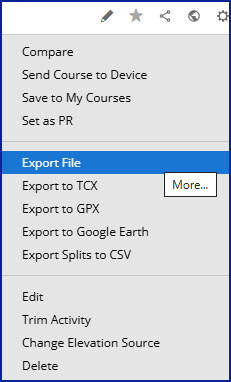
  • My activities date back to 2004, and I spot-checked several, including some from 2013, without finding any missing map data. Have you tried the "export file" function? It creates a zip file of the original file, whether it’s in FIT, GPX, or TCX format.

    Is this all permanently gone? Anyone have luck restoring these activities?

    If you can export as a fit file, then you can try opening the file in FIT File Viewer

    If there are no timestamp records that include latitude and longitude data, then it’s most likely not recoverable.

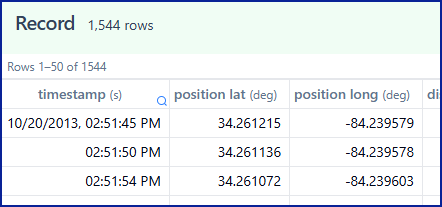
  • Thanks so much for the response. I can't export a FIT file (all instructions say to "Export original", but that option doesn't appear). However, when I try to export it as any other format (e.g. tcx) it creates a file titled "activity_0.tcx". Opening this in Excel shows only around a dozen data points, compared to the 1000s for other similar activities.

    Just venting, but this is incredibly frustrating.. this means I've lost maybe 20% of my old activities from those couple years, including outings explicitly planned to map areas.

    Thanks again for your answer though!

  • all instructions say to "Export original"

    The term "Export Original" was used years ago, but it’s now been replaced with "Export File," which creates a zip file containing the activity in the exact format it was originally created.

    If you’re checking out activities from 2013 and the device was even older, chances are it created TCX files. You can open these in a text editor like Windows Notepad to see raw details like timestamps, coordinates, heart rate, and more. If map data is included, you’ll spot latitude and longitude values.

    <Trackpoint>
        <Time>2004-08-29T12:09:30Z</Time>
        <Position>
          <LatitudeDegrees>34.0879400</LatitudeDegrees>
          <LongitudeDegrees>-83.9975600</LongitudeDegrees>
        </Position>
        <AltitudeMeters>319.7760000</AltitudeMeters>
    </Trackpoint>

    Feel free to zip the activity and attach it so we can take a look.

  • Thanks for the response. Here's an export of a TCX from one of the activities that's missing the map, and yes, it seems to be missing the coordinates but has the time stamp.

    319626221.zip

  • This appears to be a run from May 28, 2013, recorded on a Garmin Forerunner 405CX, which was first released in 2009. It’s no surprise the file is in TCX (Training Center XML) format. The 405CX used a USB ANT stick connected to a computer to upload data to Garmin Connect or Garmin Training Center. Over the years, Garmin has updated Connect several times, so some data fields may not have transferred perfectly.

    I opened the file using notepad and can confirm that there are no "Trackpoints" in the file which would contain the GPS coordinate data to display a map.

    It’s a long shot, but if you still have the 405CX or used Garmin Training Center and have a backup of that data, you might be able to recover the GPS information.

  • I'm experiencing the same issue. Old activities show only a summary, and the map and all the graphs (pace, heart rate, etc.) are missing. I did some digging and found out the following:

    • Affected activities are more than 12 years old. I can see for example an activity from September 2014, but cannot see one from January 2014 or older.
    • Activities marked as favorite (yellow star) are visible no matter how old. My oldest "favorite" activity is from March 2011, and I can still see it. I don't know if this is actually related to the "favorite" tag. It is possible that since I sometimes review all my "favorite" activities, they are cached more recently by the garmin connect cloud or something like that. So one of the hypotheses would be that old activities are invisible unless they have been viewed more recently. I'm trying to find a way to verify that.
    • I can export the original file from the activities (a TCX file, since I used the forerunner 310xt back then) and it seems to contain all the data.
  • Could you post a link to one of the activities demonstrating the issue? It may be perhaps possible to find some clues in the JSON data.

  • Yes, the detailed metadata is missing. Looks like a bug on Garmin's side, and no rendering, network, or CloudFlare issue, that is usually the first culprit. 

    I am not familiar with FR 310XT, but the activity summary shows the file is in FIT format, and a Google search tells 310XT did support FIT files (for example claimed here: Supported file formats — Cycling Analytics). Could you export the file in both formats (FIT - the first option, and TCX) and post here? If FIT file format was introduced only later after the model was already released, and initially used only TCX, perhaps that's the problem, and Connect incorrectly expects the data to be in the FIT format.

    I recommend contacting the Support and reporting the problem to them. You can also point them to this thread, in order that they see it is a problem concerning more people, because I am afraid the first level support person will probably not quite understand the root of the problem, and just give you some canned answer.

  • ... also, since you wrote the TCX file was OK, you could also try re-importing the TCX file anew, to see whether it imports correctly. In order to be able to do it without deleting the original, you'll have to edit the file in a simple text editor (such as Notepad) and change the date in the header.