This discussion has been locked.
You can no longer post new replies to this discussion. If you have a question you can start a new discussion

Help Fixing a Corrupt .FIT File

Hello! Went out for a nice run this morning, my Forerunner 35 seemed to work the entire time and I saved my activity as usual when finished. My watch is showing the run (though the mile/lap data is missing) but it will not upload to Garmin Connect and I cannot manually import it either (Garmin says "it was not accepted").

Could somebody point me in the right direction to fix the file? Tried the online fit file repair tool and kept getting error messages. Thanks!!!!

Here is a link to the file: [solved]

Top Replies

All Replies

  • @seilogramp, I have tried everything to fix this file, if you can help that would be amazing.  (Based on the size of the file I think it is beyond help). [solved]

  • Based on the size of the file I think it is beyond help)

    Yes. Disappointed 

    ++

  • Thank you for trying!

  • Hi 

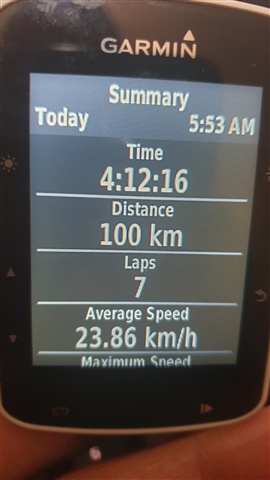
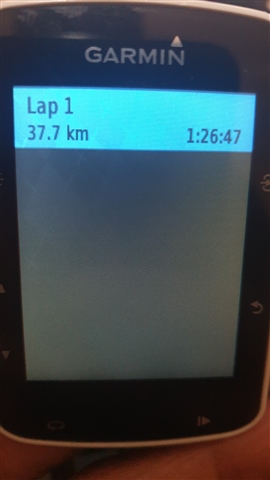
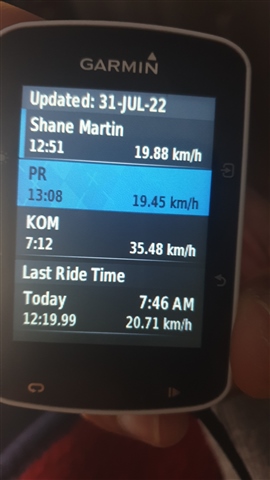
    Hoping you can assist, recently did a cycle where i manually tracked laps as part of my training. the ride total shows the full 4hour / 100km ride however the details only looks to show lap ie 1hr28m (40km). When reviewing the data on my Garmin 520 it notes 7 laps however only 1 lap is visible in the lap section, also 1 of the strava segments shows a time however that segment is on the "lost" section so was not uploaded or displayed.

    Is it possible to get the full data of the ride? Greatly appreciated if it could be salvaged.

    I was only able to extract the .FIT file off garmin connect and not the raw file directly from the device

    Yours in hope! [solved]

  • Hi Seilogramp

    On your screenshot, i think the time stamp converts to your local time (im guessing you are in the USA?) my ride start time was 05:52 am so it moved back -6 hours to get to your timezone?

    The distance on the 1st 2 if i add together is 63miles which equates to the 100km which this ride was. TOtal ride duration should be the 4:21:17 

    Not wanting to add laps, i had manually started laps as part of the training intervals i was doing.

    Ride details : for the ride i manually paused and resumed the ride (as we met at the meeting points to pick up riders), the laps i triggered with te lap button as part of the intervals training on my ride.

    See screenshots below

    1 - Summary - shows total ride distance and time and indicates 7 laps

    2 - Lap display - only shows the 1 (with the ride data, HR, power, GPS)

    3 - Segment (strava) - this segment would have been on interval/lap 2 possibly, it shows that on this ride i did it in 12:19:99 so the data is somehow there but does not display on strava or on connects data.


    Am just trying to get the full rides data if somehow possible. I seem unable to get access the device data via the USB cable and have not done any reset on the device yet. 

    Device is Garmin Edge 520 - firmware is up to date.

    Thanks again for your help on this! 

  • I am also having a corrupt file on my Forerunner 35 watch. Could you please help?

  • I am also having a corrupt file on my Forerunner 35 watch

    Hi  - this will work [resolved]

    Fixed using Fit File Repair Tool*

    Some suggestions to help minimize the occurrence of corrupt fit files on a Forerunner 35

    • Sync your watch, backup the \GARMIN\ACTIVITY folder, then do a full master reset of your Forerunner 35 using these directions - Restoring All Default Settings
    • Perform a weekly cleanup of the \GARMIN\ACTIVITY folder using these directions - Removing Recorded Activities to Free Up Space. The F35 seems to have problems with longer activities, so this step is important before a longer event
    • Regularly check for firmware updates using Garmin Express
    • Please report back here when you encounter corrupted files again

    * Requires a licensed version of Fit File Repair Tool on a Windows computer with Microsoft Access installed.

  • Great, that worked. Thanks a lot.

  • Hi seilogramp,

    When I try and manually upload the file created on my Garmin 830, I receive  a message "We don't support the file type you tried to import.", which does not make sense to me.  I'm desperate.  Can you please help.  Here is the link to the file, and the file itself.  The file name is 2022-10-29-09-23-00.fit

    Thank you!!! [solved]