Thanks! this works.
Just to clarify, courses are found under training
connect.garmin.com > Training > Courses
This did the trick for me. Many thanks!
Funny I got here after a whole bunch of testing. I was trying to deduce what Garmin was looking for in successful uploads. I thought I'd come here and share my results. The good news is you folks are way ahead of me, with the Gotoes link.
A standard.gpx file can use Routes, Tracks or Waypoints within the .xml format to identify points along a route. Garmin Connect upload requires Tracks<trkpt lat="" lon=""></trkpt> AND each track point has to have a <time>time</time> entry.
Why doesn't the Garmin upload error message tell us that? It sure would make things easier.
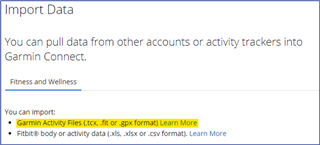
It's unbelievable that it's been 3 years and this problem is still a thing. People like me have to google the problem, find this thread and then find the solution. Why is that cloud icon even there at the top of the page if it's impossible to upload courses using that? Did the website developer get fired and they forgot to hire a new one?
Why is that cloud icon even there at the top of the page
I suppose there should be some verbiage stating how to import courses. As it is now, it mentions that this feature is specifically for activity files.

If you want this changed, you can submit a request using the Share Ideas web form.
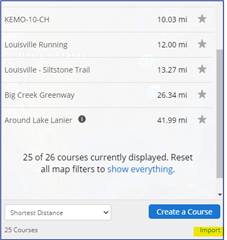
To import courses...
Go to https://connect.garmin.com/modern/courses
Select Import

Then you can drag & drop or browse for the TCX or GPX file that contains your course. Let us know how it goes.