Thanks! this works.
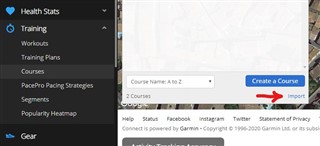
Just to clarify, courses are found under training
connect.garmin.com > Training > Courses
Not sure if this helps. A friend sent me some Strava rides via email; they were gpx files.I tried to upload them via my Mac computer but it said there was something wrong with the file. I tried the popular fix explained above... going via Google Drive - they then went into the CG app no problem, by doing the open with...and scrolling through to the CG app. However CG may have fixed something, as when I opened my email, and then held my finger on the file icon within the email, my iPhone atomically offered me a list of Apps to paste it...among the the CG app. It pasted over OK. I have yet to work out how to get these things to open in courses on my actual Edge 130 though (I'm a bit of a newbie). But I hope the above helps - as doing it 'on computer', the CG interface wasn't happy with the gpx files I had (but which were fine).
hi, that worked perfectly till yesterday, when suddenly that way is not an option as well. Now, I can't find any way to import the gpx files.
It is still on the same place: