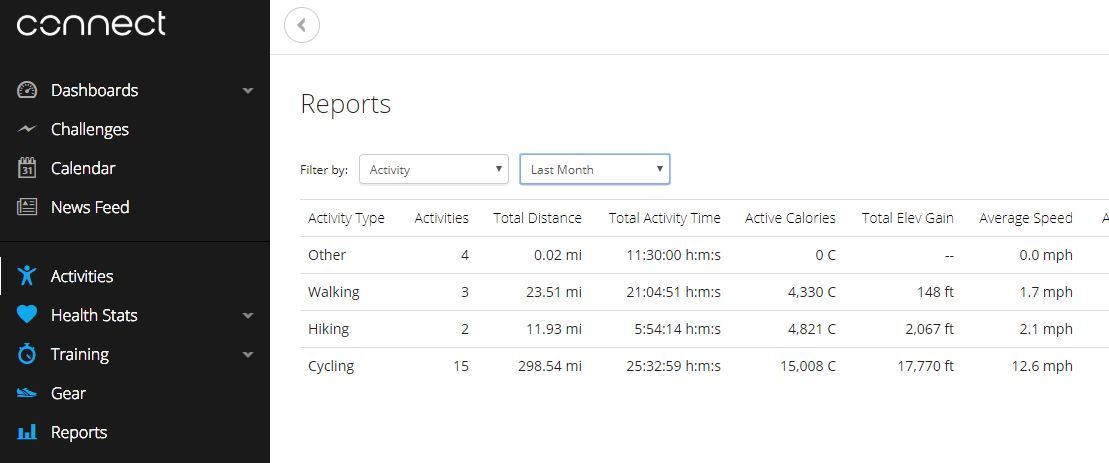
As of yesterday (5/31/18) the Progress Summary under Reports on the Garmin Connect website has changed and has become nominally useless. I am referring to the report that we get to when we select Reports -> Progress Summary -> then Filter by: "Activity". Prior to 5/31 it would display the totals for each literal activity, now it summarizes to just a few high level activities and does not let you see totals for what I'd call sub-activities. For example:
- Cycling has many forms. I use both Mountain Biking and Road Cycling. The report previously showed a line for each, now it just shows a line for "Cycling" and smashes the numbers all together. That is useless information as they are two different Activity types.
- There are over 30 completely different Activities under "Other" from Tennis, to Skiing, to Rock Climbing, etc.. This report gave a line for each activity previously which is what is should do. Now it just gives a line for "Other" and sums them all together. That is adding up things that have absolutely no commonality or meaning summed together. The report needs to show as it did previously.
See the photo attached if my description is not clear.
Is anyone else seeing this change? Is there a setting I'm missing that somehow changed that I need to correct to get the report back to what it was (Customize is not it, that is just fields shows, not the Activities list)?
ciq.forums.garmin.com/.../1355738.jpg