This discussion has been locked.
You can no longer post new replies to this discussion. If you have a question you can start a new discussion

Garmin Connect Badges Not Being Awarded

Former Member
Former Member

Thank you for the ongoing discussion regarding the new badges. We have been following these discussions and are investigating why some badges have not been awarded as expected.

We have created this thread to track reports of badges not displaying in accounts. Please post here if you did not receive a badge as expected, and provide:

  • Badge Type
  • Link to the activity (Privacy set to Everyone)
  • Any other details (such as social media platform you shared an activity to or linked your account with)
  • Do we have permission to view your account data while investigating this issue through our Administrative Tools (Yes/No)?

If you have previously posted about a badge not being awarded, thank you for doing so and there is no need to post again about that specific badge. We are investigating each of those reports and will reach out with any new information individually. We request that posts in this thread be saved for NEW reports of badges not being awarded to aid us in tracking these appropriately.

Thank you for the continued discussion and your cooperation is greatly appreciated.

**************************************************************************************************** *****************************************************************************

06/19/2018: A new update has been posted here.

  • I have been using the Strava app to record and track my walks

    I Was Not Awarded a Badge for an Activity or Challenge I Completed

    • Badges are awarded for completing specific goals and can be earned using a Garmin® or Tacx® device.
    • A Garmin device must be used when recording an activity or completing a challenge.
    • The activity recorded needs to be saved and uploaded directly to Garmin Connect and cannot come from a third-party app or website
  • Hello guys !

    Looking for some hints regarding the "Druid Arch Vitrual Climbing" badge, that I visibly missed in a previous attempt. I would like your help before trying again, running in the building stairs is not much excitement... Badge requests 735 feet = 225m of up stairs activity.

    For this activity : https://connect.garmin.com/modern/activity/9790662772 
    I
     did around 470m of altitude gain (there are much indicator with altitude, but they are all above 400m). Activity is available, and have been performed with my Garmin 935. I did after it the altitude correction via Garmin Connect button, without any impact.

    Would anyone be kind enough to advice me, before any new attempt ? Or explain me why this one was not successful ?

    Thanks for your help in advance !

  • You climbed 476 meters.

    Druid Arch requires 735 feet = 225 meters

    Next badges is Mist Trail which requires 1000 feet = 305 meters.

    After that is Angels Landing with 1500 feet = 458 meters

    That is the issue. You ascended too much. You reached Angels Landing. It doesn't matter if you already got it. The ascent for Druid Arch must be more than 225 m but less than 305 m (Mist Trail).

  • Hello!

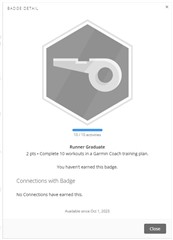
    My badges show the "Runner Graduate" badge with 10//10 activities completed, but it did not award.  I started Amy's 5k program with a benchmark run on August 16th and had to pause the plan for a week due to an overuse injury.  Did pausing affect the results?  Is completing the plan a requirement?

    I'm only halfway through the plan, so is there a way to reset the badge progress?

  • I got an answer from Support.  The badge requires Garmin Coaching Activities that are dated on, or after October 1, 2023.  So while it's showing 10/10, it's not supposed to be counting coaching activities that happened in the past.  Minor bug that it's displaying the 10/10.

  • My hydration streak badge doesn't seem to be counting days that i've had over 64oz of water recorded via the glance on my fenix 7.  I verified that the data is synced to garmin connect app.

  • Try using the app. That works for me.

    Report the issue with the glance to Garmin support: https://support.garmin.com/

  • I have just noticed new badge called Mythical Sleep that require sleep score of 100. It happened that today my body battery was showing 100 but badge was not awarded. Why? 

  • You have answered your own question: sleep score is not body battery. They're different things

  • Sleep score and body battery are 2 different metrics.