This discussion has been locked.
You can no longer post new replies to this discussion. If you have a question you can start a new discussion

Garmin Connect Badges Not Being Awarded

Former Member
Former Member

Thank you for the ongoing discussion regarding the new badges. We have been following these discussions and are investigating why some badges have not been awarded as expected.

We have created this thread to track reports of badges not displaying in accounts. Please post here if you did not receive a badge as expected, and provide:

  • Badge Type
  • Link to the activity (Privacy set to Everyone)
  • Any other details (such as social media platform you shared an activity to or linked your account with)
  • Do we have permission to view your account data while investigating this issue through our Administrative Tools (Yes/No)?

If you have previously posted about a badge not being awarded, thank you for doing so and there is no need to post again about that specific badge. We are investigating each of those reports and will reach out with any new information individually. We request that posts in this thread be saved for NEW reports of badges not being awarded to aid us in tracking these appropriately.

Thank you for the continued discussion and your cooperation is greatly appreciated.

**************************************************************************************************** *****************************************************************************

06/19/2018: A new update has been posted here.

  • "May Ride to 200" and "May Tour"

    Last day of challenge I was at 101 miles and needed 24 miles to get badge. I rode 30 miles. It counted up 15 miles and stopped at 116. This has also effected my "May Tour" in the same way. It is stopped at 116 miles

    https://connect.garmin.com/modern/activity/8824118936

    https://connect.garmin.com/modern/activity/8823926418

    https://connect.garmin.com/modern/activity/8823663537

    You can view my account

  • Odd behaviour that it counted 15 miles of your 30 since no combination of your rides is 15 miles.

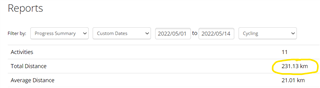
    What does the progress summary report say as total distance for cycling for the custom dates 1 - 14 May?

    https://connect.garmin.com/modern/progress-summary

    Is it still an issue with "May Tour"? Has it stopped at 116 miles?

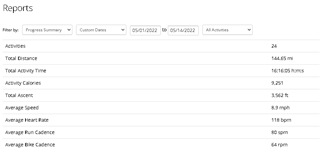
  • So I went through my activities and noticed 2 indoor cycling activities that i did on the Peloton i forgot to put miles on. It added 13 miles. So total distance is now up to 144.65 mi

  • The May Tour challenge went up by 13 miles. It now says 129 miles

  • Manually created activities or imported from 3rd party services do not count for challenges, but it sounds like you log everything with a Garmin device and just enter the distance to that activity. That will work for challenges.

    Did you check that you had a Garmin device displayed as the device for each activity?

    The progress summary report will count all activities. Even those that do not count for challenges. 

  • So total distance is now up to 144.65 mi

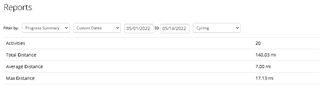
    Yes, but that's the total distance including running. You have to select cycling only, to see the cycling distance

  • That's fine I just don't understand why it only counted 15 miles of my 30 i rode that day. It was at 101 that morning. I rode 30 (on my road bike w/edge1030 tracking it) and it only added 15. I did the sort with only cycling it was 140 miles. Its not a big deal. I know I did it. It just kinda takes the fun out of accepting challenges if it doesnt track your progress accurately.

  • I should add that when i checked the progress of the challenge i checked under the challenge. I did not know there was a progress report until today. That is really cool actually and i will use those reports. Glad i got this convo startedSlight smile

  • Hello! I'm missing few badges from activities I imported from my garmin watch after getting connected with the app, as well as one that I had after connecting the app. I'll start by grouping the badges for each activity.

    Climber 1, Climber 2, 50 Mile Ride

    https://connect.garmin.com/modern/activity/embed/2819679111

    N/A

    Yes, you have my permission to view my account data.

    ________________________________________________

    Treadmill Mile

    connect.garmin.com/.../7531642015

    N/A

    Yes, you have my permission to view my account data

    ________________________________________________

    Thanks!

  • You will only get one climber badge per activity and you must not exceed the ascend so you reach the next related badge. 

    To get climber 1 you must climb at least 500 feet, but not more than 1000 feet. To get climber 2 you need at least 1000 feet but not more than 2000 feet. Your activity would award you with climber 3 but I guess you already got that one.

    To get the 50 Mile Ride badge you must ride more than 50 miles but not more than 100 miles.

    Same with Treadmill Mile. You must run longer than 1 mile but not longer than 5 km.

    So it is correct that you didn't get those badges for those activities.