This discussion has been locked.
You can no longer post new replies to this discussion. If you have a question you can start a new discussion

Garmin Connect Badges Not Being Awarded

Former Member
Former Member

Thank you for the ongoing discussion regarding the new badges. We have been following these discussions and are investigating why some badges have not been awarded as expected.

We have created this thread to track reports of badges not displaying in accounts. Please post here if you did not receive a badge as expected, and provide:

  • Badge Type
  • Link to the activity (Privacy set to Everyone)
  • Any other details (such as social media platform you shared an activity to or linked your account with)
  • Do we have permission to view your account data while investigating this issue through our Administrative Tools (Yes/No)?

If you have previously posted about a badge not being awarded, thank you for doing so and there is no need to post again about that specific badge. We are investigating each of those reports and will reach out with any new information individually. We request that posts in this thread be saved for NEW reports of badges not being awarded to aid us in tracking these appropriately.

Thank you for the continued discussion and your cooperation is greatly appreciated.

**************************************************************************************************** *****************************************************************************

06/19/2018: A new update has been posted here.

  • Turin Marathon 2012

    • Badge Type: Maratona (26.2 miles)
    • Link to the activity (Privacy set to Everyone) : connect.garmin.com/.../
    • Any other details (such as social media platform you shared an activity to or linked your account with) : no
    • Do we have permission to view your account data while investigating this issue through our Administrative Tools (Yes/No)? YES

    Rome marathon 2013

    • Badge Type: Maratona (26.2 miles)
    • Link to the activity (Privacy set to Everyone) : connect.garmin.com/.../
    • Any other details (such as social media platform you shared an activity to or linked your account with) : no
    • Do we have permission to view your account data while investigating this issue through our Administrative Tools (Yes/No)? YES
  • The marathon badge was introduced in 2018, so it automaticaly only applied to marathons done after that date. If the runs were recorded by a Garmin device, you can edit the tittle or a minor details in them, and save, and they may get reparsed and counted, in this way.

  • Non fully correct: I had the badge this morning before a minor change (even if recorded before 2018) . Then today I fixed the distance (bad idea) from 42,35 KM  to 42,20 then the badge disappear. I confirm I ran that marathon with garmin device. Not the first one (2012).

  • Non fully correct: I had the badge this morning before a minor change (even if recorded before 2018)

    If you had the badge already, then why did you post here, asking how to get it??

    Then today I fixed the distance (bad idea) from 42,35 KM  to 42,20 then the badge disappear.

    If you shortened the distance for some reason, then set it back to the original value. If it does not help, export it as Original, delete from Garmin Connect, and then import the original from the FIT file. Alternatively, instead of deleting and importing, you can just try the option "Restore Original" in the activity cogwheel menu in GC web. If not available, trim the activity first (just a minor trim), and the option will appear.

  • Deleting and restoring it worked , thanks

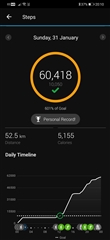
  • Stepping Up 50K 

    sunday 31 January step up 60,418

    • Do we have permission to view your account data while investigating this issue through our Administrative Tools (Yes)
  • Do we have permission to view your account data while investigating this issue through our Administrative Tools (Yes)

    Well, Garmin staff does  not intervene here since years, and we (the users) have no way to access your data. You will need to post some screenshots. For example try posting first the screenshot of the Steps daily graph for given day. It should be under [https://connect.garmin.com/modern/daily-summary/2021-01-31/steps]

  •  hope that can help

  • Yes, it looks all right. Are you sure you have not missed receiving the badge? Did not you receive already earlier? Do you have badges enabled in the public profile? If so, then what is your screen name, or the link to the profile?