This discussion has been locked.
You can no longer post new replies to this discussion. If you have a question you can start a new discussion

Garmin Connect Badges Not Being Awarded

Former Member
Former Member

Thank you for the ongoing discussion regarding the new badges. We have been following these discussions and are investigating why some badges have not been awarded as expected.

We have created this thread to track reports of badges not displaying in accounts. Please post here if you did not receive a badge as expected, and provide:

  • Badge Type
  • Link to the activity (Privacy set to Everyone)
  • Any other details (such as social media platform you shared an activity to or linked your account with)
  • Do we have permission to view your account data while investigating this issue through our Administrative Tools (Yes/No)?

If you have previously posted about a badge not being awarded, thank you for doing so and there is no need to post again about that specific badge. We are investigating each of those reports and will reach out with any new information individually. We request that posts in this thread be saved for NEW reports of badges not being awarded to aid us in tracking these appropriately.

Thank you for the continued discussion and your cooperation is greatly appreciated.

**************************************************************************************************** *****************************************************************************

06/19/2018: A new update has been posted here.

  • connect.garmin.com/...

    Did you really pass through the Share email form on Garmin Connect? Did not you simply just copy the address from the browser? Could you enable the visibility of your badges on the Public Profile (at the bottom of the page https://connect.garmin.com/modern/settings/publicProfile)?

  • Former Member
    0 Former Member in reply to trux

    I made my badges visible to you.
    i tried sharing it through the sharing symbol below in the middel in this screenshot to my e mail which results in the link I posted before.

    connect.garmin.com/.../5088851210

  • Former Member
    0 Former Member in reply to trux

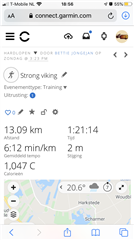
    Somehow the sharing button is not visible in the bar with the pencil, star and the lock symbols

  • Former Member
    0 Former Member in reply to trux

    Hi, thanks for your help

    I changed it. Nothing happened. Give me a second to post the Activity...

  • Somehow the sharing button is not visible in the bar with the pencil, star and the lock symbols

    So when you previously wrote that you used it to share the Activity, it was not true? How did you share it then? If it is grayed out, then you need to make the Activity visible to Everyone first (see the paddlock symbol).

  • Former Member
    0 Former Member in reply to trux

    I did share it with the box with the arrow symbol below in the screenshot (next to my bookmark) and send it to my mail. I just wondered about the position of the share symbol, because it is not next to the star or padlock symbol, which was hinted on other forums. I opened my activity to everyone before sharing, so .. can’t think of anything else to do... 

  • can’t think of anything else to do... 

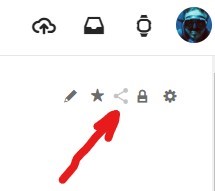
    So you never shared the Activity from within Garmin Connect Web, with the Share symbol shown below? I asked you to do so already earlier repeatedly, and you confirmed you did, so I am starting to be confused with the contradictory information. How did you share the Activity from GC Web, if not with that icon?

  • I did share it with the box with the arrow symbol below

    OK, I see now the symbol - but that's just the default Share symbol of your browser, not that of Garmin Connect. So if you share a page with that function of your browser, there is no chance Garmin Connect could get any information about it. You really need to use the internal sharing function. If you do not see the Share symbol on you phone, turn it 90° so that the screen is larger. If not enough, open the page on a computer instead.

  • Former Member
    0 Former Member in reply to trux

    That might be the problem... I didn’t share it with that icon you pointed out, as it is not shown anywhere in garmin connect web or on my app (you can see it in my previous screenshot of my activity). Instead I used the box with an arrow out of it which in my interface used for sharing (see enclosed in this message), on the web as well as in my app. The sharing symbol you sent is exactly how it looks on the badge, but again, not visible in my app not web... Does this make sense to you?