This discussion has been locked.
You can no longer post new replies to this discussion. If you have a question you can start a new discussion

Garmin Connect Badges Not Being Awarded

Former Member
Former Member

Thank you for the ongoing discussion regarding the new badges. We have been following these discussions and are investigating why some badges have not been awarded as expected.

We have created this thread to track reports of badges not displaying in accounts. Please post here if you did not receive a badge as expected, and provide:

  • Badge Type
  • Link to the activity (Privacy set to Everyone)
  • Any other details (such as social media platform you shared an activity to or linked your account with)
  • Do we have permission to view your account data while investigating this issue through our Administrative Tools (Yes/No)?

If you have previously posted about a badge not being awarded, thank you for doing so and there is no need to post again about that specific badge. We are investigating each of those reports and will reach out with any new information individually. We request that posts in this thread be saved for NEW reports of badges not being awarded to aid us in tracking these appropriately.

Thank you for the continued discussion and your cooperation is greatly appreciated.

**************************************************************************************************** *****************************************************************************

06/19/2018: A new update has been posted here.

    • Badge Type: Weekend 10K (2 pt • Join this challenge and record a 10-kilometer running activity from June 12-14.)
    • Link to the activity:  connect.garmin.com/.../5088635381
    • Permission to view your account data: Yes

    One more question: is it confirmed that the "Ride to 100" (2 pt • Join this challenge and record 100 kilometers of cycling activities from June 8-14.) badge does not get rewarded for indoor cycling?!

    Edit: "Ride to 100" badge rewarded thanks to trux. ;)

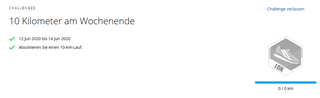
    "Weekend 10K" however is still bugged. I did a 11 Km run today (14. June 2020) and the challenge looks like this:

    Update: after switching the activity type from "Running" to "Street Running" and back to "Running" i received the badge.
    I'm confused..

  • indoor cycling works too

  • OMG after i opened the Challenges Page you provided and activating the challenge i got the "Ride to 100" badge insta-rewarded.

    So this was the problem after all, these temporary badges only get rewarding when actively joining it.

    It says "Join this challenge.." which i ignored.

  • Hello, I didn't receive the Weekend 10K badge. The activity link is:

    connect.garmin.com/.../5086866940

    Best regards,

    Mirta

  • Hello, I didn't receive the Weekend 10K badge. The activity link is:

    What is suspiscious is the name "Virtual RUN". Did you import it somehow, or was it recorded directly with the Instinct? If it is an imported virtual activity, it might perhpas indeed cause a problem. However, try editing the Actviity, doing a minor change (i.e. adding a Calorie), and save it. Perhaps you get the badge, anyway. Make sure, though, that you really joined the chalenge, before editing the Activity. Without joining it explicitly on the Challenges page, there won't be any badge.

  • The activity was imported directly from Instinct and I changed the name of the activity to get the badge. It didn't work at first, but now when I changed the name of the activity again the badge appeared. Thank you. 

  • Former Member
    0 Former Member

    10k challenge badge not awarded.

    Link: connect.garmin.com/.../5089341064

  • 10k challenge badge not awarded.

    Still the very same answer as at several identical requests before yours:

    Did you join the Weekend 10K Challenge (on the Challenges page) before doing the run? If not, join it now, before it is closed, open the Activity, Edit it, change a minor detail (i.e. add a Calorie) and save it.

  • Former Member
    0 Former Member in reply to trux

    Sorry I can’t find that symbol.  This is very frustrating.  How else can this be resolved?

  • Sorry I can’t find that symbol.

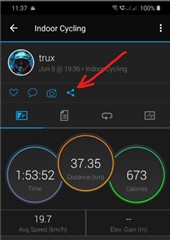
    If you use the phone app, the see the image below. If you use the web app, then there is the same symbol on the Activity page as well:

    How else can this be resolved?

    Record you indoor cycling activity directly with your Garmin watch, instead of importing it from Zwift. Just note that you need to enter the distance you rode, manually.(after activating the Edit function in the menu of the activity).