Nutrition tracking - auto adjust calorie goal bug

I set up Nutrition tracking yesterday, and realized that the "auto adjust calorie goal" feature does not deduplicate from the "active calories" target. Specifically, when setting up my calorie target, I selected the recommended "Active Calories" average as my activity level. I wanted to use this as my baseline to start the day, but if I have a heavy workout day I want to make sure I my calorie intake adjusts to match, so I selected "auto adjust calorie goal." It looks like these two features can't be used together, because now it just adds all of my active calories on top of my average calories instead of just adding the difference. 

For example, my average active calories is 555, so my calorie target for the day was 2955 (2400 resting + 555 active). Yesterday, my actual active calorie expenditure was 821, so my adjusted calorie target should have been 3221 (2400 resting + 821 active), but instead it gave me 3776 (2400 resting + 555 active avg + 821 actual active). 

For now, it seems the workaround is to just set my activity level to sedentary and then use the auto adjust feature as I'd prefer to start my day at a higher baseline since I know I will always burn well above sedentary. I've been using LoseIt to track calories and it accurately dedupes your actual calorie burn from your target, so I'm hoping this is just a bug for Garmin and not the intended design!

  • I changed activity to sedentary and it did reduce total calories target by 244 for that day.  I will Continue watching it, thank you for finding this workaround until Garmin gets their app corrected.

    Resting 1882 + 54 active (recovery day) - adjusted  target goal 1692 = 244 deficit.   Hopefully Garmin codes some AI into charting and analyzing the selected nutrition plan and provide analysis to best reach weight goals while also maintaining optimal training.  Hopeful, I want to like this nutrition feature.

  • Mine is the same. I set a half a pound reduction a week, and use the active calories suggested instead of a baseline BMR with an activity level and then turned on the auto calorie function to change the baseline in accordance with expenditure during the day with a surplus for exercise and a deduction for lack of movement. What I found is that it took my base calories from plan and added my activity calories on top and then did nothing to decrease it as my movement decreased. In essence I'm getting way too many calories and can't lose weight with this app the way it's currently working and that is very frustrating for such an expensive model to be so faulty in accordance with very expensive watches. The pros are of course being all in one ecosystem, the watch, tracking nutrition, the apps etc but it's not worth it if the basic functionality doesn't do what it's supposed to do for those of us that want to monitor how much they're eating versus their exercise and gradually lose weight in a healthy way. So far I have found the nutrition tracking wildly inaccurate.

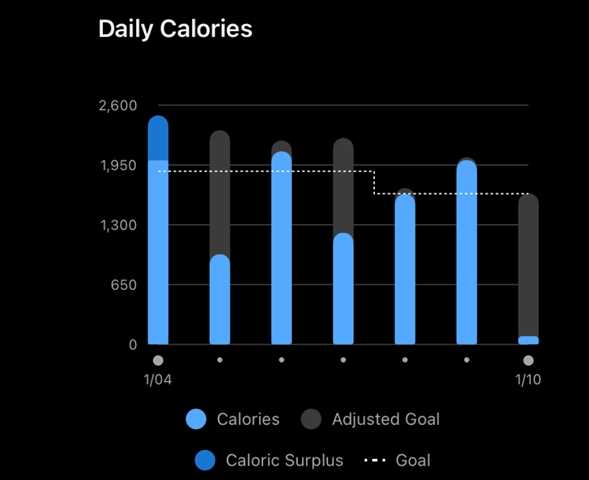
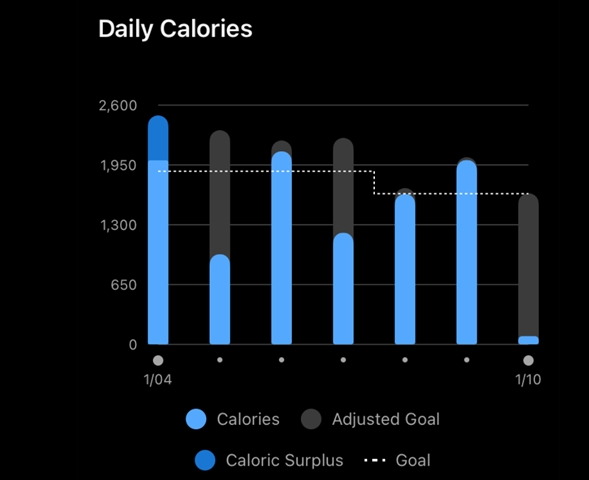
  • Garmin, with this workaround it appears to calculate in my weightloss goal but please code this — dashed goal line to be the visual for adjusted target.  Difficult to see just the grey bar especially when filled in with blue daily calorie intake.

    Example:  1/9.  I ran a 5k which gave me an adjusted goal.  The dashed line would be a much better visual for a stepped up adjusted goal imo.

  • Hi - if under Health Stats/Nutrition/settings/nutrion plan you set activity level to sedentary, as mentioned earlier in thread it does show the reduced calorie number.  Not perfect, but better than an over calculation for calories until Garmin codes this correctly.  You can see below when I applied it the dashed line calorie goal dropped, it is taking the calories off the baseline, 244 in my case.  Unfortunately, it does not back update the previous days in the chart, but does work that day and going forward once applied.

  • I suspect this is by design, albeit counter-intuitive.

    I think the issue comes, when you enable "Auto Adjust Calorie Goal", it will add on **recorded exercise** calories each day, **but** the initial setup set the "Activity Level" baseline to include both recorded and non-recorded activity, which you need to undo (the overuse of the word "Activity" in Garmin's terminology does not help here!)

    Put another way, if you use the "Auto Adjust Calorie Goal", and say, for example, typically walk 10k steps per day not-recorded (you work on your feet a lot), then the "Activity Level" should be set to something that roughly covers that non-recorded baseline activity, and then the "Auto" setting will increase if you record an activity.

    So I don't think its quite right to say the workaround is to say you're sedentary, but rather to set the Activity Level to something that matches how much you burn from moving (but not BMR) outside of recorded actvities (which might indeed be sedentary - depends on your day / work type).

    Put another way:

    1. if you move from non-Auto mode to Auto mode, then you should adjust down the Activity Level down to your baseline, non workout, activity; and

    2. if you move from Auto to non-Auto, then you should adjust the Activity Level up, to include some "average" of your workouts.

    The un-intuitive surprise, I think, comes from the initial setup using #2.  And there being nothing to tell you that you need to manually remove the averaged activities when going to #1.

    I hope that makes sense? :)