Nutrition tracking - auto adjust calorie goal bug

I set up Nutrition tracking yesterday, and realized that the "auto adjust calorie goal" feature does not deduplicate from the "active calories" target. Specifically, when setting up my calorie target, I selected the recommended "Active Calories" average as my activity level. I wanted to use this as my baseline to start the day, but if I have a heavy workout day I want to make sure I my calorie intake adjusts to match, so I selected "auto adjust calorie goal." It looks like these two features can't be used together, because now it just adds all of my active calories on top of my average calories instead of just adding the difference. 

For example, my average active calories is 555, so my calorie target for the day was 2955 (2400 resting + 555 active). Yesterday, my actual active calorie expenditure was 821, so my adjusted calorie target should have been 3221 (2400 resting + 821 active), but instead it gave me 3776 (2400 resting + 555 active avg + 821 actual active). 

For now, it seems the workaround is to just set my activity level to sedentary and then use the auto adjust feature as I'd prefer to start my day at a higher baseline since I know I will always burn well above sedentary. I've been using LoseIt to track calories and it accurately dedupes your actual calorie burn from your target, so I'm hoping this is just a bug for Garmin and not the intended design!

  • Hi - edited.  My calorie numbers do align.  If I take daily calories goal under my nutrition settings + active calories under calories burned, it matches calories allocated for that day in the nutrition tab.  

    I seen someone posted that Nutrition also changed fitness age to use bmi instead of bodyfat% causing fitness age to jump, in my case increasing age 4 years.

    Update:  The fitness age issue was due to no weight entered in 2026.  On garmins documentation it states if BF% is not available it uses BMI to calculate fitness age.  I Uploaded today’s weight, BF% is there now and fitness age decreased back 4 years to normal value.  

  • It's surely still not right though? Mine is set to use the Active Calories setting based on my data (1,104cals) and gives me a target of 3,535cals for today (after logged exercise) - and I've got it set to lose .75kg a week.

    My watch says my active calories are 1,313 (20km run) plus 1,278 rest, with a projected total of 3,250 for the day. Not sure how the nutrition tracking will have me losing weight when it's offering me more calories than I've burned, let alone allowing for a deficit? 

    Surely something isn't right with the daily calorie goal calculation?

  • That is odd, It does sound off in both cases posted, strange that mine is lining up at least in the short couple days I have used it.  I saw a few YouTubers questioning the math accuracy in their videos as well.  I want to like this feature, especially if it factors in exercise vs calories in vs weight goals.  Hope it turns out to be useful and accurate.

  • bm12music, I see the issue as well now that I look at my numbers closely, It should reduce my total calories allocated to create a deficit for weight loss per my setup, It is clearly not.

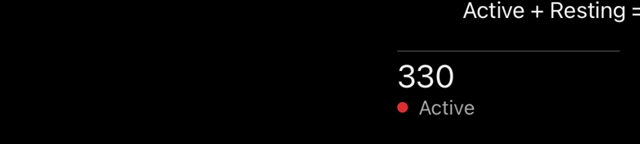
    Here are screenshots from today.

    1882 is my calorie goal.  It appears Garmin is using my Avg resting for this calorie value.  

    Today’s active calories were 330.

    Total:  330 + 1882 = 2,212   There is no deficit factored in, it shows me the break even point of 2,212 calories.

  • I am having the same issue! I want my calorie intake per day to adjust with my calories burned with a deficit - but when using the auto feature, it only gives me my calories without the deficit! I hope they fix this soon...its not very helpful otherwise.

  • The same for me. Add the active calories to the calories of the day's activity and overestimate the calories.

    How to solve it? What's the best way to do it?

  • Setting the activity level to sedentary works for me.

  • Oh definitely! But at least the work around mostly works for what I need.

  • Hi - The feature is broken imo.  Garmin is setting my goal to my resting calories, it then adjusts by adding the active calories on top.  It calls that the adjusted goal (Resting + Active)…ok, but where is the new target goal showing a reduction in target to accommodate for my weight loss plan I configured in settings.  Am I required to determine 5% less than the adjusted target?  Garmin should be doing that in the app, otherwise what’s the point of this feature, maybe they are providing that but I do not see it.  

    i was expecting intelligence in the app like notifications and charts, statements that you are on target for weightloss goals based on calories in vs calories out,   Suggestions for backing off or need to add calories to maintain training intensity.   App is supposed to have AI, do the math and analysis for us.