This discussion has been locked.
You can no longer post new replies to this discussion. If you have a question you can start a new discussion

Next calendar appointment not showing if within same hour

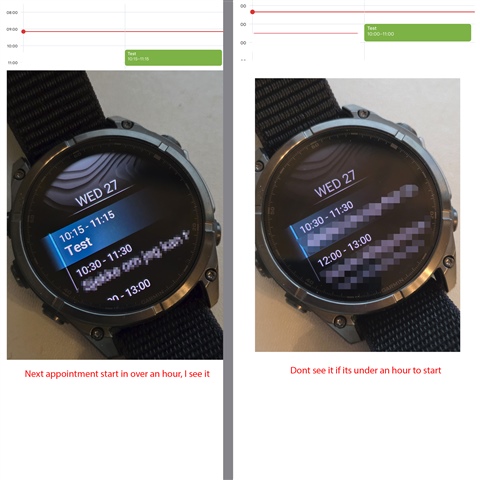
After one of the latest updates, not sure what number, it seems like if the next calendar appointment only shows if it's more than one hour until it starts. It shows all appointments that starts in over an hours.

I use the calendar all the time at work. Driving from location to location, and before I could just hold a button (shortcut) to see my next appointment, but now I can't see it anymore, just the next one after that.

  • To help clarify what you are seeing can you please send us some screen shots of what you're seeing? It would also be helpful to know what kind of phone you are using with the Garmin Connect app. 

  • Hi

    I use an Samsung Fold 7.

    I tried to make an visual explanation here. Image to the left is when the apointment start in over an hour, and I see it on the watches calendar. But if startup time is under an hour, I dont see it. 

    EDIT: I also have an Instinct 3 Solar. Checked on this now, same issue.

  • I have the same issue with a brand new Forerunner 970 and a Samsung S25, in Sweden (UTC +2)

    It's currently 13:11, and I have one meeting at 14:00-14:30 and another meeting 15:00-15:30, but in the calendar app in the watch all I see is the 15:00-meeting.

    Has been the same the whole day, didn't see a meeting 10:00 when I looked at 09:30, could have missed the meeting due to this so it's a good thing I remembered it and checked my phone.

  • I asked a friend that also have Samsung and a Garmin FR 965. Same problem. Maybe its Samsung One UI 8.5?

    Does anyone here have an Samsung with One UI 8 or down that can check? :)

  • You are not alone, check this thread. If you are for instance UTC+2, events are finished 2 hours earlier as if UTC.
    I use my calendar the same way you do.
    It is not phone related, I have Sony and it happens on Samsungs too etc. It is Calendar app or Garmin Connect related.

  • Ah, nice to know. I tried to reset Garmin Connect on my phone, and set all up again. Did not resolve anything.

  • Got an update on Garmin Connect on Android today - now this issue is resolved :)

  • The latest Connect app update should resolve this concern. If you have updated both your watch and your Connect app but are still experiencing this, please create a new thread so we can look into this on the new software version.