


I am writing to report a localization bug in the Garmin Connect app regarding the language display settings.
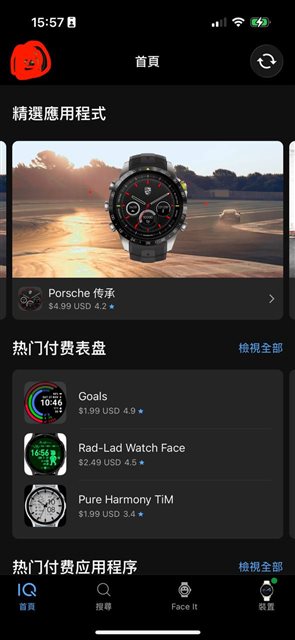
Issue Description: Even though I have selected Traditional Chinese (繁體中文) as my preferred language in the app settings, several parts of the user interface are still displaying in Simplified Chinese (简体中文).
Steps to Reproduce:
-
Go to Settings > Profile & Privacy > Manage Garmin Account.
-
Ensure the language is set to Traditional Chinese.
-
Observe the Home Screen where several data cards are incorrectly showing Simplified Chinese.
-
Observe that certain menus, descriptions, or notifications are incorrectly shown in Simplified Chinese.
Environment:
-
App Version: 2.45
-
Device Model: iPhone 15 Pro
-
OS Version: iOS 26.3
-
Garmin Device: Venu 4
I have attached screenshots highlighting the inconsistent language display for your reference. I would appreciate it if your team could look into this and provide a fix in a future update.

Best regards