


Hello. Despite entering my City in the correct field when updating my billing address it says the field ‘is required’?
I’ve tried writing the City in the Name field and then copy and pasting it into the correct box but that hasn’t worked.
Thanks.
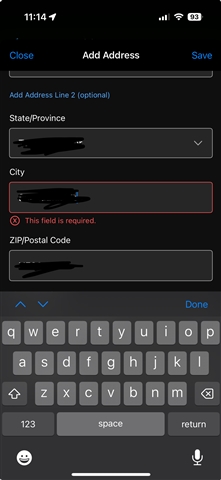
Hello. Despite entering my City in the correct field when updating my billing address it says the field ‘is required’?
I’ve tried writing the City in the Name field and then copy and pasting it into the correct box but that hasn’t worked.
Thanks.
We're pleased to report that this issue was resolved with the 5.20.2 release of our Connect app, which is available now through your Apple App Store. Please update your Connect app, this should correct…
This is getting ridiculous. I left it 48 hours and tried again and nothing has been done to fix it. The City field refuses to accept anything. These are valid addresses, and it just comes up as in your…

