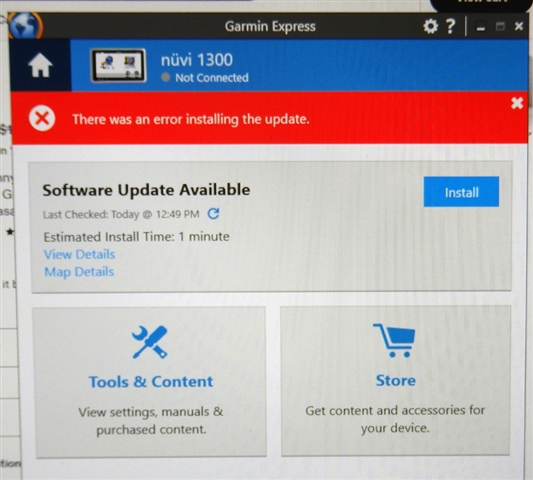
I'm finding it impossible to update my GPS.

This has been a ridiculous experience.  Installing Garmin Express on Windows 11 causes a problem. I want to install Net Framework but for some reason it can't. It doesn't tell me why or what might happen without it. Garmin does install, but Net Framework doesn't. Maybe that's the problem - I dunno.  Garmon express runs, sees my device and is "Step 1 of 2: Preparing Device for Software Update. This may take a minute" The minutes has gone on for 2 hours. No end in sight. Why is this so difficult?

  • My optimism was short lived.  About 50% thru the map installation process had an error message.  Retried a few more times and it would pick up at 50%, run for a few minutes, then the same error message.  Device showed as no longer connected.  Have re-formatted microSD card to try again this morning.

  • I suspect  you can well handle the formatting but make sure the allocation size during the process is set to “Default allocation size” or 32 kb.  See Formatting

  • Thanks for that tip.  I had previously formatted it with allocation size of 16 kb.  I had 4 choices (8, 16, 32, 64) and 16 came up first, though nothing said default.  I re-formatted card to 32 kb and tried whole process again.  Started Map Update at 50% again and made it to just over 55% when error occurred and GE said nuvi 300 was not connected.  Any other suggestions?

    UPDATE: After more reading and verifying Format options, "Default Allocation" was another choice.  I will try map upload again.  Also, my card is Class 4.  This is apparently as "slow" as recommended.  Do I need a Class 10 card?

  • UPDATE: After more reading and verifying Format options, "Default Allocation" was another choice.  I will try map upload again.  Also, my card is Class 4.  This is apparently as "slow" as recommended.  Do I need a Class 10 card?

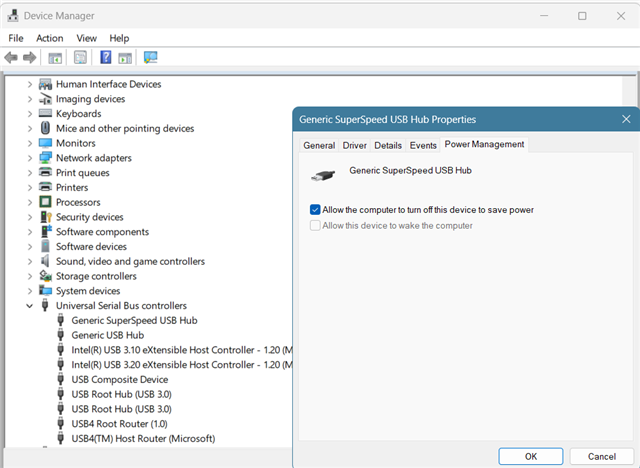
    I don't think you need a faster card.  Format is FAT32 right?  As for the disconnecting around 50%, I would dig into the power saving setting on the PC to make sure no USB device or controller is being turned off after a certain period of time.  One would think that the PC would recognize that the connection is active and not power anything off but a power saving action is the only thing that comes to mind, especially since it happens at about the same place each time (assuming same time elapses).

  • Yes, FAT32.  Trying with microSD re-formatted to "Default Allocation" made no difference ... Error at 55.3% complete and nuvi 1300 was shown as not connected.  I checked power saving settings and computer was already set to never turn off.  I don't see any settings for USB devices ... any suggestions on where those might be?

    UPDATE:  After typing in "Device Manager", a new window appeared.  Will try changing USB Root Hub (3.0) to NOT turn off this device to save power and see if that fixes it.

    ANOTHER UPDATE: That did not fix it.  Disconnected even sooner than before.  Under Device Manager I looked at all of the devices, and one of them had this note: 

    Windows has stopped this device because it has reported problems. (Code 43)

    A request for the USB device descriptor failed."

    I get frequent messages that the microSD card needs to be scanned and repaired.  I have scanned and repaired several times, and each time it is said to have no errors.  Is my card bad?  It is the only microSD card I have, so time to try a new one?

  • They are in Device Manager.  I was surprised to find that power management was enabled for a USB hub I have connected to my laptop although I shouldn't be.  It is a recent addition for which I never thought to check its power management setting.  I will be checking all USB related devices now though.  I don't think it would be necessary to do this with your nuvi connected but I would anyway just to see if it is listed in Device Manager, and if so, whether whether Windows assigned any power management.

  • Thanks for your reply.  I edited my previous comment perhaps while or after you replied.  If you haven't seen my edits, please advise if you have any other suggestions.  Specifically, for

    Windows has stopped this device because it has reported problems. (Code 43)

    A request for the USB device descriptor failed.

  • Windows has stopped this device because it has reported problems. (Code 43)

    A web search for this generated a lot of hits so I guess it is not uncommon.  That is were I would start. 

    The fact that the card repeatedly shows errors is troubling.  I new card is certainly worth a try.

  • What/where was the source for your memory card?

  • I don't recall exactly when I got it.  It may have been for a former phone.  It is a SanDisk 32GB microSDHC Class 4.  I have ordered a new card and will be picking it up later this afternoon.  See below

    PNY Elite 32GB Micro SDHC Flash Memory Card with SD Adapter


    Key item features

    • High Capacity: 32GB MicroSDHC card designed for dash cameras and other devices
    • Fast Data Transfer: Sequential read speed of up to 100MB/s for quick data transfer
    • Optimal Performance: Class 10, U1 rating ensures optimal performance for full HD photography and videography