This discussion has been locked.
You can no longer post new replies to this discussion. If you have a question you can start a new discussion

I'm finding it impossible to update my GPS.

This has been a ridiculous experience.  Installing Garmin Express on Windows 11 causes a problem. I want to install Net Framework but for some reason it can't. It doesn't tell me why or what might happen without it. Garmin does install, but Net Framework doesn't. Maybe that's the problem - I dunno.  Garmon express runs, sees my device and is "Step 1 of 2: Preparing Device for Software Update. This may take a minute" The minutes has gone on for 2 hours. No end in sight. Why is this so difficult?

  • Thanks for your suggestion.  I did notice the requirement for .NET 4.7.2, and when I tried to install it I got a message that said that version (or a later version) was already installed.  This morning I tried using an older computer still running on Windows 10.  During the Garmin Express installation, got a message that said I needed .NET 3.5, which it downloaded and installed (and which included .NET 2.0 and 3.0).  Garmin Express said the same as before ... first needed a Software Update, and there were 2 other updates available (Proximity, Text, GLX, All Languages, v3.90, 26.69 KB and City Navigator North America 2027.10, 5.00 GB)  I could appear to successfully download and install the Software Update and the Proximity, Text, GLX, All Languages Update, but even after installing either one the screen would still show both of them needed to be installed.  I recorded what I see on the screen (while trying the other day on my newest computer running on Windows 11) and posted in on Dropbox if anyone would like to view.

    https://www.dropbox.com/scl/fi/5ryccaoiguqqhjwqnjkp8/record_2026-04-24_07-35-50.mp4?rlkey=u6eru7gfkovbcpw2g82x7j0vt&st=hgodva6e&dl=0

    And, thanks to Garmin for getting the forum up and running again ... over the weekend I was unable to reply.

  • It is common for you to have to disconnect the device, restart it, and then connect it to Garmin Express again before GE recognizes that the updates are installed.  You might have to do this multiple times when there are multiple updates.

  • Thanks for your reply.  I did disconnect the device from the computer each time I was instructed to do so, and after reconnecting the cable, it would then reconnect to GE.  Do I need to actually shut down GE or the computer between updates?

  • Not the computer.  My process has been to disconnect the device, close GE, reconnect the device, then start GE after the computer has recognized the connected device.  I suspect you could start GE then connect the device but I find comfort in knowing that the computer has recognized the device before I start GE.

  • Hey   and  !

    To make sure we have our bases covered, please confirm the following has been done:

    • Garmin Express is up to date
    • USB connection on the cable and device are both clean and clear of any dirt/debris
    • Use a different cable

    If they have been tried and you're still experiencing this kind of connection behavior with Express, please let us know so we can investigate further.

  • Oh geez.  I am tired of posts by "Garmin - ??" that are not relevant to the discussion.  It appears that Garmin is using AI to post a response based on a key word and not relevance.  To do so flagged as a suggested answer is maddening.

  • To answer Garmin - DK, yes Garmin Express is up to date .  Version 7.28.0.0  USB connections are clean.  Have tried 2 different cables.

    Next door neighbor (software programmer) just spent two hours trying on his computers.  He had same results as me.

  • More info:

    I recorded what the files structure and folder contents look like using a screen recorder and uploaded it to Dropbox.  If anyone sees anything that doesn't look correct, please let me know.

    https://www.dropbox.com/scl/fi/6ok2p85yhdv56rf9mngtw/record_2026-04-27_15-26-24.mp4?rlkey=ujo5zc859jiex0yjtorccxm30&st=qptm2p6c&dl=0

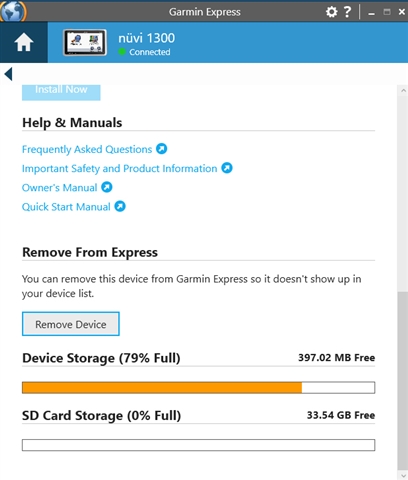
    I erased all of the non-English voice files to make more space on the 2 GB internal memory, in case that was part of the problem.  No change.

    I tried Peobody's method / sequence of restarting GE and the device, and again, no change.

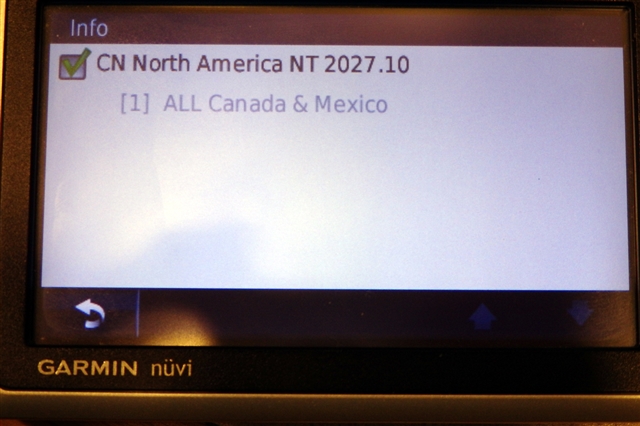
    And, FYI, here is what Map Info shows.  All I am trying to do is to get the lower 48 US map to be available.  I don't need Mexico or Canada.

    And finally, I have purchased a used unit off of ebay to see if I can update the software and maps on it.  It should arrive by next Monday.

  • Hey, all! Please try viewing the update details and select only the map update to be installed (no others, like voices, text, etc). Let us know how that goes.

  • Previously I couldn't select only the Map update because the Software Update had to be installed before the Map Update could be installed, and even though I got a message that the Software Update was successful, I still got the "Update Software" button  after re-starting the device.

    Just to give it another try, I started Garmin Express without my nuvi 1300 connected.  Where I usually saw the "Update Software" button, this time it showed an "Install All" button.  I clicked on "View Details" and 2 updates were available (same 2 as before).  However, now the larger Maps update was listed first, and if I hovered over the "Install" button I did not get a message that the Software Update needed to be completed first.

    I connected my nuvi 1300, and the "Install All" button was still there, and no mention of "Update Software".

    I Viewed Details again, and chose only the Maps to be installed.

    Got a message that a microSD was detected, and the map would be installed it to unless I wanted to change it.  

    I let it proceed, and Map Update is now 5% complete.  In a couple of hours I may be able to select an address within the US, if all continues to go well.

    Fingers crossed!