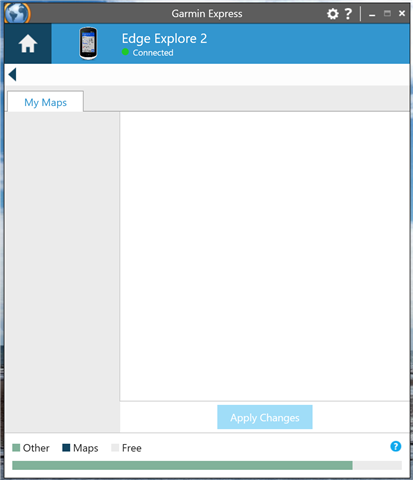
Manage Maps screen is blank

I'm trying to update the factory-included maps on my Amazon refurbished Edge Explorer 2.

I initially had some trouble updating to the latest firmware (it had apparently been sideloaded) but joining the beta channel triggered the update to 30.19

I'm now struggling to update the maps - the ones on the device are all from several years ago (with the exception of the third party map I have purchased)

When I click "manage maps", I just get this blank screen - as if it can't recognise any of the maps on the device (given the storage is just full of "other").
These are the files in the GARMIN folder:
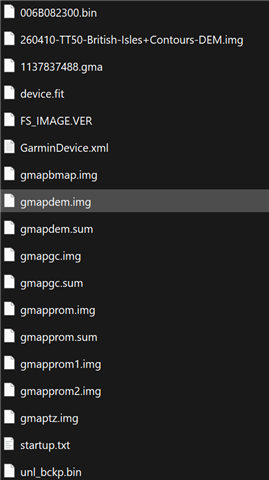
I've several steps so far after going through Google

  • Running Garmin Express as admin and in Windows 8 compatibility mode
  • Ensuring high contrast themes are turned off
  • Setting desktop scaling back to 100%
  • Deleting the maps
  • Deleting GarminDevice.xml
  • Removing and re-adding to Garmin Express
  • Reinstalling Garmin Express and clearing all data out

I think it could be a device issue - as my Fenix 6X Pro updated its maps no problem.

Can anyone advise on what to try next? Or could this signal a device problem that needs taken up with Amazon and a replacement?

Many thanks!

  • If there are available map updates showing on the home page for the Edge Explore 2, but none are actually being installed, can you please share a video here of going through that process? 

    If there are no listed available updates, then it may be best to request a return from Amazon since it was a refurbished device through them. 

  • Sure - attached here.

    The issue is that the Manage Maps button just opens a blank screen as in the photo. The maps are on the device, and work for navigation, but aren't recognised by Garmin Express - the storage just shows it full with "other" files rather than picking the maps up properly. They're definitely out of date - the device suggests they're all around 2021/22.

  •  Thank you for the details. I've sent you an email with instructions for sending us your Garmin Express logs so we can take a closer look at this. Please respond to my email.

  • I have same problem with my fenix 7 sapphire solar , did you solve ?

  • Not yet. Still apparently being looked at by the Garmin team.

    Used an AI tool to translate what the logs were indicating into plain language.

    Best I can work out is that the device has lost its entitlement on the Garmin server side.

    From what others have said, this should be fairly straightforward for someone at Garmin to fix, but nothing has transpired yet.

    Bit annoying - as my unit was an Amazon Refurb and I'm out the window to return it. Fortunately third party maps work well but it'd be nice to have the actual Garmin ones too.

  • Please try the following steps from another user on a similar thread which resolved their concern: 

    1. On the watch, go to System → USB Mode and select MTP.
    2. Connect the watch directly to the computer with the original Garmin USB cable.
    3. In Windows File Explorer, open EPIX PRO → Internal Storage → GARMIN.
    4. Make a backup copy of GarminDevice.xml on your computer.
    5. Delete GarminDevice.xml from the watch.
    6. Safely eject and disconnect the watch.
    7. Restart the watch and wait until it has fully booted. The watch will automatically recreate the GarminDevice.xml file.
    8. Reconnect the watch to the computer and open Garmin Express.

    Garmin Express detected the watch correctly afterward and displayed the available maps again. The TopoActive Europe map also became available without an Outdoor Maps+ subscription.