For several months now I have had no Manage Maps option in Garmin Express.
Reinstalling the software fixes it for one session, but as soon as the software is closed and reopened I lose the option again.
Is:

Should be:
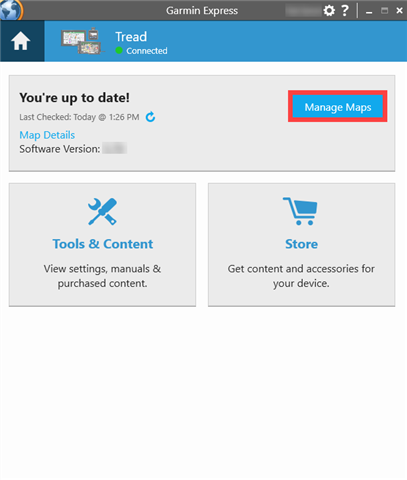
For several months now I have had no Manage Maps option in Garmin Express.
Reinstalling the software fixes it for one session, but as soon as the software is closed and reopened I lose the option again.
Is:

Should be:

I had the same. Thought it had something to do with the fact that I had completely reinstalled and emptied my PC a week ago. I am on Epix Pro beta 26.09, Garmin Express 7.28.0+f1c0ff2f.
I did as suggested by Garmin - DK, deleting GarminDevice.xml, but just before I removed the device from Express, I already saw the Manage Maps option pop up. I did, however, finish the instructions.
When readding and selecting "use MTP - No", I didn't get the manage Maps option. I don't connect to my PC very regularly, but I think I always selected MTP - No.
Then I thought let's try it again with MTP - Yes. And yes, I get the Maps option again. And actually also the Music and IQ Apps option, because these are also missing when "Manage Maps" is missing.
I did some further testing. I haven't found a very good correlation between MTP and the Maps option being available, but it seems to have something to do with it for me.
For now I can get it to work, especially with MTP - Yes.
Does your Enduro 3 have a similar screen to my second image? (Just a big refresh button to check for updates?)
I tried deleting the xml file and re adding the watch but I ended up with that same screen.
Yes, the same.
I seem to get the same MTP correlation as you
Where do you select MTP - Yes or MTP - No? That option seems missing for me.
That prompt after plugging in only appears if you have Garmin mode switched on for usb mode, if not MTP automatically turns on about 30 seconds after plugging in (you’ll know MTP has activated as It should show up as a drive like a usb stick does on your computer)
I had the same problem. I fixed it by installing version 7.26 of the software. It seems the bug only affects more recent versions.
That's encouraging. It suggests it can be fixed with a software update.
Where is the archive to download previous versions of Garmin Express?
I happened to have a 7.24 installer, I’ve installed 7.24 that didn’t work, so I deleted device.xml and re added watch to express and it still has the same problem on my Fenix 8
I've tried older versions 7.27 and 7.26. Still the same error with my Forerunner 970. Older versions are available on uptodown.com