Transferring waypoints

Former Member
Former Member
When I got my NUVI 1350, I could arrange the Waypoints in Basecamp Folders, and when I sent everything to the Garmin, everything ended up in the Category (Folders) they were in Basecamp. The update to BaseCamp I installed in the middle of May 2014, changed that and in addition to putting Waypoints in Basecamp folder you had to add a Category to each Waypoint for them to appear in the Garmin Category (Folders).

With the recent update, (Installed it today 09/08/14) I can not longer get the Waypoints from Base camp into the Category (Folders) of the Garmin.

Could some one outline the procedure to transfer folder with waypoints and categories to the Garmin and have them appear in the same category (folders) structure as in BaseCamp.

Or is this a programing error like the one in May that took a month to correct. To say the least, I was a bit upset in May when the Garmin technician told me he could not help me and I would have to wait until after my vacation for the software to be fixed. Now we are back in a similar situation.
  • My Nuvi has waypoints saved as categories (named for cities) which is how I had Lists created in Basecamp quite a long time ago. Somewhere along the line, I noticed that when I'd add a WP in BC under a city's List, the WP would not end up in the city's Category on the Nuvi


    It won't, that's because the association between Lists in BC and categories on the nuvi was removed a while back when users complained. If you want a WP in BC to be in a specific category on your nuvi you need to change the WP's category in the Categories tab when you look at the WP properties.
  • I also noticed in BC that many WP have a system-generated "Map Points & Coordinates" category, which corresponds to a system-generated "Map Points & Coordinates" on the Nuvi.


    This category is created by your nuvi ... that's just the way the nuvi works if you create a waypoint on your nuvi that is a 'Map point or coordinate'
  • Former Member
    0 Former Member
    My 1490T doesn't allow categories to be renamed. You can only add them (and delete implicitly when no waypoints/favorites are left in the category).

    What I did with 'Map point or coordinate' was add a new category, with a name of my liking, add all the points to it, and them remove them from 'Map point or coordinate'.
  • Former Member
    0 Former Member
    It won't, that's because the association between Lists in BC and categories on the nuvi was removed a while back when users complained. If you want a WP in BC to be in a specific category on your nuvi you need to change the WP's category in the Categories tab when you look at the WP properties.


    AAAGGGGHHHHH!!! Please read me more clearly. I understand exactly what you are saying, and is indeed what I was trying to do. What does NOT seem to work is the categories I set in BC getting transferred to Nuvi.

    Let me spell out a simple example:

    I have my sister's house in BC, in a list called Austin... some years ago when I got my nuvi, I tranferred that WP and it went into the Category "Austin". Now, I find a cool new restaurant in Austin so I want to save it on BC, and ultimately transfer to Nuvi. I put it in the Austin list and also set it's category to Austin. Once I tell the list Austin to "Send to..." NUVI, when I get on the nuvi, and look in "Austin" Category, the new restaurant is not there. If I search for it in "All Saved Places" I can find it. Then when I hit the 'i' for info to edit the Category of it in Nuvi, "Austin" is not there. Get it? Category on a WP in BC disappears on Nuvi.

    I think the process to recreate it is more complex than this example, but I'm trying to put an example out there which is as crystal clear as I can make it so that everybody understands the issue I'm discussing. If you want, I can give detailed steps of how I believe it can be recreated, but it requires careful reading.


    P.S. I was one of those who complained that Lists became Categories in the Transfer (and thus dragging unwanted "categories" into the Nuvi. I worked around it by creating lists that made useful sense as Nuvi categories, and not "cross-posting" WPs in more than one list. If I can crack THIS nut above, I'd redo my folder/list naming scheme and organization to something that makes more sense in BC.
  • Former Member
    0 Former Member
    I think nuvi's have a limit to the number of categories they support. The Garmin FAQ database seems to be having issues right now so I can't check.

    When you transfer data from BC to a device what happens (for most devices) is that a temp.gpx file is written. Upon reboot the device reads that file and adds the transferred data.

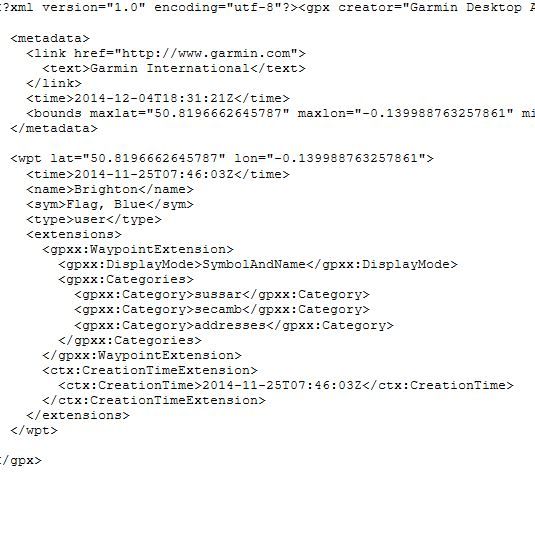
    What I'd do is try the transfer, close BC, copy the temp.gpx file on your unit, and look at it to see if the waypoint categories are in the file. If so BC is working correctly and the issue is with your device. If not BC is the culprit.
  • Let me spell out a simple example:

    I have my sister's house in BC, in a list called Austin... some years ago when I got my nuvi, I tranferred that WP and it went into the Category "Austin". Now, I find a cool new restaurant in Austin so I want to save it on BC, and ultimately transfer to Nuvi. I put it in the Austin list and also set it's category to Austin. Once I tell the list Austin to "Send to..." NUVI, when I get on the nuvi, and look in "Austin" Category, the new restaurant is not there. If I search for it in "All Saved Places" I can find it. Then when I hit the 'i' for info to edit the Category of it in Nuvi, "Austin" is not there. Get it? Category on a WP in BC disappears on Nuvi.


    Well your simple example may not work for you but it does when I do it, the category transfers across just fine. It's how I edit my nuvis. I pull all the data across to Basecamp, clear my nuvi, edit the data in BC and then send it back. Categories in BC transfer across.

    Do you delete the temp.gpx file created by BC when you send data across once the data has been 'imported', which happens the first time you switch your nuvi on? Just wondering if that may confuse your nuvi and create the problem you describe.

    Incidentally I did read your posts clearly, but you added more detail in a later post which I didn't see until I'd posted mine.
  • What I'd do is try the transfer, close BC, copy the temp.gpx file on your unit, and look at it to see if the waypoint categories are in the file. If so BC is working correctly and the issue is with your device. If not BC is the culprit.


    Just done that and the categories are listed just fine in temp.gpx ....


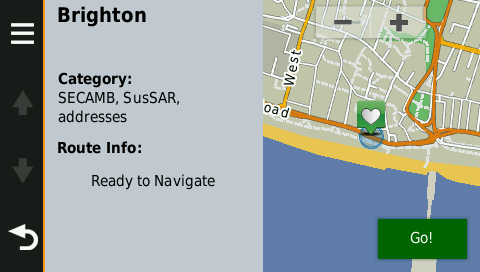
    and show the 3 categories on my nuvi, a 2508 ...


    so it all works as I stated. May be an issue with certain nuvi models?
  • Former Member
    0 Former Member
    Well the point is to have PLARKINJR do that since he/she is the one having the issue.
  • Agreed, it may be an issue with his nuvi, but BC transfers the data correctly :)
  • Former Member
    0 Former Member
    I suspect a nuvi issue as well but we'll see if PLARKINJR checks ;)

    BTW does a limit of 30 categories sound right to you? That's the number I recall but I can't check.