Backing up routes and tracks?

Former Member
Former Member
Where can I find my routes and tracks files in Basecamp as I want to copy them across to a memory stick. I tried "send to" from Basecamp but this does nor work, it sees the memory stick but nor the folders on the stick. In any case nothing happens. I looked through the entire Basecamp directory mostly just a bunch of .dll files. I checked user directory and the usual library but cant find anything there.

Thanks for any help
  • route files

    Try searching your PC for .gdb files - possibly in 'my documents'? Hope that helps, Mick.
  • Former Member
    0 Former Member
    Where can I find my routes and tracks files in Basecamp as I want to copy them across to a memory stick. I tried "send to" from Basecamp but this does nor work, it sees the memory stick but nor the folders on the stick. In any case nothing happens. I looked through the entire Basecamp directory mostly just a bunch of .dll files. I checked user directory and the usual library but cant find anything there.

    Thanks for any help


    Use the 'export' function in Basecamp. This will write the data that you have selected to an external file.
  • Former Member
    0 Former Member
    Try searching your PC for .gdb files - possibly in 'my documents'? Hope that helps, Mick.


    Nothing found there.
  • Former Member
    0 Former Member
    Use the 'export' function in Basecamp. This will write the data that you have selected to an external file.


    Thanks, I did this and by default it exported OSM.gpx file which opens with JOSM but only details one waypoint the current location not the route.

    So wondering if the route.gpx file you find on the Garmin device is something totally different in Basecamp?

    What I am trying to do is upload the routes to a memory stick in the same format as you see them on the device. So far "backup" "export" and "send to" do not appear to do this. Backup does create a small file of about 60k but surely that does not include my 14 detailed routes?

    Seems like unless you have a Garmin device attached there is no way of backing up routes and tracks to another location? I hope someone proves me wrong as my device is in for exchange so in the meantime if this computer gets flattened I lose all my routes :confused:
  • Former Member
    0 Former Member
    Why don't you just backup your files in BaseCamp? Send your routes, waypoint and tracks from your device to BaseCamp and then use the backup function to store all your data somewhere else (like on a stick, an external hardrive, or somewhere on the cloud). If you ever need to restore your data, use BaseCamp's Restore functionality and send the data back to the device.

    That is definitely the route I would go if all you worry about is having a backup in case your hard-drive ever fails.

    Or you can also export routes, tracks and waypoints to gpx or gdb and store them wherever you like. Or you can send them to a memory card.
  • Former Member
    0 Former Member
    I could have sworn I saw somewhere that there was a bug that was fixed which caused basecamp not to see folders in removable media.

    In win7, I bet you'll find the basecamp DB under
    C:\Users\{you}\AppData\Roaming\Garmin\BaseCamp
    if that is any help at all.

    As for my backup strategies: I backup my entire PC daily
    But for my "mapping" data, I regularly export all my basecamp stuff and import it into Google Earth... that forms a sort of backup, and also gives me some additional tools and flexibility. Conversely, I frequently export from GE and import into BC. I know, not a true backup, but the CONTENT is usually available in two different places so I can at least mostly recover/regenerate one or the other.
  • Former Member
    0 Former Member
    Why don't you just backup your files in BaseCamp? Send your routes, waypoint and tracks from your device to BaseCamp and then use the backup function to store all your data somewhere else (like on a stick, an external hardrive, or somewhere on the cloud). If you ever need to restore your data, use BaseCamp's Restore functionality and send the data back to the device.

    That is definitely the route I would go if all you worry about is having a backup in case your hard-drive ever fails.

    Or you can also export routes, tracks and waypoints to gpx or gdb and store them wherever you like. Or you can send them to a memory card.


    This is what I am trying to do. I do not have the device as it is being exchanged but the routes in the old device are in Basecamp and it is the ones in Basecamp I am trying to copy to an external source. Export to a memory stick does not work, BC sees the stick but does not copy what I thought would be gpx files, in fact it does not see any directory on the memory stick other than the root. Export to a different location on hard drive exports a small file which is only the first waypoint not the entire route. Backup creates a small 60k file which I am not certain contains my 14 routes.

    I thought that maybe the gpx files for each route would be listed in a BC directory somewhere and that I could select all with one click and drag to another drive like you can for instance with word documents or similar. But it is not that straight forward or that easy.
  • Can you actually SEE your Tracks, Routes, etc. on the Map Screen in BaseCamp?

    If a full backup was only 60K, you certainly do not have much data in BaseCamp, or you are not correctly selecting that which you wish to backup.
  • Former Member
    0 Former Member
    I could have sworn I saw somewhere that there was a bug that was fixed which caused basecamp not to see folders in removable media.

    In win7, I bet you'll find the basecamp DB under
    C:\Users\{you}\AppData\Roaming\Garmin\BaseCamp
    if that is any help at all.

    As for my backup strategies: I backup my entire PC daily
    But for my "mapping" data, I regularly export all my basecamp stuff and import it into Google Earth... that forms a sort of backup, and also gives me some additional tools and flexibility. Conversely, I frequently export from GE and import into BC. I know, not a true backup, but the CONTENT is usually available in two different places so I can at least mostly recover/regenerate one or the other.


    Yes that is what is happening, BC cannot see folders in removable media so cannot export to a memory stick. I found the database with the %appdata% command from run box ( Thanks for suggestion ) but the route files are not listed unless in some other form or as 1 file of all.

    I tried your suggestion of exporting to the route to GE and what happens is the first WP is shown but nothing else for the route. This kind of matches the behaviour of BC exporting to somewhere else other than removable media.

    I dunno what the solution to this is!
  • Former Member
    0 Former Member
    Can you actually SEE your Tracks, Routes, etc. on the Map Screen in BaseCamp?

    If a full backup was only 60K, you certainly do not have much data in BaseCamp, or you are not correctly selecting that which you wish to backup.


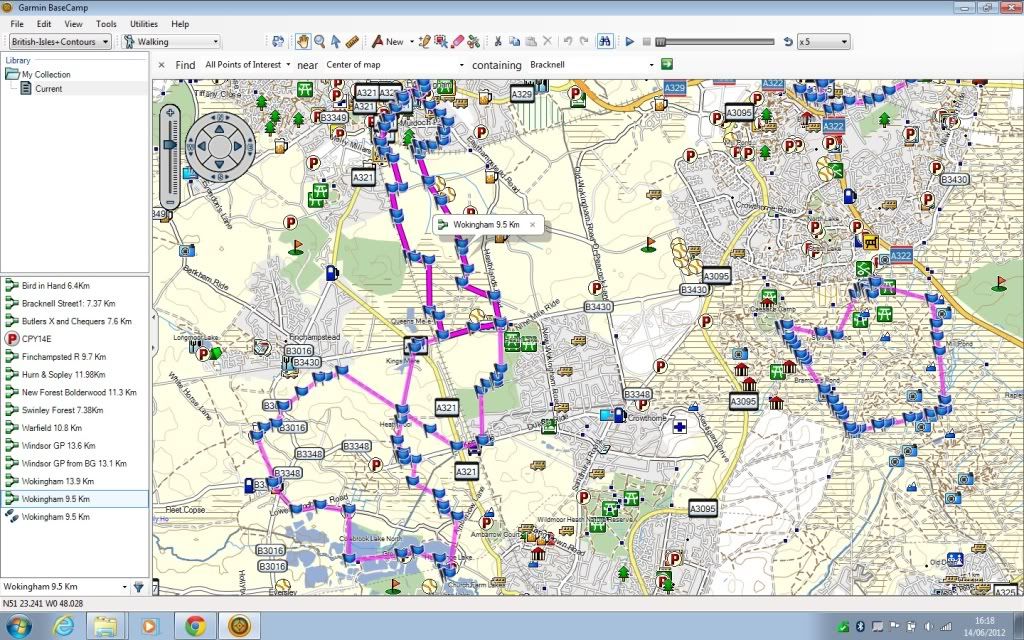
    Yes I can here is a screen shot.


    So to send a route on the left list I would normally connect the Garmin 450 and "send to " and this simply uploads a gpx file. What I want to do now is send these routes to a safe place on a memory stick so if the HD does get flattened I have my routes ready to load back into BC