
Missing part of a trip in BaseCamp

Former Member
Former Member
Hi all! I am new to this forum.

I have been using a Garmin nuvi 205W and so far happy with it. Yesterday I used it to track a flight from San Juan, PR to Boston, MA and for some reason I can only see the beginning and end of the flight and not the entire trip in BaseCamp. I lost satellite reception like three times during the flight but only briefly. The parts I am able to see are the part during departure into like 360 miles into the flight and then the initial approach about 60 miles before landing all the way to landing. However, the entire flight track is visible in the Garmin unit itself so I know it was recorded. There are only small gaps in the places where I lost signal. All that is missing from BaseCamp is over the Atlantic Ocean far from land. Attached is a screen capture of what my unit shows with the map zoomed out enough.

How can I view the entire trip in BaseCamp or Google Earth (which by the way shows the same thing)?

Thanks in advance.
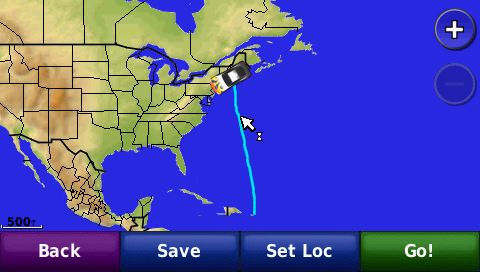

  • Former Member
    0 Former Member
    Please post or send me the gpx file in a PM so we can take a look and see what's going on.
  • Former Member
    0 Former Member
    I posted the current.gpx for you to see. The URL is in a PM.
  • Former Member
    0 Former Member
    The GPX file that you posted only has track points for the beginning and the end of the trip. I'm following up with some other people to see why the device is displaying the whole trip but only writing out a portion.
  • Former Member
    0 Former Member
    We are now kind of wandering off topic but the interesting part is that the track log seen in the device but not found in the GPX file reflects some minor course changes during the flight that I remember actually happened (I looked at the device when they occurred) so it kept an accurate track of the flight.
  • Former Member
    0 Former Member
    Sorry for the delay. Here's what I've found out with some help from other team members:

    Automotive engineering has stated that the problem occurs during the transfer of the information from the device to either BaseCamp or MapSource. Basically the log is recognized as one that is coming from an automotive device. Any speeds deemed too high or inconsistent with an automotive device are seen as anomalies and then thrown out and not part of the log. That is why you see the beginning and end of the log. This is when the speeds are the slowest.
  • Former Member
    0 Former Member
    That would explain the approach and landing part but the take-off section continued well into cruising altitude and speed. The airplane had been flying at 38,000 feet and around 530 mph for quite some time at the point the log was cut off. The initial part logged 360 miles of the flight.

    Oh well... that means I cannot use a nuvi to track a flight. :( Well, at least not to keep a record that I can see in BaseCamp or Google Earth.