This discussion has been locked.
You can no longer post new replies to this discussion. If you have a question you can start a new discussion

My forerunner 935 stops tracking the pace after 5 minutes?

Former Member
Former Member
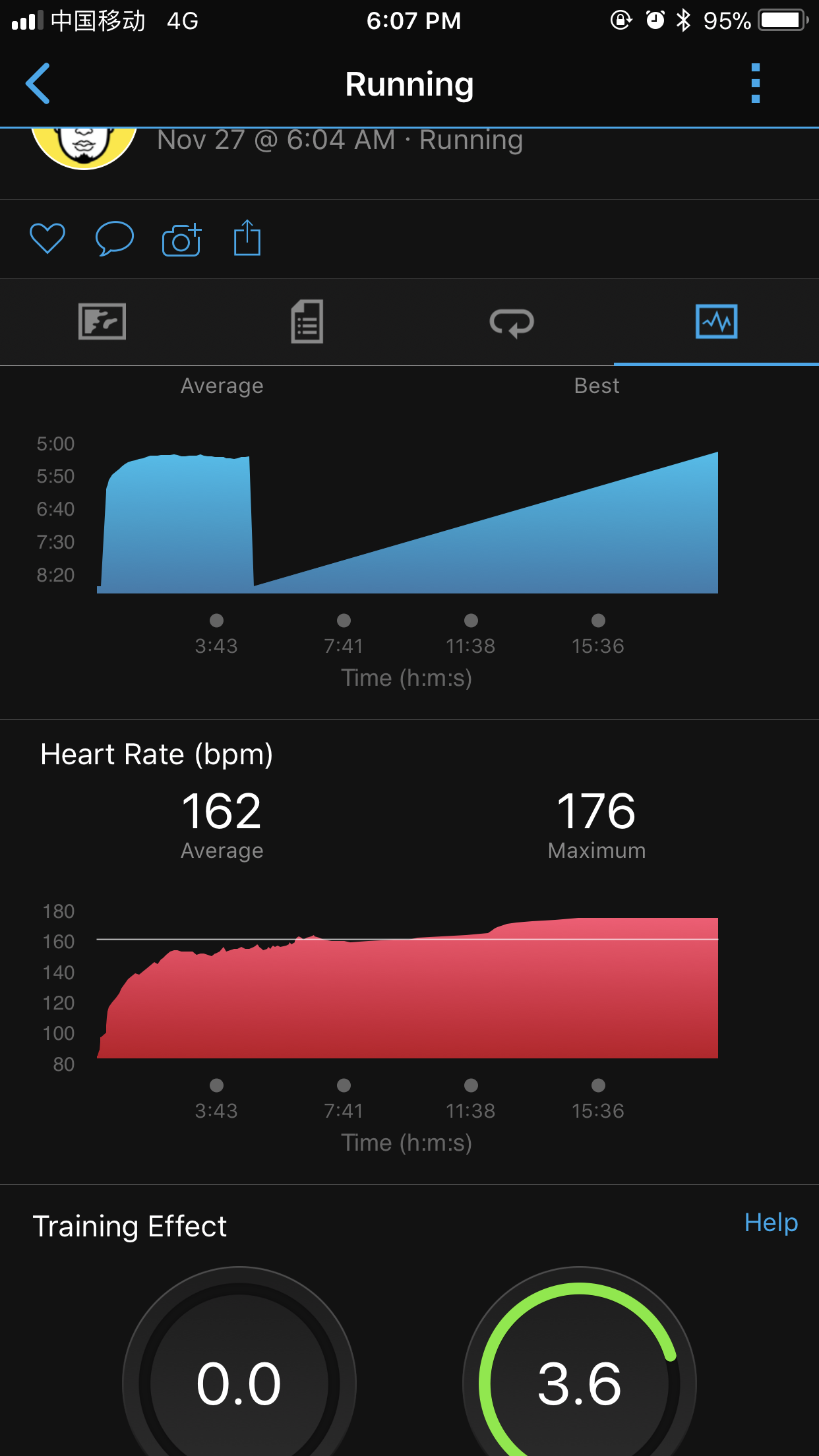
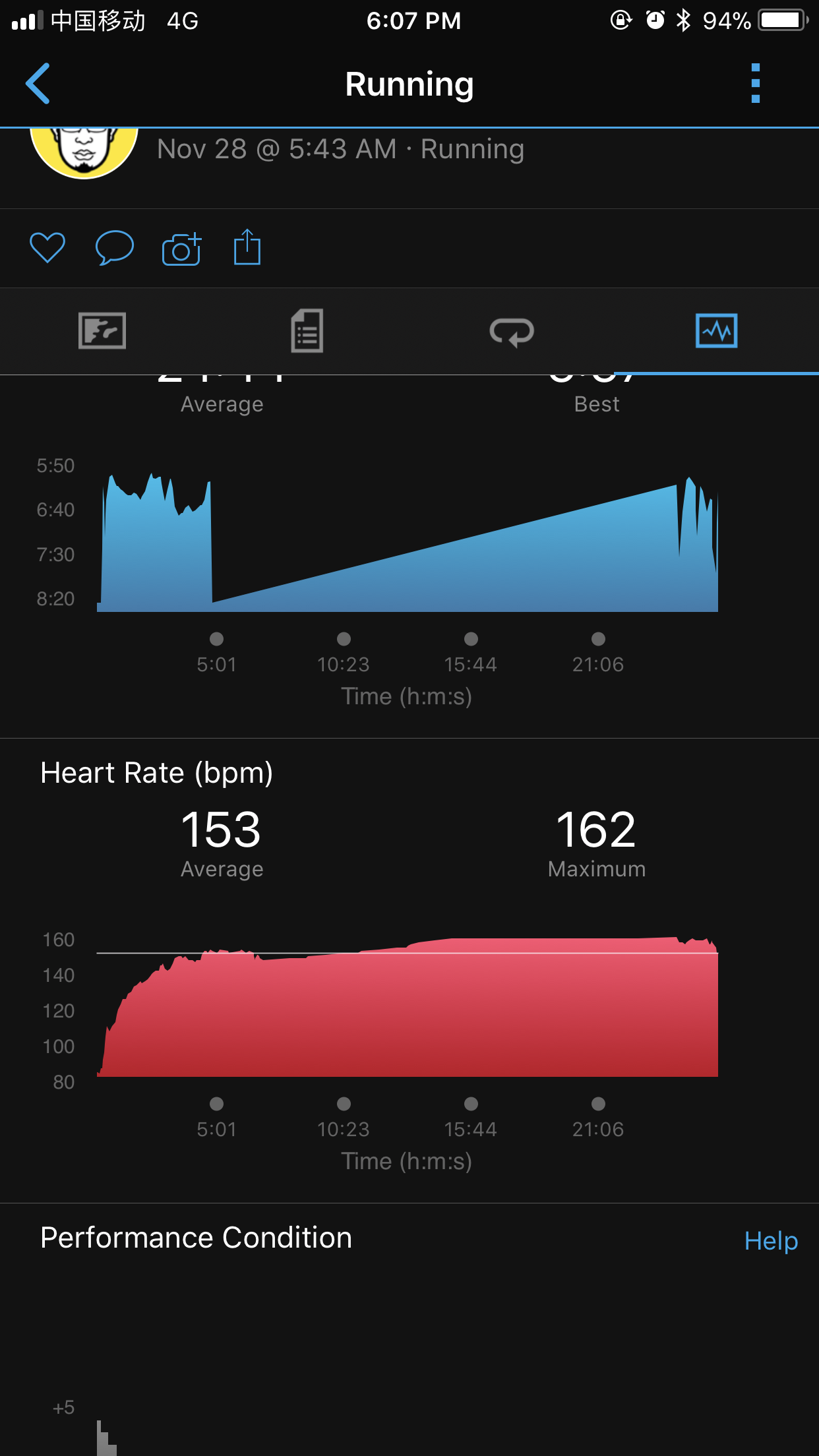
My forerunner 935 stops tracking the pace after 5 minutes. Only the heart rate was tracked during the whole running. The cadence/stride length/vertical ratio and all other data dropped to zero after five minutes too. I used an RDP.
I didn't try to increase the timeout setting from Normal to Extended, because a friend of mine used the same default settings and the tracking was OK.

And I ran twice these days, both tracking stopped at five minutes. For the first run, the GPS did not start at all. for the second run, the GPS seemed OK for the first 5 minutes. And distance tracking was totally wrong too. I run around 3KM but the distance was only 0.8KM. In the end of the second run, I hit some buttons and the tracking started again.

Anyone encountered this issue?

ciq.forums.garmin.com/.../1279624.png ciq.forums.garmin.com/.../1279625.png
  • Strange! Just double checking, you did start the timer on these runs and didn't stop it? The Normal/Extended timeout is for when you are on the data screens but haven't started the timer. The Normal timeout is 5 minutes. Once you have started the timer these timeouts don't apply.
  • Former Member
    0 Former Member
    Yes, I started the timer and didn't stop it. And I turned on voice prompt on my phone, but I heard the same pace and heart rate every tim. I guess it's because the watch didn't collect any new data.
    And my watch is a Chinese version. I didn't see 6.10 in the Garmin Express, so it's still 6.00. Maybe I can try to upgrade first? How? Upgrade to an English firmwire is Ok for me.

    Any other thing to try?
  • You can't change one regional firmware to another type am afraid. Sounds like you have the latest version for your region.

    This is so basic functionality that am struggling to understand what's going on especially as you have had it twice.

    Did you continue to get a GPS trace after 5 mins in these runs?
  • How do the recorded tracks look like?
  • Former Member
    0 Former Member
    The image is too big to upload. But there is no GPS trace at all for the first run. For the second run, there is GPS trace only for the first 5 minutes and the very last few seconds - after I click the start/stop button in the end of the run.

    I run again today, without RDP, the same result. It stopped around 5 minutes - not exactly 5 minutes, somewhere around 4:50 minutes. Around 6 minutes, I checked the watch and clicked the start button, the run paused, and I clicked the start button again, the run continued. After that, the whole tracking seemed OK.

    And comparing the heart rate track for these runs, I think the first two runs look also strange, the heart rate was too smooth after 5 minutes. It might mean the data sampling stopped working. The third run looks just normal. Strange!

    I reset the run settings to default, and remove the data field etc. Will have another run in the weekend.

    If there is nothing else to try, I'll go to Garmin Support.

    BTW, do you think I should try the beta version?ciq.forums.garmin.com/.../1279992.png
  • You need only paste a link to your Garmin Connect activity from the internet. If you have any added data fields or other CIQ stuff, perhaps remove them, then try a run.

    There's probably little to gain by loading the beta version. This is basic functionality. You could try a reset by pressing and holding the power on/off button until the device turns off. Then power on again.
  • Former Member
    0 Former Member
    Right. Here are the links of the three runs.
    https://connect.garmin.cn/modern/activity/27957010
    https://connect.garmin.cn/modern/activity/28122289
    https://connect.garmin.cn/modern/activity/28352178

    Thank you for the suggestion. I'll remove all CIQ stuff and reset to factory defaults and try a run.
  • You'll need to unlock the activities - padlock up towards the top right of the screen
  • Former Member
    0 Former Member
    Right. I unlocked these activities :-)
  • did your watch jump back to the clock screen after it stopped? if it's then it's this same problem faced by some other users including me--> https://forums.garmin.com/forum/into-sports/running/forerunner-935-aa/1253709-activity-freezes-at-30s-to-2-minutes-into-an-activity but for me this problem didn't really always popped up, i only had it 3 times so far, and all at the same hill reps route and stopped at the same exact point without warning just jump back into the default clock watch face.