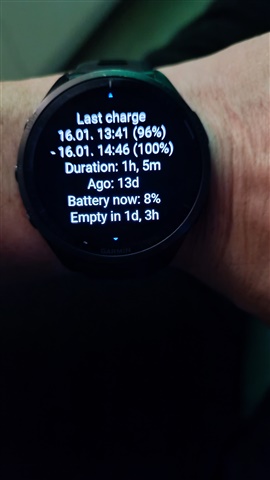
The draining is 4x times higher without any activities requiring GPS nor any otehr changes to the setup of the watch. Today it lost 10% in 6 hours ... doing nothing
Garmin support got me to do that yesterday, and I done a factory reset to no success. Can’t even get the watch to stay on long enough now to attempt anything else. Thanks for the reply
I’m having the same issue. Contacted support and they only suggested a restart, reset, and then to replace the watch. They told me they haven’t had enough complaints to fix the issue with an update.
LOL, I can only guess why. There were other issues I kept on reporting for years, spanning multiple devices. Usual interaction with support goes like:
1. I report the bug, ask them to open an internal ticket to fix it.
2.
Option 1. They don't even understand the problem, say something irrelevant or untrue.
Option 2. They try to send me links to FAQ based on one of the first three words on the message I sent but demonstrating that they haven't even read the rest.
Option 3. They are sending some workaround (this sometimes helps a bit), but refuse to open an internal ticket, because they don't see it as a bug.
Option 4. They rarely but sometimes show signs of an internal ticket because I get follow-up emails.
Even when I know that similar issue was already reported (either by me or someone else in the forum*) they usually can't find any sign of it.
*) always report any issue to customer support, because they rarely read the forum. I also usually try to open a ticket via email and not chat, because at least they usually respond to the email and you can later send more related details back to their email and at least it'll surely be filed somewhere (in the write-only ticket system ;)
So "they haven’t had enough complaints" only means that the random agent you talk to haven't heard of the issue in their current shift....
That’s what I’m hoping, that they issue a patch and it resolves it, the watch now only turns on very intermittently now, and for the last nearly 3 years I never had an ounce of bother with the watch
I feel like exchanging the watch for another one won’t fix the issue either. As soon as it updates it will probably have the same issue.
I had turned off automatic updates but lately the updates have been pretty good so I turned it back on after the last one. My bad!
Yes and no. But for the no part you probably don't need another watch either. As you already understood the problem is most likely a change in the firmware. The reason why Garmin don't care fixing it is because it probably needs more than that for the drainage. This is probably also why even if they try to reproduce, they most certainly won't find the bug: the relatively few people who have the problem probably will reproduce it on another watch too, if they will set up the new watch the same way as now.
My theory is that if you factory reset the watch and then use it as is, with minimal changes. Start with the least changes you can do with. Maybe use it as is after factory reset for a day. 1 day should be able to see if the battery is crazy. Then every day do only 1 small change. Install your favorite watch face, but don't change it's default settings yet. After a day do that. After every small change wait for a day. And use a notebook. After every change write it down: date, time, change, battery %. Do only charge it occasionally just before the change, and also write down the battery percentage before and after charge.
I believe that it'll take some time, but you'll get to the one setting that will reproduce the problem. However to be really able to reproduce it you'll also need to send Garmin the whole list if other changes you did since the factory reset, because I'm pretty sure that the last change alone doesn't cause it, only together with some of the other changes YOU made. This is probably why Garmin couldn't reproduce it until now.
I don't think that's going to get them anywhere. I've had the watch for 2 years or so. I changed my watch face in the beginning to what I liked and haven't made a single change since other than letting the watch update. I didn't do every update for a little while but I was on v26 and after that was successful turned automatic updates back on and the day it updated or the next morning I noticed the battery life went from normal to what it is now. Like it drained overnight 10-12% or so and I thought maybe it was a battery problem at first but after a recharge and restart it would go 10-12 hours normal drain and then it would go back to drain fast until another restart and then the same repeats. It's something in the update and I'm sure eventually it will be fixed just like other issues in the past. At least it's not an activity bug. That's the way I'm looking at it.
Two years with Garmin I was still optimistic as you, but after 5 years and 3 watches I'm much less
Before I update my watch, I always do all 3 steps and never had any problems....
1. RESTART WATCH (hold light button for 10 sec to turn off, ..... now turn ON the watch)
2. UPDATE WATCH TO LATEST SW VERSION
3. Emediatly after your watch is updated to last SW version, make a SOFTWARE REINSTALL (go to settings/sistem/about now pres 8 times LIGHT BUTTON and chose SOFTWARE REINSTALL)
If you are already on last SW version, do 1. and 3. step...
If you use 3th party watchfaces, first uninstall all watchfaces, restart watch, recharge watch to 100% and with default Garmin watchface see if battery consumption is ok...... I have to do this once last year, after updat...
Hope it will help...
This is my battery status, after installing 27.09...