
Altimeter broken or is this normal variation for this watch?

This is a screenshot of the altimeter after a run with the FR955. The insert is the altimeter from a Fenix 5 Plus that I also wore during the run. The run was in the time period marked by the orange lines.
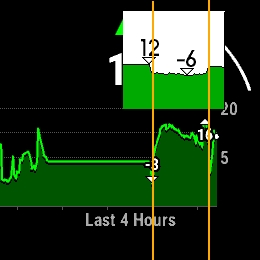
I had been on 10 meters altitude for a a few hours, went downstairs to -2 to run, and went back to 10 meters. The Fenix 5 Plus shows this clearly. Why is the FR955's altimeter so much off? It has never been as good as the Fenix 5 Plus (and 6), but it's been consistently wrong during outdoor activities from this location since September last year, which I attributed to unstable autumn weather. But now I have compared the two a few times and this shows that the FR955 is always varying too far much. This elevation plot from Runalyze shows the pattern more clearly. 
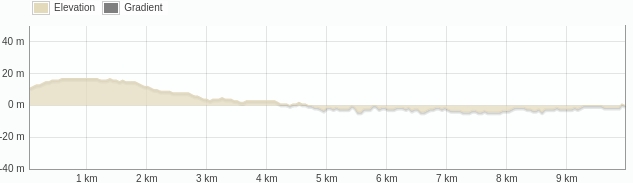
I am 90% convinced it is software, because all other runs that start at altitudes above sea level and do not start shortly after descending stairs, are OK. DEM calibration to an altitude of -2 meters also does not work anymore, it will always calibrate to +2 meters or higher. I don't mind a small offset of a few meters, but the 'fake hill' in the elevation plot is not right and it annoys me. 

I have never swum with the watch or immersed it in water (except for trying to clean the sensor as per Garmins instructions), usually take it off before using hot air hand-dryers (or dry my hands on my socks). I do not always take it off while showering and run in the rain with it, but that should not damage the baro sensor it I think. 

What do you think? Is this more likely to be software or could it still be a sensor issue? 

===

Edit: I compared with similar runs in this location, from other devices. ALL do a better job than the FR955. Fenix 2, 3, 5Plus, 6X, 7, Epix (gen 1) did it right. The Forerunner 935 sometimes also showed this 'fake hill" but not every run and not as pronouced.

  •  I hope you don't mind if I keep posting in this thread, our problems seem similar, but I can open another one if you do :).

    After I contacted the german Garmin support with my problem, I got a response.

    A list of things to try.

    What I tried so far is:

    • "Soft Reset": Press the Power Button for 30 secs to shut it off and wait 1-2 minutes to power it on again. - did not work
    • Go into developer settings and use the "reinstall software" function. Wait for it to reboot and reinstall. - did not work

    Next on the list:

    • Factory Reset while keeping the data on it, then let it sit outside for 30min for a GPS-Fix (I am not sure if there is an "option" to do a GPS-Fix, if I should just have it lay outside or if it has to be while in the activity setup phase (although there it probably shuts off before 30 min is over due to inactivity).
    • Full Reset followed by the same 30 min gps fix thing.

    If it still does not work after that, they want to analyse my data.

    I did some analysis myself. The problem started in November, pretty sure it was after the upgrade to version 26.08 from Version 25.06. I might also try going back to that version if I can find out where to get it and how to do it.

  •  I hope you don't mind if I keep posting in this thread, our problems seem similar,

    Not at all, thank you for helping to figure this out! 

    I have a number of old firmwares (full update files), a random collection of which the newest is 22.24. I have them from other participants of this forum and have not verified if they work or are correct. I assume they are pretty much tamper-proof (files are encrypted, checksummed, watch will refuse files that are altered).

    Problem with downgrading is that you can't be sure that all of the firmware for the subsystems (sensor hub, GPS) is present in the update file, and if it is, if these subsystems accept a downgrade. The base OS can be downgraded, but in theory you could end up with subsystems or modules that cannot, and it is not guaranteed that the older OS interfaces well with the modules that kept their newer firmware. I am just guessing, I didn't experiment a whole lot with downgrading, last was a Fenix 6 and that failed (I wanted to revert to an old sensor hub firmware, but only the base OS and CIQ were successfully downgraded). 

    Basically, best option is to dutifully follow all the reset/wipe/GPS soak/reinstall/call Garmin-actions and hope for the best. 

    I am going to test now, by just standing around for a whole long time with GPS on, before I start my run. 

  • Update:

    Factory Reset while keeping the data on it, then let it sit outside for 30min for a GPS-Fix (I am not sure if there is an "option" to do a GPS-Fix, if I should just have it lay outside or if it has to be while in the activity setup phase (although there it probably shuts off before 30 min is over due to inactivity). - Also did not work.

  • I am going to test now, by just standing around for a whole long time with GPS on, before I start my run.

    It worked. It was a little on the cold side so I walked for only 10 minutes before starting a Run activity. 

    The first 1/3 part is exactly right (0 m) after that the wind direction and temperature changed, and the elevation is from there on 5 meters too low, but I can live with that. I just hate "fake hills" because I don't know what the impact on VO2Max and other running-related metrics might be. If any. 

  • Would you be so kind as to try walking for 10-15 minutes with GPS on, and then starting a Run activity?

  • Do you mean while being in the activity select screen when the watch is tring to triangulate the gps signals?

  • I think that would be the best test, and I do intend to do it that way, but I think you can also start any activity that uses GPS for 10-15 minutes. Today I started a Walk activity, walked for 10 minutes, saved the walk, selected Run, waited for two minutes while it was finding GPS, and then started the run.
