Incorrect cadence calculation on my FR955 Solar

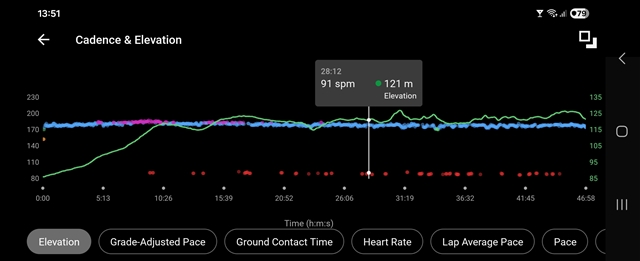
Hi to everyone, in my recent runs, I noticed that my watch calculates cadence incorrectly. This happens with both the latest firmware and the previous one. Almost half of the run is recorded with only half of the actual cadence, which can be seen as red dots in the cadence graph.  The watch is worn tightly on my wrist.

I noticed this during my last runs by chance when I looked at the watch — at that moment, the display showed only half of the cadence value, for example 87. When I slightly raised my arm while running and looked at the watch for about 5 seconds, the number suddenly jumped to around 175. This happened several times during the run.

I am attaching screenshots from the last two runs.

FR 955 Solar with latest 27.09 fw.

This is today’s run. The initial gaps are walking during the intervals. However, the issue can also be noticed at the beginning and at the end of the run.
This is today’s run. The initial gaps are walking during the intervals. However, the issue can also be noticed at the beginning and at the end of the run.

Thanks for any advice.

Martin

  • I will keep updating this thread until someone from Garmin notices it...

    This was my run on Friday. Whenever my arm is in a normal running position, the cadence values are incorrect — those are the red dots. Whenever I rotate my wrist and look at the watch, the cadence is calculated correctly. On my other wrist I was wearing an Apple Watch 6, which measured cadence without any issues. Garmin, please do something about this.

  • Whenever I rotate my wrist and look at the watch, the cadence is calculated correctly.

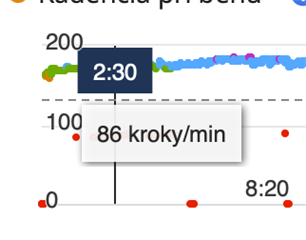
    My experience with this bug is that it is more of a randomised timebased such than depending on wrist position. Though, your experience could surely be evidence of another variant of the bug. However, the whole bug-concept is far, far from a new one. My FR955 (non-solar) still is at FW 19.18 and looking at a random Run session from the summer of 2025 (last time I regularly used the watch), the below screenshot paints a typical picture. Observe that the watch is 'clean', i.e. not attached to any external sensors, HR, Stryd or others:

    I believe the cadence 'half-life' bug stems from the very beginning of Garmin exercise watches, when cadence indeed was expressed as in cycling - that is, by a RPM value (Revolutions per minute). Later on Garmin did an 'easy' adjustment in the algorithms and doubled the value to keep up with a more modern sense of running cadence. But... bugs happened and now probably is so deeply entrenched that they've given up on finding/fixing them.

    Fun fact: Some months ago I had my mind set on gifting an old FR630 (from 2015) to an (even) older man with knee problems. My idea was to teach him how to run slowly with a high cadence and short steps. So I set the watch up in a 'foolproof' state and a data screen showing only Lap Pace and Cadence. Then I took it for a test run... Some 10 minutes in, the halving cadense bug reared its ugly head! I tried both with and without the built-in metronome engaged (and with/without vibrations). That was really frustrating, and hilarious, looking down at the same bug on a FR630 as on the FR955.

    By the way, the Suunto Race S I use nowadays is still rooted in the old cycling paradigm; running cadence is expressed as RPM on the watch. The Suunto App - afterwards - shows both true runners cadence and RPM for the exercise.

  • Thanks for the insight. I hadn’t noticed this bug before; I’ll need to look back at my runs from one-two years ago. A friend of mine has a Garmin Enduro 2, and I don’t see this issue in his data. So now I’m not sure whether this is something limited only to the 955 models...what do you think?

  • I can't really remember... I had the Fenix 5X from 2017 and when writing a complex CIQ data field for it we had to specifically do a 2*(cadence) to get the right value. But during that time I also mostly ran with an external HR monitor which probably sent Cadense as well as the other stuff, like Ground Contact Time etc.

    One thing I can see in the FR955 graphs is that the inbuilt GCT etc also show bad data points in tandem with the Cadence halving.

  • I believe the cadence 'half-life' bug stems from the very beginning of Garmin exercise watches, when cadence indeed was expressed as in cycling - that is, by a RPM value (Revolutions per minute). Later on Garmin did an 'easy' adjustment in the algorithms and doubled the value to keep up with a more modern sense of running cadence. But... bugs happened and now probably is so deeply entrenched that they've given up on finding/fixing them.

    It says a lot that Garmin cannot fix pervasive, recurring bugs apparently stemming from their own design decisions 20 years ago, when they have *complete* control over all the relevant hardware and software: the watches, the FIT file format, and Garmin Connect.

    At least based on fitfileviewer.com and activity FIT files created by my own FR955, it seems that cadence is still *written* to the FIT file in terms of rpm / strides per minute ["half cadence"] as opposed to steps per minute [which is what we expect to see on the watch and in Connect]. If that's the case, then maybe the bug is the value is sometimes halved *again* when it shouldn't be.

    e.g. Say I run 180 spm and say this is usually recorded as 90 rpm. Maybe sometimes it's actually recorded as 45 rpm because there's an inappropriate extra halving.

    To be clear, I don't think there's anything wrong with writing half running cadence to the FIT file, as long as Connect [and 3rd party sites] know that they have to double the number when displaying it for running activities, which I think they do. In fact I think it's better that way, given that the same cadence field is used for cycling, and it's better to have consistent units. And ofc there's always backwards compatibility with the super old files to think about.

    Obviously writing 1/4 cadence would be wrong (if that's what's actually happening).

    Ofc they could've done things differently: they could've created a new running cadence field with the "correct" modern units (steps per minute) when they switched over, but it seems they didn't want to do that then, and there's no way they'll do it now.

    Speaking of 2 definitions of running cadence and "strides", I saw at least one running article where both definitions were used at the same time. The author referred to running cadence as strides per minute, but then offered 2 separate definitions of "strides": a stride is 1 step for one foot, or a stride is 1 step each for both feet [this is Garmin's definition, as the internal unit of "half" running cadence is strides per minute, which is equivalent to rpm for Garmin].

  • One thing I can see in the FR955 graphs is that the inbuilt GCT etc also show bad data points in tandem with the Cadence halving.

    Hmm maybe something else is going on then? (Besides the "normal" half cadence bug that people have complained about for years. Or maybe this *is* the normal half cadence bug?)

  • Obviously writing 1/4 cadence would be wrong (if that's what's actually happening).

    In my mind I have always seen it as more of a timing bug where the calculation gets interrupted before having made the last 2* update of the RPM value. From memory of looking at the .fit files back then, Garmin also introduced a 'fractional' cadence field (of 0.5) so as to be able to show e.g. 175 spm on the watches (87.5 RPM. My Suunto only displays 87 or 88 for that cadence, thank the deities :-) So there are a few operations having to be done, which might be time-critical but not properly locked.

    But, only Garmin know... Would be interesting to know what their 'Running Dynamics' capable HR straps send nowadays for Cadence; RPM or SPM. If the latter, then that indeed opens up the possibility of making a division error before writing to the .fit file.

    Edit: But in my case, as the example screenshot shows, running completely without external sensors, I'm inclined to go with a multiplication error due to timing.

    Edit of the edit: But you might be right... 1/4 of the correct value would perhaps show up as 1/2 of the value in the Connect graph! I'd have to examine the .fit file to be sure. Don't know if I have the stamina to go all the way with that (only using a mobile phone nowadays).

    As for the definition of running cadence today, yes it still is a mixed bag of confusion amongst writers, old-timers (coaches, athletes) and tech companies. The first running watch I bought in 2013 (not knowing anything about the field) was an outdated non-GPS Garmin FR70 (released 2011-2012) with footpod and HR strap. That watch showed cadence as RPM. Then I started to read articles, which already had mostly switched to SPM in their recommendations for a good cadence spread to minimise injuries. Doing 2* maths during runs was not a fun exercise for a novice...

  • Or maybe this *is* the normal half cadence bug?

    Yes, I believe so. All the built-in 'Running Dynamics' data on a FR955 probably use the basic Cadence points in their own computations.

  • As for the definition of running cadence today, yes it still is a mixed bag of confusion

    I don't think writers are great with numbers and math in general [lots of journalists would brag about sucking at math, but nobody ever brags about being illiterate].

    And I don't think English [and natural language in general] is well-suited towards expressing simple mathematical concepts anyway.

    Pet peeve #1: "X% more"

    - 100% more is always understood as "multiply by two" [i.e. take the original value and add 100% of the original value]

    - 500% more and 1000% more are usually understood as "multiply by 5 / 10" unless maybe the writer is a math nerd. For consistency with 100% more, they should mean multiply by 6 / 11, but most people would not understand them that way.

    - 200% more is probably the most illustrative example. If you say it means multiply by 2, then "200% more" means the same thing as "100% more" which is ridiculous. If you say it means multiply by 3, then again people won't understand why.

    Pet peeve #2: "X is 10% more than Y, therefore Y is 10% less than X".

    - "X is 10% more than Y, therefore Y is 10% less than X". No, that's not how percentages work. It just so happens that 10% is "close enough" for that sentence to be almost true. But try it with any other percentage, and it's obviously wrong: "X is 100% more than Y, therefore Y is 100% less than X".
    It only works if you think "X% less" somehow inversely relates to X as opposed to directly relating to Y, but that's not logical at all.
    I've talked to engineers who literally said something like "X is 10% faster than Y, so Y is 10% slower than X". When I pointed out that's not how percentages work, he said "you know what I meant".

    Right but if *you* knew what you meant and you cared to communicate precisely, you wouldn't have said that. You could have said "Y is 90% as fast as X", but I guess that doesn't have the same ring to it.

    - I saw a *finance blogger* write that she always negotiates a 30% pay increase when she gets hired, which means everyone else makes 30% less than her. No, that's not how percentages work, you expect people to take your advice on money after that?

    - I once went to a mom-and-pop hobby store that was having a "no sales tax" sale. To get rid of the 13% tax (which they were still obligated to add by law), they input "[item total] - 13%" on their cash register (i.e. (1.0 - 0.13 (item total)) = 0.87 * [item total]), which ofc means that that I got a slight better deal than I was supposed to. The correct calculation would be to divide by 1.13: [item total] / 1.13 = 0.885 * item total which is clearly more than 0.87 * item total. This is an example where not understanding percentages actually means someone lost money.

    People aren't good with simple math, and natural language isn't good at expressing simple math concepts like percentages.

    Doing 2* maths during runs was not a fun exercise for a novice...

    Funnily enough I created a whole Excel-type CIQ data field for runners who wanted to be able to input a formula like "cadence / 2", because they preferred to see running cadence in RPM.

    I guess now I know why. (I started running at a time when everyone used steps per minute).

  • To get back on topic, I think running cadence as steps per minutes is more intuitive (although this probably depends on which definition you were first exposed to), and it's more practical if you ever measure it manually (i.e. by counting steps yourself).

    Same thing could be said of running pace (in minutes and seconds per km or minutes and seconds per mile). It's very useful if you ever need to do certain calculations in your head.

    But I've seen ppl argue for running speed to be used in Strava, saying that pace is outdated because we have running watches now and don't need to do any calculations in our head. According to them it's only people who are used to running without a sports watch / smartwatch who need to use pace for running. (I don't really agree, but that's what they say.)

    I guess you could say the same for cadence: if your watch is always measuring cadence for you, then supposedly the units don't matter except in regards to what people are used to.

    I will say even though I wear a watch on every run, I still see the value of running pace (as opposed to speed) and cadence in steps per minute (as opposed to steps per minutes divided by 2). While I never calculate or measure cadence manually, I do think steps per minute is more intuitive. And although I suppose speed vs pace is only a matter of what you're used to, pace is still much more useful for runners because sometimes there are certain calculations / estimates that you wanna do in your head. e.g. "how fast do I have to go in the next km split to hit my workout/race target?" Yeah, there are features in your watch that can do that for you, but you're not always gonna use them, and they won't be perfect for every situation.