This discussion has been locked.
You can no longer post new replies to this discussion. If you have a question you can start a new discussion

Transferring fixed FIT file back to watch

Former Member
Former Member

Hello all,

Just after finishing a swim yesterday, my watch restarted and didn't correctly save the activity.. It then showed up on my watch as an "invalid" entry with 0 distance -- though when viewing the details, everything was there. This is the first time happening to me, though looking around here it seems somewhat common. Following the advice I've seen here, I took a go at fixing the corrupted FIT file using Fit File Tools. I then imported the corrected file to Garmin Connect, and it all seems to be okay.

Wondering if there's a way to get that same activity back onto my watch now, so that it is accounted for in training load, etc? Though it appears in Garmin Connect, syncing my device doesn't seem to carry the new activity file over to the watch.

Any advice? Does that mean I didn't correctly fix the FIT file? Something else I need to do?

Thanks for your help!

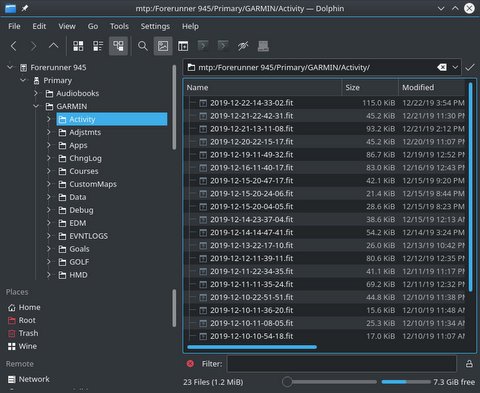
  • Hi! You can do it manually using a computer. Just connect the watch to it, and go to this directory with your file explorer (I am using a Linux computer, maybe the initial part of this URL is different if you use Windows or Mac, but the destination directory will be the same):  

    mtp:/Forerunner 945/Primary/GARMIN/Activity/

    Note: I am assuming that your connection type is USB MTP (not USB Garmin) because this type is the default on FR-945. 


    Delete the old/corrupted .fit file from the Activity directory and copy the new one on it with the same name (on Linux I can't replace a file without removing it first, maybe it's the same on Windows/Mac). 

    After the copy, just disconnect the watch and check if you can can see your training in the history section. There are other files that could be on sync with all activities like the records (mtp:/Forerunner 945/Primary/GARMIN/Records/Records.fit) or summaries (mtp:/Forerunner 945/Primary/GARMIN/SUMMARY/*.fit). I think that those files are updated/generated just after an activity is saved so it's quite possible that, for example, if you have a new record in your repaired activity, the record won't be reflected in the record section of your watch after the fixed file was copied.

  • Former Member
    0 Former Member in reply to BrightScully

    Fantastic - super helpful. Thank you BrightScully for the guidance!