How do I set how long the activity is available for viewing?

For years while my 735 xt and Samsung Galaxy 23  the activity (always Hiking) was available for viewing for quite a long time. @4 hours as I recall. I now have a new Galaxy S25 FE and the activity can only be viewed during the activity.

How can I reset it?

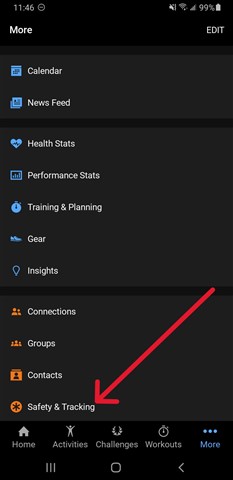
  • In Garmin Connect Mobile, go to More > Safety & Tracking > LiveTrack > Sharing Settings, then toggle on Extend Session Visibility.

  • Thanks, but this doesn't work for me.  First problem is on my phone I see Garmin Connect, not Garmin Connect Mobile. If I go ahead with Garmin Connect More, I don't see Safety & Tracking. 

  • My apologies. By Garmin Connect Mobile, I’m referring to the app version used on a mobile device, such as an iPhone, Android phone, or tablet, to distinguish it from the web version, known as Garmin Connect Web.

    I don't see Safety & Tracking. 

    After rereading your post, I noticed it’s about the 735XT, not the Forerunner 745 mentioned in the forum title. Since the 735XT doesn’t include Safety & Tracking features, that option won’t appear in the app. I also saw in another post that you now have a Forerunner 165. If it’s paired properly with the Connect app, Safety & Tracking should be visible. The Forerunner 165 supports these features, so the menu should show up as soon as it’s paired and fully set up. 

    If that menu isn’t there, you can also check under More > Live Track > Sharing Settings. That's where it exists while I have my Forerunner 920XT paired with my android tablet.

  • I am referring to Garmin Connect app on my cellphone. I don't recall even knowing there was Garmin Connect Mobile.

    Regarding "More > Live Track > Sharing Settings", I don't see that on my phone. There is a Settings "gear" icon.  Clicking on that has several choices, none of which are Livetrack> Sharing.

    Regarding my Forerunner 165, it was a gift. I tried to use it but gave up. First, I'm a "fat finger" guy making the "touch screen" user interface a challenge. On top of that, virtually every touch brings up a request for the 4-digit pin code. And on top of that, sometimes one cannot simply touch 4 digits in the wanted order. Instead, each touch simply moves to the adjacent position in the grid. So if the PIN is 91 and the current position is the wanted digit is 9 you have to click 8 times to get there! I don't know what causes this obtuse to arise, but it causes me to just give up and start my hike! On top of these annoyances, 95 % of the functionality of the device is meaningless to an old grandpa like me who has never been a bicycle racer, competitive swimmer, or triathlon competitor. So, I'm either going to give it back to my son-in-law or sell it on eBay.

    Thanks for your interest in my problems.

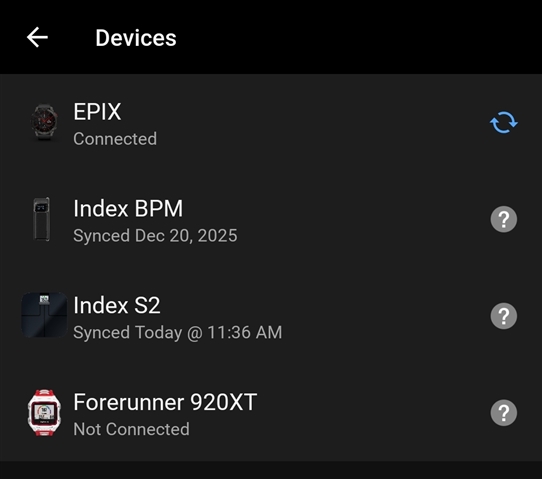
  • Which device is paired with the Garmin Connect app on your phone? That will determine where the LiveTrack settings are located.

    In the app go to More > Garmin Devices. Send a screenshot of what you see if possible.

  • It says "Forerunner 735XT" Connected. I don't remember how to do a screen shot on my Samsung S25 phone

  • Also, since it performed pretty well on my 2 1/2 mile walk this morning. I'd say it was indeed "connected." When I say "pretty well" I mean I could see my track on my phone and on my Windows desktop when I got home. My wife also saw it. Only 2 things were disappointing. One, I wasn't able to see mile Live Track while walking, In the good old days I could see it on a map. Also, if there were landscape features like ponds, they would show also. 

    Another shortcoming is I used to be able to have the Live Track sent to participants preselected from phone Contacts. Now if I really want someone to watch my Live Track I have to use the Share feature. 

  • Just to clarify, I'm resolved to use my 735XT.

  • This was my hike this morning. I went through the usual tasks of starting Live Tack in Garmin Connect the Clicking Hike on the phone. I then clicked on the Share icon on the phone and sent it a few family members and a hiking buddy. This was easy since they were all in my phone Contacts. I also added myself. I could immediately see my track on a map. Here's a link to it https://gar.mn/XaQX6N36pY .  While I'm mildly elated, I still want to get back to the point where my LiveTrack gets sent to recipients preselected from the Contacts on my phone... i.e., without doing the Share mechanism.

    Needless to say, I'm feeling pretty good about this since I am using my old Garmin 735XT watch that I was about to cast out as broken.

    BTW, this watch was given to be about 10-11 years ago by a hiking buddy who couldn't figure out how to use it. He bought an Apple watch. 

    Of possible interest to you is that I've owned lots of hiking tracking devices over the year. My first was a FindMeSPOT I used when I was doing a lot or challenging hikes & backpacking in the western National Parks... Yosemite, Grand Canion etc. Later I dumped the  FindMeSPOT 'cuz it cost over $100 a year for the service contract. My First Garmin was one of those big things... about the size of a small camera. No phone involved. At some point in that era, Garmin switched the OS sofware. I'll say they initially used software from a major player.. Microsoft perhaps. Then they programmed their own. It was a disaster! It kept crashing and rebooting etc. It came to be known as a Big Golden Bugbox.. itwas huge, expensive, and full of bugs.

    Hope I'm not boring you. 

  • Still puzzled by what's going on. Today I didn't use Sharing, instead relying on naming myself as a Recipient preselected  from Phone Contacts.  My wife texted me saying she could see my Live Track. However, I couldn't see my Live Track while I proceeded with my walk. When I got home, I could see it.

    Any idea what's causing this?