Incorrect GPS starting point causing shifted route

Hi everyone,

I bought a Garmin Forerunner 265 last December to replace the running app on my smartphone.

I always run the same route. The distance is usually very stable, and the GPS track is normally accurate and matches the real path. If needed, my runs can be checked on my Strava account.

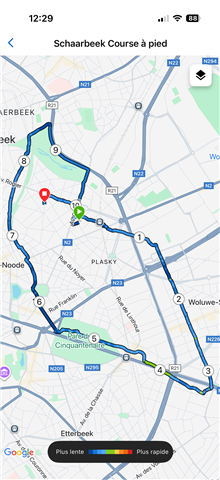
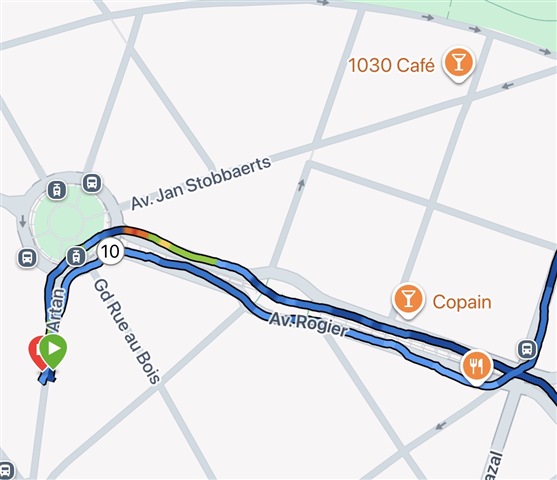
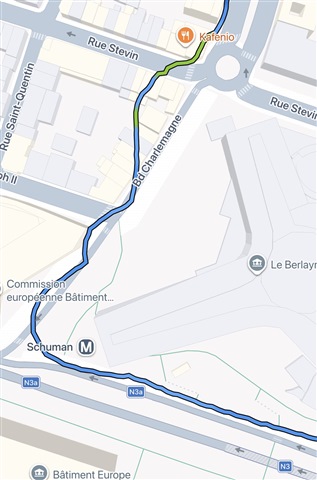
This morning, for the first time, the starting GPS position was wrong. It seems the watch detected an incorrect starting point, and then shifted the whole route to match it. Because of this, the activity shows me running through streets I did not take.

As a result, the distance and the time are not accurate for this run.

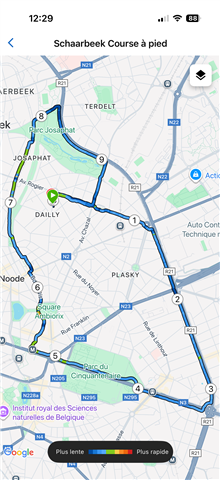
I have attached two images :

  • a first one, from a normal run on this route
  • a second one, from this morning’s problematic run

I’m looking for help to understand why this happened and how I can avoid it in the future.

Thanks a lot for your help.
  • Interesting. Could be an unavoidable result of challenging conditions (tall buildings?) but that wouldn't explain why you only see the problem intermittently.

    I have had situations where I waited for a shorter time than usual and I thought my GPS signal was stable, but I still had issues at the start of the run (too much distance, unrealistically fast pace). I can only assume that in those cases, I needed to wait longer.

    As FR265 does not have true mapping (just breadcrumb trails), it's harder to use the watch to verify your actual position. (I can do so just by comparing my position on the map page with my irl position.)

    What you can do is save a location to your watch at the start/end location of your run when you are sure you have a good GPS fix. Maybe one good opportunity to do this would be at the very end of a run. The next time you go for a run, look at the "map" page and make sure that the watch shows that you are standing at the correct location, before you press the start button.

    You could also use google maps to get the coordinates of your start location and save the location on your watch by entering the coordinates.

  • To add to this discussion, I went for a run and something similar to what the OP described happened to me (not for the first time).

    - I waited for the green GPS ring

    - I waited for my pace to settle to 0:00

    But despite waiting about 2 minutes (much longer than normal), my start position on the map was incorrect. Since I didn't want to wait any longer, I just started the timer and started running. Ofc my stats and GPS track near the beginning of the run were bad.

    This does happen to me every now and then - no matter how long I wait (while standing still) at the beginning of a run, sometimes my start position is wrong, and GPS never "catches up" until I start running.

    Another point of nuance in this entire discussion is the idea that unavoidable GPS drift occurs when you're standing still, which is why some people recommend pausing your watch whenever you stop running.

    So I guess the ultimate solution would be to:

    - wait for the green GPS ring

    - wait for pace to settle to 0:00

    - wait for start location to be correct

    But if pace / start location is still wrong after a few minutes, I guess you could start running (without starting the timer), and only start the timer when you feel like you have a true GPS fix. (It would be harder to tell in your case, without a true map.)

    Even I'm not willing to start running without starting the timer though, for various reasons. 

    Another solution could be to just wait for as long as practical, and start running. If you still have bad data at the beginning of your run, you can always crop it. (I do this sometimes.)

  • Thanks for getting back to me !

    I live in the city, surrounded by houses and a few low-rise buildings, so it’s definitely not a skyscraper-type environment.

    When you mention the "map page", what exactly do you mean ? Where can I find it on my Garmin Forerunner 265 ?

  • When you mention the "map page", what exactly do you mean ? Where can I find it on my Garmin Forerunner 265 ?

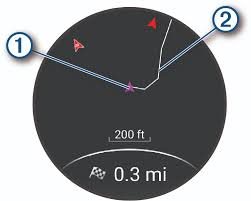
    It's an optional data page that you can add to your running activity which shows a breadcrumb trail:

    https://www8.garmin.com/manuals/webhelp/GUID-F41EAFB3-6CC9-42DE-9C6C-9E358DBB0671/EN-US/GUID-A877CC78-A0E1-4836-84E2-6A7366C8F705.html 

    It's also displayed by default when you use the navigation feature.

    Like I said, it's not as useful on FR265 for this situation because FR265 doesn't have true maps (with place names, streets, etc), but only a breadcrumb trail. It does show your current position and any nearby saved locations.

    So if you save a known location (like your home / usual start/end point for a run), you can see whether the watch correctly places you close to that location (indicating a good fix), or incorrectly places you a little too far away.

    Like I said, yesterday I saw that the map showed me as too far away from my actual position, but I started running anyway.

    An example of the map page:

    https://www8.garmin.com/manuals/webhelp/GUID-F41EAFB3-6CC9-42DE-9C6C-9E358DBB0671/EN-US/GUID-CF774818-0C30-4992-962C-DDA9EA00E8C6.html 

  • I live in the city, surrounded by houses and a few low-rise buildings, so it’s definitely not a skyscraper-type environment.

    Yeah, yesterday when I had a similar problem to you, I purposely crossed the street so I could stand next to a parking lot (as opposed to tall buildings). It actually helped me get a faster fix, but I still had GPS issues (bad starting position).

    So I think tall buildings can make the problem worse, but just because you don't have tall buildings, doesn't mean you won't have the problem.

    I'm not really sure how to avoid it completely. I mean it's possible that if I had waited 5 or 10 minutes the watch would've eventually showed the right starting position, but ofc I don't want to do that.

    Maybe the real solution would've been to start running without starting the timer (after waiting for as long as reasonably possible), then only start the timer when my position was better. (Ofc this would be harder for you, without having a real maps.)

    I'm just thinking that if GPS drift is an issue while standing still, maybe the same can be said of having a slightly incorrect position? Maybe once you have a good fix, motion actually fixes these little problems?

    After all, we both see that only the start of the run is affected in these situations.

    Ofc, maybe the best of both worlds is to just start the timer at the start of the run anyway, but crop the start of the activity if you have bad data. If you can't completely control / prevent the bad data, you can get rid of it after the fact.

    On the flip side, if it's something important like a race or even an interval workout where you don't want to crop data, then the best solution is probably just to get a fix well in advance. When I run races, I make sure to get a fix at least 15 minutes before the race starts. (I enable the extended power save timeout activity setting so the activity doesn't automatically time out if I forget to press buttons to keep it alive.)