Incorrect GPS starting point causing shifted route

Hi everyone,

I bought a Garmin Forerunner 265 last December to replace the running app on my smartphone.

I always run the same route. The distance is usually very stable, and the GPS track is normally accurate and matches the real path. If needed, my runs can be checked on my Strava account.

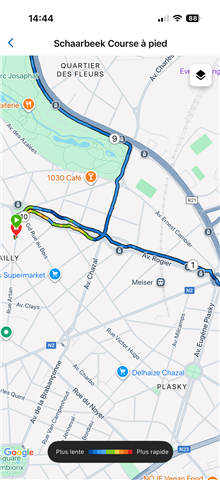
This morning, for the first time, the starting GPS position was wrong. It seems the watch detected an incorrect starting point, and then shifted the whole route to match it. Because of this, the activity shows me running through streets I did not take.

As a result, the distance and the time are not accurate for this run.

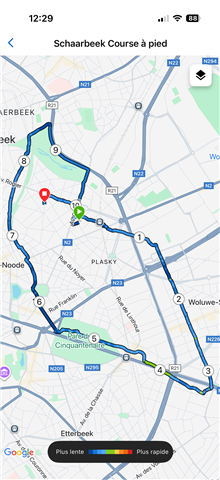
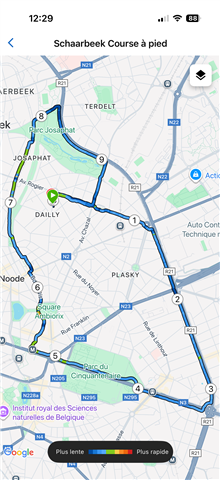
I have attached two images :

  • a first one, from a normal run on this route
  • a second one, from this morning’s problematic run

I’m looking for help to understand why this happened and how I can avoid it in the future.

Thanks a lot for your help.
  • Here is a great article that will walk you through GPS accuracy, along with tips to improve the readings: Top FAQs About GPS Distance, Speed, and Pace Accuracy With Garmin Devices

  • What no one ever tells you is that the green Garmin GPS ring is (sometimes) a lie. It usually appears very quickly when you're outdoors, but it doesn't always mean that you have a solid GPS fix.

    I can tell that the watch doesn't truly have a solid GPS fix because I'm standing still, but:

    - my location on the map screen is wrong

    - the map screen shows that I'm moving

    - the instant pace data field shows a pace that's changing wildly (and sometimes shows me running at impossible paces for a few seconds)

    This especially tends to happen when I start my run near tall buildings (which is the majority of my runs, since I live in a high-rise apartment which is located near a lot of other apartment buildings).

    What I almost always do is wait several seconds after the GPS ring for my instant pace to settle down to 0:00. Usually this takes less than 30 seconds, but in the worst cases, I've had to wait a couple of minutes. When I do this, it avoids the kind of problem that you posted about.

    If I'm in a hurry and I don't wait, I have similar problems: my start position is wrong, the GPS track near the start is wrong, and my stats near the beginning of the run are wrong (incorrect distance, unrealistic pace). In this case, sometimes I'll crop the start of the run using Connect to get rid of the bad data (which also fixes the totals/averages).

  • It might help to add the satellites data screen so you can check before starting? Not sure if it shows how many are connected, signal quality, etc.

  • I have a Forerunner 955, and to my knowledge it doesn't have a satellites data screen. I don't know of any Forerunners which have one. My point still stands regardless, as every Forerunner I've had since FR935 (2017) has had the same problem. 

    Besides, it's enough for me to wait for my pace to settle to 0:00, and for my location on the map to be correct (and not show me as moving while I'm standing still).

    For example if I'm standing still but my instant pace says something impossible like 1:45, I know that I don't have a true GPS fix regardless of the green ring.

    I've also seen other runners have the same problem, especially if they start running around tall buildings. Most ppl will wait for the green ring (since it usually appears very quickly), but almost nobody will bother to check if their pace is changing wildly, especially since they may have wait up to 2 additional minutes.

  • You should have a built-in data field called GPS that you could add to a custom data screen that shows the signal strength. But waiting will work too Slight smile

  • You should have a built-in data field called GPS that you could add to a custom data screen that shows the signal strength

    That is no different than looking at the GPS ring.

    When the GPS ring is green, that data field will show full bars for GPS. Same goes if I write a CIQ app which shows the numerical value of the GPS fix (which is an integer from 0 to 5) - it will show 5 when GPS ring is green, but that doesn't mean I have a good lock.

    And again, I cannot emphasize this enough, even when the watch claims that you have full bars / green ring / good GPS, it's possible that:

    - your location on the map is wrong

    - the watch shows you as moving when you are standing still, based on the instant pace field and the map

    - the watch shows you as moving impossibly fast

    - if you start the activity at this point (while the watch shows you as moving when you're standing still and in the wrong location), the GPS track and distance/pace stats for the first part of your activity will be wrong, just as in the OP).

    I live in a high-rise apartment building complex (lots of tall buildings), so I see this behaviour almost every day. I get a green ring, but I have to wait longer for a real fix.

    Not to state the obvious, but Garmin wants to show a solid GPS lock asap, bc users don't like to wait for GPS. But maybe it should be clear by now that Garmin is showing that solid lock a little too prematurely.

    Iirc, Garmin watches from before FR935-ish (2017) would take forever to get a GPS lock. While this may have reflected older, worse tech where it actually did take longer to get a lock, at least when you got a lock it was more or less guaranteed to be "real".

    Iow, newer Garmin watches probably do get a GPS lock faster than before. But I think they *also* lie to a certain extent about how fast they get that lock (i.e. they show a solid lock before they really have one).

    It's not necessarily an intentional lie, but all I can say is that the practical result is that I don't know if I have a good GPS lock when I see the green GPS ring. The green GPS ring is necessary but not sufficient for a good lock.

  • Ah, ok, thanks. I'll keep it in mind for when I start activities. I live in suburbs, so no tall buildings nearby.

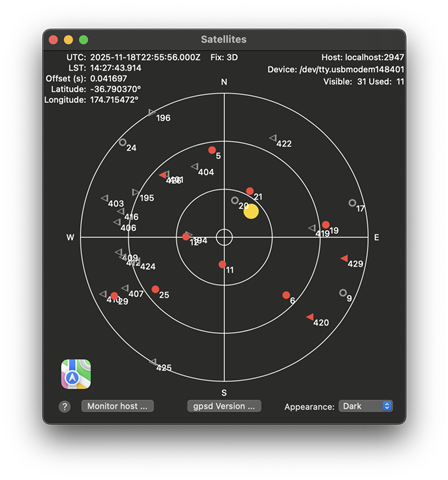
    Pity you can't see a graphic of the satellites like this, would be handy.


  • Ah, ok, thanks. I'll keep it in mind for when I start activities. I live in suburbs, so no tall buildings nearby.

    Yeah it's def more noticeable if there's tall buildings nearby.

  • Pity you can't see a graphic of the satellites like this, would be handy.

    I don't think that would help the average user tho.

    I think what would help is if the green ring did not prematurely appear on a consistent basis under certain conditions. Either Garmin hasn't bothered to make it as accurate as possible, or they don't want to (because then users would complain that it takes too long to get a fix).

    It's also possible that they don't test around tall buildings / challenging conditions. Any tall buildings in Olathe, Kansas?

  • Hi everyone,

    Small update from my side, as the issue happened again today, but in a less severe way.

    The GPS signal took longer than usual to be acquired, but I waited until it turned green and stayed stable before starting the run.

    However, during the first part of the run, the track was shifted, as if I was running on the other side of the avenue. Also, the GPS trace does not follow the street properly and sometimes goes straight through city blocks, instead of staying on the roads.

    After the first part, the track became more accurate, but the beginning is still clearly incorrect.