Feature request: Disable Sleep Schedule

This has been asked before and I'll ask it again because Garmin isn't listening. I'm a shift worker and I have no regular sleep schedule. The current sleep schedule options don't work for me (and clearly many other users). 

Please give us the option to disable the sleep schedule and manually put the device in and out of sleep mode as it suits us.

  • This would be amazing even for someone like me who doesnt work shifts, but does find that the sleep detection doesnt work for me for whatever reason. Be nice to either tell the watch that I wasnt asleep after it logs it as sleep, or like you say, just manually put it into sleep mode

  • I am a shift worker.

    I have been adjusting the sleep schedule regularly in advance (before sleep) for the last few years.

    Sleep tracking is all good actually.

  • That's great for you, but sadly sleep tracking doesn't work for everyone. I've had issues across different watches and Garmin just basically said "it cant work for everyone" Upside down

  • You mentioned you are not a shift worker so I assume you have a regular sleep schedule ie 11pm to 7am.

    Garmin does not detect your sleep during this period ?

  • Sometimes i have regular sleep patterns, sometimes im unable to sleep at that time, but garmin just uses those times as a way to start and stop the sleep mode, rather than it actually detecting sleep. That is what OP and I are saying, the timer works, but the detection doesnt, so having an option to manually start a sleep 'activity' would be useful because currently there doesnt seem to be a way to tell the watch you are awake, even if you walk about a bit.

    I dont think anyone is saying we should only have manual mode, but having it as an extra on top of detection modes that work for some people would suit everyone a bit more :) 

  • >but garmin just uses those times as a way to start and stop the sleep mode, rather than it actually detecting sleep.

    This is not true. If you set sleep schedule at 11pm to 7am, the watch face will switch to sleep mode but actual sleep will not register exactly the same time.

    "Sleep times and sleep stages are identified by using a combination of heart rate, heart rate variability (HRV) and body movement data."

    If you don't believe me, try walk or move from 10:30pm to 1am. Then go to sleep afterwards. I am very sure your sleep will register from 1am.

    When you say the Garmin sleep is inaccurate, I would expect you to at least verify with 2 other trackers to confirm. Did you try ?

    I think most people are facing inaccuracy in a situation whereby the person starts laying down on bed at 10pm while reading a book. Under this scenario, Garmin registers sleep from 10pm. This is understandable because your heart rate is low and you are very still, so Garmin probably thought you are already asleep.

  • I support this request. I am not a shift worker and still this automatic sleep mode schedule is annoying. I just want to manually start and stop the sleep mode.

    The workaround is use is to set the schedule to 1am until  9am. I normally go to sleep before 1am and I normally wake up before 9am, so in this way I can manually override the start and the stop of the sleep mode. But it would be great if I could just disable the schedule all together.

  • How do you set the watch manually just before sleep? I work some nights 730p-8a, go to sleep by 10a and wake for 6p. Then I'll work weekends 1130p to 12 noon.....Garmin 265 just has a hard time being able to set schedules like this. I would be amenable to just setting it right before sleep. Can you walk me through it?

  • I think this just means turning off the sleep mode. I'm not sure how helpful it is, but i turn this off if i need to use the watch normally (as it changes the screens a bit in sleep mode). All it really seems to do is turn it off temporarily, or delays the sleep mode. But yeah, it SEEMS to help it track my sleep a tiny fraction better haha. 

    For me, it is on the power/screen on button (hold top left button), then turn off "sleep mode".

    If it isn't there:

    >Hold the middle left button

    >go into the settings (the cog)

    >appearance

    >controls

    >"Add"

    >select "sleep mode" :) 

    Sorry if that was too detailed, just wanted to make sure it all made sense to anyone who might see it, at all levels of technological ability :) 

  • I have 3 night shift patterns.

    Mon, Tue, Wed, Thur

    Wed, Thur, Fri, Sat

    Mon, Tues, Fri, Sat

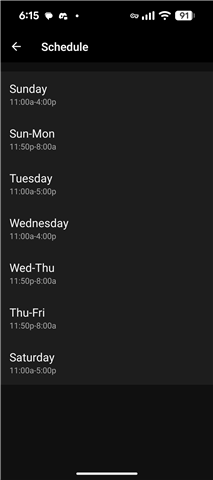
    Here I attach my sleep schedule for the last pattern. Configured through Garmin Connect.

    I just noted the Wednesday day sleep did not trigger by the watch so no sleep score for just this special day.

    I probably need to schedule for Thursday from 12am to 8am to fix the Wednesday sleep.

    All the other days on the other shift patterns can record sleep score. Just needs to configure the schedule in advance.