Problem with elevation Forerunner 265s

I have already read all problem related topics in Forum, bu to me it seems that my problem is a bit different. 

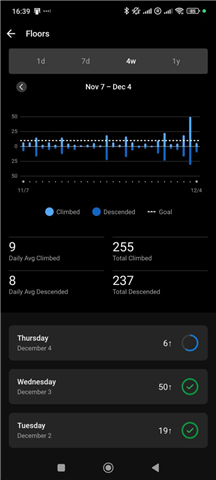
My fFR265s constantly adds elevation to my activities, also it gives me 2-3x 10 flights of stair climbed in a day, when  I'm nowhere near that. 

Example:

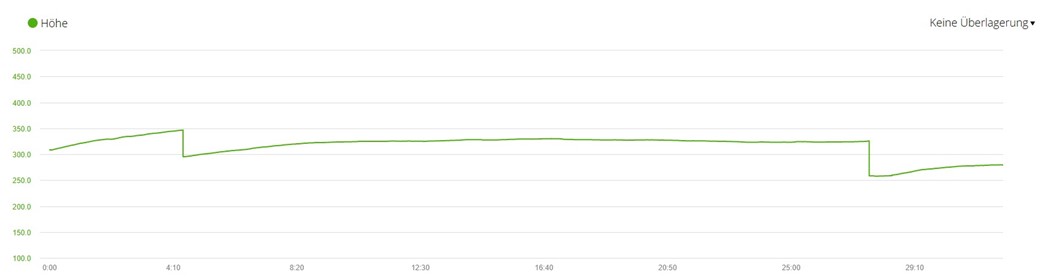
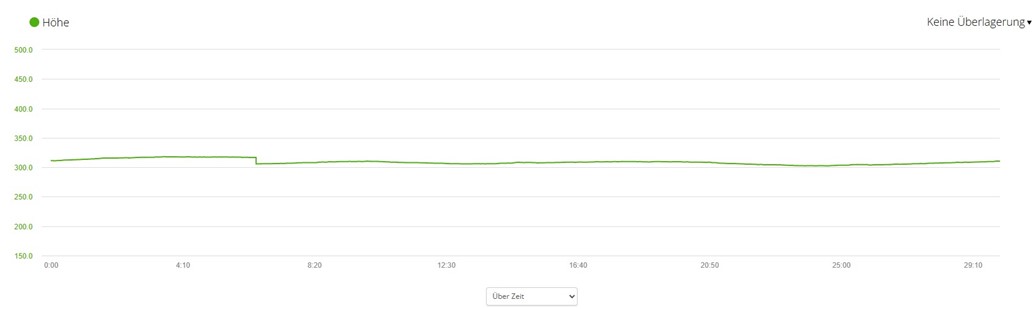
This was simple bike ride, same in both directions. FR gives me 350+ m of elevation, when in reality its closer to 100 (as seen in DEM corrected elevation graph)

Recorded graph:

DEM Correvted graph:

No wind, no change in weather, no water. 

Also, I would go for a run on completely flat circular track and it would give me 70-120m of elevation, which does not make sense. 

This would happen with every activity.

What I already tried:

-Resetting

-Cleaning the barometer port

-Calibrating before every activity

-changing Altimeter settings from "auto" to "Altimeter only" to "barometer only"

No luck.

Is it hardware of software problem?

  • i have the same issue. routes that are with 50m of total ascention are now reported as 100m. i lay on my bad and get stairs alerts.
    looking at the data, it looks like the barometer is inaccurate and drifts. is it a hardware problem or a software one? 
    did the same step as OP and nothing changed

  • I have this problem too. I don't know which software update caused this but it's a quite new problem for me (I'm currently on Version 26.08).  What I also noticed is that almost everytime when I pause my current running activity the altitude starts to decline. The longer the break, the greater the decline. 

    The first screenshot below shows an elevation profile of a basically flat course from the weekend (parkrun). The second screenshot is the same course months ago.


  • I've got wrong "floors climbed" since last FW update 26.08: 50 floors when I didn't use staircase at all thru the day, but I've walked ~10k steps that day. 

  • Same problem here, since 26.08. Some days are worse than others. Today was especially bad. It's showing 68 floors climbed, when in reality I've climbed fewer than 5.

  • Just sent mine back for an exchange, the elevation from the barometer sensor was reading 42000 ft, i'm at 1050 ft.  Every singe Garmin that has a barometer sensor has gone bad for me,  Unlike most Garmin users, I use mine for swimming and water will eventually get into the sensor hole and ruin it.  Heck, I won't even swim with my 965 because I don't want to ruin it, i've already replaced it once.  Doesn't matter if it's a $300 watch or a $1200 watch, if you swim a lot the sensor will eventually go bad.

  • There's a very simple solution to this problem and that's to allow users to use Digital Elevation Model (DEM) Data by default. And they used to allow users to do just that. If anyone knows how to rollback their watch to get this functionality back please let us know.

  • Seriously, if a watch has an barometer, isn't it more logical (and more accurate) to use it? 

    My Fenix 7 baro worked more or less flawlessly. Especially if you are advertising +-10 feet accuracy in any given point?
    (I've sent mine back after 50m error at the top of the mountain)

  • I had issues with the elevation on my 265 as well and I swam in a pool with my watch three times a week.  Garmin was great about replacing the watch.  After reading on the forums here and on reddit about Cl2 impacting the barometer sensor, I no longer wear my 265 in the pool. Since replacing the watch, and no longer swimming with the 265 in a pool, the elevation issues have gone away.

    I have a 745 that has now become my swim watch.  As the 265 is my daily wearer, I am not as concerned with the barometer on the 745 going wonky.  Still, I am fortune that I have a second watch to go back to.   I agree the issue of the Cl2 and the barometer needs to be addressed.

    FWIIW I do open water swim with my 265, although not very often.

  • Sent my to Garmin.
    im not a swimmer but did wear it in showeres and in sea waters from time to time, but it happend a few months after. SW update didnt seem to solve the issue, so its probably HW issue

  • That would be my guess.  Before Garmin replaced my 265 I was on a call with a service rep.  We did all sorts of things to remedy the issue but the only thing that fixed the issue was a new 265.  Hardware issue indeed.