This discussion has been locked.
You can no longer post new replies to this discussion. If you have a question you can start a new discussion

heart rate zones all the same

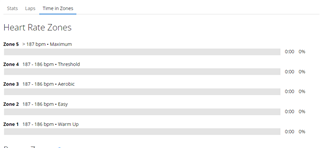
I have recently looked back at a race from last year for comparison on time spent in the different Heart Rate Zones, however I have noticed that the time spent in the various heart rate zones are now all messed up as they are blank.  For some reason on old activities the different zones are all set to the same value of 187-186bpm so do not display any metrics correctly.  The Heart Rate graph vs time displays correctly but this time spent in Heart Rate Zones table does not.   Does anyone know how to overcome this? 

Please note, when I looked at this old activity shortly after I completed it, the time spent in Heart Rate Zones were displaying correctly (at the time), So these values have changed with time erroneously.  Also any recent activities I have completed show up correctly.

I see the same issue on other past activities if I view them on the web or on the app.  I have confirmed my heart rate zones are setup properly on the app (also they display recent activities correctly) .
  • Thank you for sharing. We are aware of this and are currently investigating. As a workaround, please update your Max HR by one or two BPM's sync, then change your Max HR back to what it originally was and sync again.

    May I have permission to reach you via email so I can add you to the impact of this report?

  • I did try what you suggested and it didn't work, old activities are still blank in the Heart Rate zones. 

    I also tried re-entering height and weight too as I read that on other posts but that doesn't work either.  I think that solves the issue if its recent runs that are showing up blank, but my issue is with the older runs.  

    Yes sure, you can contact me via email.

  • The workaround will only fix the activities moving forward and cannot adjust past activities unfortunately. 

  • If you want to determine whether the HR zones in the old activities are actually corrupted, or if this is some weird display issue, you can try the following:

    - open the activity on the Connect website

    - select Gear icon (top-right), and select Export File (this will save the original activity file as a ZIP to your device)

    - open https://www.fitfileviewer.com/, click Open FIT File and open the file you just saved

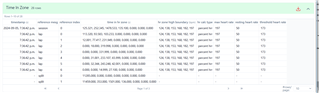
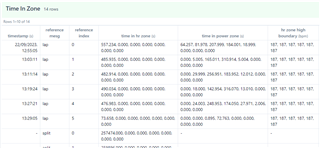
    - Look for a section called Time in Zone. This should show the activity zones / time in zones at the time the activity was recorded

    I can see this section for both recent activities and old activities (like 1 year old or several years old, including older devices.)

  • Thanks for suggesting that.  I have the issues from 22Sep23 and beforehand, so I viewed that file and a valid working one after that date. 

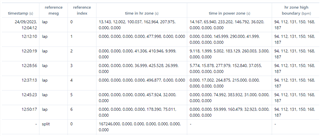
    I found that before 22Sep23 it shows all the HR zones high boundary all to 187bpm, just like what I see in the "Time in Zones2 table when viewing on the Garmin Connect Website.  I don't suppose there is a way to edit this?

    After that date the HR zone boundaries are set correctly (as they work on the Garmin connect website HR Zone Table)

  • That's really strange. Either the zones were recorded incorrectly in the first place (but then how did you see correct time in zones in the past?) or the zones were originally recorded correctly, but have somehow become corrupted over time (as you said.)

    If you want to see the correct time in zones for old activities, you could use the free site https://www.runalyze.com, which syncs with your Connect account. Runalyze calculates time in zone for zones that you configure in runalyze itself, instead of relying on the zones saved in the activity. Only downside is the site isn't great on mobile, and there's no app. Another downside is there's no zone 0, or in other words, zone 1 has no lower limit - so all the times will always add up to the total activity time and the percentages will always add up to 100%, unlike Connect, but it may also be unclear how much time you actually spent in Zone 1 (as Garmin defines it). (For longer / more intense runs, this shouldn't be much of a problem.)

    You could also use Strava, except time in zones is a paid feature there. (Their definition of zone 1 also has no lower limit.)

  • Yeah a bit of strange behaviour, also those runs aren't even on my watch anymore, considering I have over 5GB available space (i don't store music etc) they should still be there.  I can’t help but think it was a software glitch when the watch suggested to me to change my Max HR after a run session, it must have messed up the previous runs somehow.  

    Garmin are aware of this issue, so in the mean time I exported the FIT file data points of my race last year into Excel and plotted it myself.  I had to convert and manipulate the data then calculate the elapsed time, a long winded method of viewing this but dependable.

    Thanks for the suggestion of runalyze, it looks like it has a lot of features, I might end using that too.