
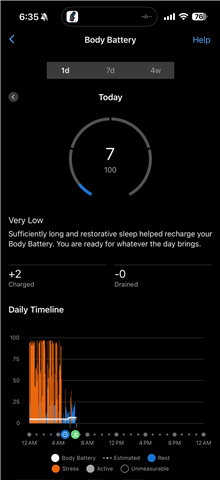
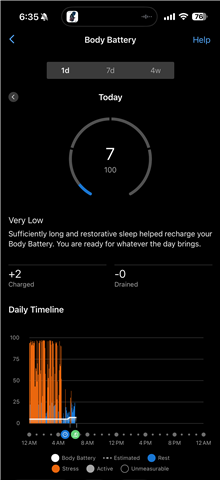
So I got the vivoactive 6 so my Index sleep monitor could calculate my body battery and sleep score. However the past two nights instead of that it has given me a sleep score and an addition to my body battery but it doesn’t actually add it to my body batt


So I got the new watch so it could be comparable with the true up but it doesn’t look like it is actually doing it as of the past couple of days. I have attached these screen shots or well tried to do multiple. It would only let me do one and I tried the work around and have no clue why it has me stuck. For example in the read out it shows my body battery has +75% and a 95 sleep score  but my actual body battery didn’t change. 

  •   

    So I got the new watch so it could be comparable with the true up but it doesn’t look like it is actually doing it as of the past couple of days. I have attached these screen shots or well tried to do multiple. It would only let me do one and I tried the work around and have no clue why it has me stuck. For example in the read out it shows my body battery has +75% and a 95 sleep score  but my actual body battery didn’t change. 
  • I have had the same experience. As explained on this ISM support page, you need to take off your watch before going to bed. I had been wearing both the ISM and my watch at night and the information shown in Garmin Connect Mobile was weird. Problem is, without the watch you may not get any Body Battery reading for the night. I think Garmin could do better than this.

  • Since your Vivoactive 6 is compatible with Body Battery TrueUp, this feature should allow the sleep data to sync with your app and watch, resulting in a fully updated Body Battery number. (It's important to note that this feature can only work if you're wearing just the Index Sleep Monitor (and not your watch) while sleeping.)

    However, we do have a workaround that should help (you note a workaround in your message, but I want to make sure that our workaround is listed here):

    1. Ensure the Garmin Connect mobile app is open and running on your phone.
    2. Verify that your watch has synced in the last 5 minutes. You may need to go to More > Garmin Devices > Device Name to manually sync.
    3. Put on Index Sleep Monitor and verify that it vibrates, indicating it has connected and is recording heart rate.
    4. Remove watch from your wrist and power off.
    5. Go to sleep.
    6. Upon waking, remove the Index Sleep Monitor and turn it inside out, OHR sensor facing up.
    7. Verify that the Index Sleep Monitor is syncing to the Garmin Connect mobile app.
    8. Power on your watch and put it on your wrist.
    9. Verify that your watch syncs. The two devices may need to sync multiple times for a full TrueUp of all data.

    If you've completed those steps and your Body Battery data is still not syncing properly via TrueUp, please comment to let us know.