Sleep Score and HRV Missing From Training Readiness

Garmin released an update for my Fenix 8 yesterday. I installed the update and updated the phone app on my iPhone. My watch shows that I have a sleep score, but both my HRV and Training Readiness are showing that there’s no sleep data for last night. I have restarted my watch and force closed/restarted the app on my phone. Not sure what else to try at this point. Very frustrating for a high end watch to not be able to show me at least two of the key features despite it very clearly showing it has sleep data from last night. 

  • If your smartphone app Garmin Connect synchronizes with Garmin servers before the end of the ISM synchronization, you have no datas for the training readiness. And whatever you do during the day, it won't change. It's really silly. They should change the way you fill the training readiness. If you sleep with your watch it never happened to me. Since I'm using the ISM, it happened 2 times ...

    You must first sync your ISM and then your app. It's frustrating. As soon as a sleep score is transfered to Garmin servers, they should change the Training readiness and HRV.

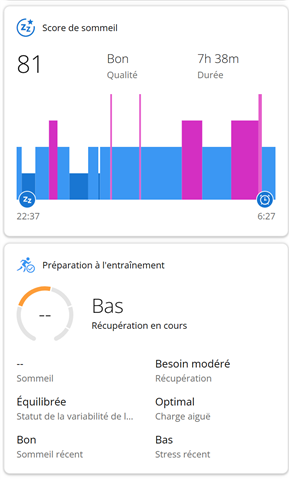
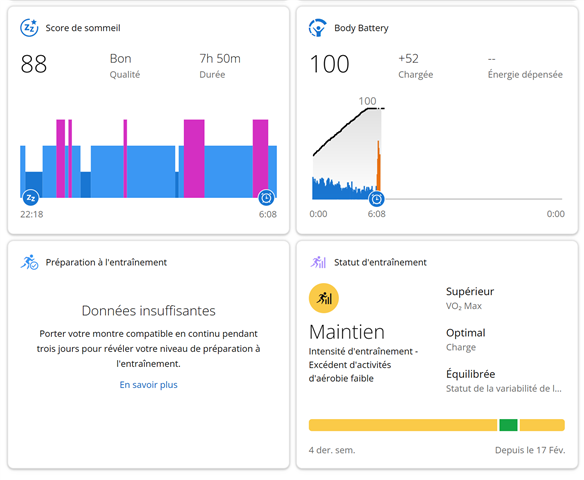
    On the screen capture, the HRV was transfered but not the sleeping score for the training readiness. The other time thre were no sleep score and no HRV for the Training Readiness.

  • and how this should be done? I mean, syncing ISM before Connect app syncs with Garmin servers....

  • On the smartphone with the Garmin Connect App, you choose "more" on the bottom right (3 dots) and then you choose the "Garmin Device" menu. You have the list of all your garmin devices, then I force the syncing process of the ISM.

    Thios way I'm sure that the ISF is synced befored the garmin connect app connects to Garmin servers.

    My app is in french, so I'm not sure about the english menus.

  • ok but the moment you open the connect app i think that it start syncing with garmin servers, am i wrong? tonight will be my first sleep with ISM, let's see what happens

  • Correct.  If you open the app and your phone is connected to wifi or a cellular network, the app will sync with the Garmin Servers. For me the process in the morning goes > ISM off > take phone off airplane mode > open app > ISM sync > sleep data poplated.

    Hope that helps.

  • i don't put my phone on airplane mode during sleep (it's the only phone i have and my parents are old). If i put it on plane mode right before i pull off ISM and then turn off plane mode should work the same i guess... garmin is the homeland of workarounds

  •  Could you please clarify what you're experiencing and provide additional details? The title of this thread mentions that HRV is missing, but you also note that your HRV isn't showing sleep data. I'm just wanting to fully understand what's happening so I can advise on this.

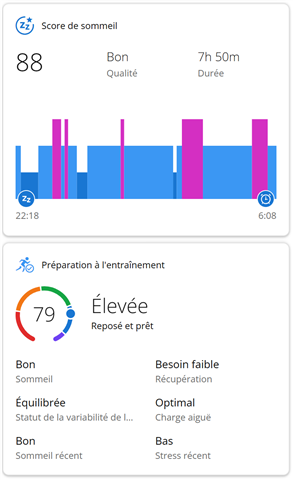
  • The screenshot is showing what happened to me 2 times.

    The ISM has been certainly synced with the smartphone Garmin connect app after  the Garmin connect app synced with the Garmin servers.

    I woke up in the morning and I took my smartphone. I think I have clicked on the 2 circles of the app (force synchronize). So at first you could see no sleep datas and no training readiness. I didn't took a screen capture.

    I decided to force the synchronization between the ISM and the smartphone. Then I could see Sleeping Datas but the Training Readiness remained like the screenshot forl all day long.

    I don't know if my explanation is clear for you. English is not my native language.

  • Hello,

    It happened again this morning, Sleeping score without Training readiness.

    I woke up during the DND period. I don't know if it's relevant.

    I took care to synchronize first the ISM before syncing the Garmin connect App.

    It took a lot of time before being able to see the Sleeping Score eventhough the ISM was synced.

    I'm wearing the ISM since 2 months every night and before I was wearing my watch during the night.

    EDIT : finally one hour and a half after I woke up, the Training Readiness appeared.