This discussion has been locked.
You can no longer post new replies to this discussion. If you have a question you can start a new discussion

Deleting or disabling unused maps?

Former Member
Former Member

Hello !

I have an edge explore 2 and pretty happy with it. Yesterday I connected it to Garmin express to update the maps and it took some Time as there are three maps to update (Europe east, central and west).

So I was wondering, as I never ride outside my country, if there was any benefits to deleting or disabling central and east Europe maps and only keep west? Does it make the unit faster or more responsive with less data to handle?

Thanks Slight smile

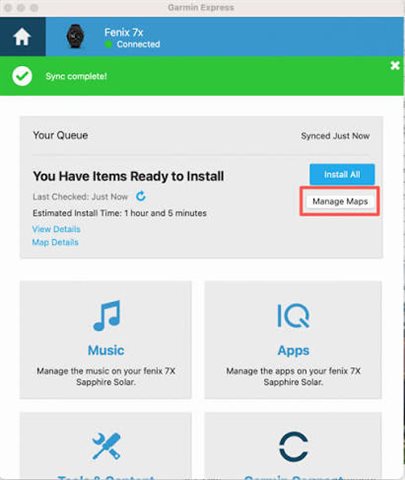
  • Using Garmin Express you can uninstall the unused maps from the main menu / Manage Maps.

    If the unused maps are not activated they will (probably) not influence the performance of the unit. Uninstalling them saves quite a lot of storage space.

  • Former Member
    0 Former Member in reply to bikepc01

    Thank you, is it confirmed by Garmin that disabling maps has an effect on the performance of the device? I searched but didn’t find anything on that topic…

  • It certainly will make the map update (of only those you really use) faster the next time Slight smile

    And you might also gain a few seconds when you boot the device (you can see that it displays that it's loading each map. Each takes about a second)

  • Former Member
    0 Former Member in reply to flocsy🤠

    Ok thanks, I’m gonna try to disable 2 of the 3 maps first and see. In the future I’ll see if I go as far as deleting them from the memory of the unit Slight smile

  • I think disabling them will delete them.

  • Former Member
    0 Former Member in reply to flocsy🤠

    If someone already tried it, or a garmin rep sees this, it would be interesting to confirm this information ! I don’t have my edge with me right now I’m travelling overseas…

  • That is surely not the case! Disabling a map will not delete it from the device. If that should be you should have to re-install the map every time after you changed your active map(s).

    I own an Explore 2 and regularly change the active map.

  • Former Member
    0 Former Member in reply to bikepc01

    I was a Little surprised by what flocsy said, What you say makes more sens… Did you notice anything different when you disable maps in terms of responsiveness of the unit?

  • I think we're talking about 2 different "dimensions".

    The question here was about unused maps, i.e why should I have the maps of countries, regions, continents that I am not planning to visit ("geography" dimension)

    And if I understand what "active map" means, then that is another "dimension": what map (look) I see.

  • Former Member
    0 Former Member in reply to flocsy🤠

    What I understood from your message, and I think bikepc also, was that if I go in the map menu on my device and disable maps that I don’t use, it will delete them from the memory of the unit, which is why We were surprised Slight smile