
When changing the data screens, usually a small blue edit field pops up in the top right corner for about 3 sec. Can anybody explain the functionality or meaning of this field?
Seems somehow annoying.
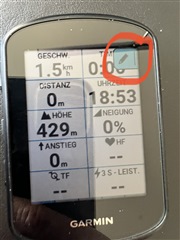
When changing the data screens, usually a small blue edit field pops up in the top right corner for about 3 sec. Can anybody explain the functionality or meaning of this field?
Seems somehow annoying.
Tapping and pressing on those icons does absolutely nothing for mine, and why are they different depending on the data page?
The icons are there to show what the long press of the top right hand button does. They do not react to screen touching. They are there as an aid to understand what short cut is programmed into that long button press. What is behind the shortcut depends on the page you are on. Hence the different icons.
For example on most data screens it takes you into edit mode, on the map screen into zoom mode on the elevation page it toggles the X-axis between a narrow view and the whole activity or course.
This likely has greater value for 540 users as they need to do everything via buttons. The 840 user can use the buttons or touch screen to access functionality.
Thanks for explaining now it finally makes sense. I'm so used to the touchscreen functionality didn't occur to me it was button related.