This discussion has been locked.
You can no longer post new replies to this discussion. If you have a question you can start a new discussion

incline wrong - not catching elevation changes

probably since the last update, Garmin 540 shows a flat graph in the elevation display. Incline shown as -1/0/1 degrees not matter what the real incline is.

Calibration does work, as in - sets the device to the correct elevation but then the acitivity stays at that elevation.

31.30

  • try a soft reset , press and hold the power button until the unit switch off by itself (apprx 20s), wait another ~5s, the screen will flicker (maybe with a Garmin logo), after that you can release the power button, and test again . the grade% problem is a well know issue since years in these units, but the altitude measurement should be good and accurate

  • Thank you. I will try.

    The elevation graph in the activity just shows a flat line, though. as you mentioned the altitude measurement sould be good. It is good only in the sense that it shows the correct altitude right after calibration.


  • calibrated before beginning the activity. GPS catched the correct altitude. However, the acitvity showed a wrong readout.

    • how is the temperature readings? accurate? could you clean/blow out the baro's hole on the back of the unit? you can put it into/under water for 5min and after blow out and dry and test. yep it looks like the barometer is stucked in one place... 
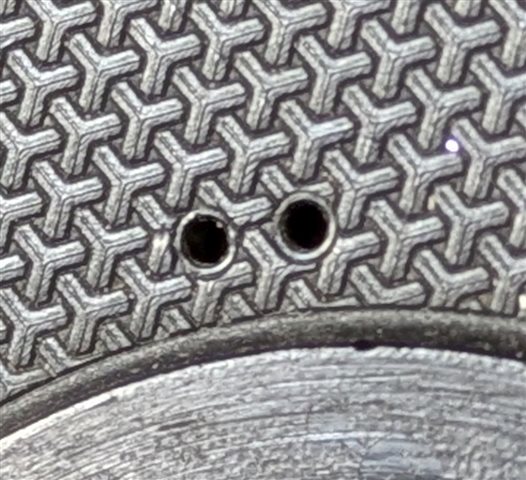
  • The temperature readings is correct. I tried a soft reset. The baro holes seem to be clean

    The altitude reading is correct - it shows the correct altitude. From GPS calibration and during the activity. Incline alternates around -3 to 3 degrees erraticly.

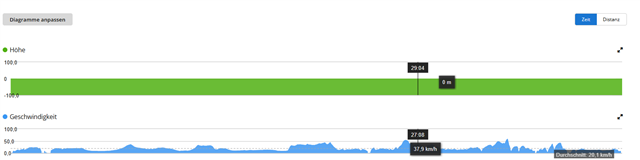
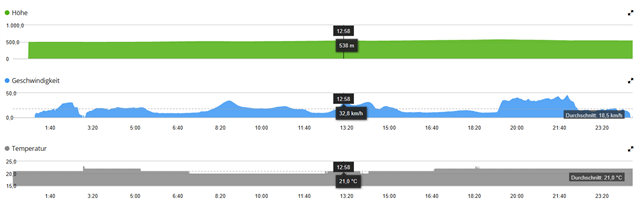
    current activity

    shows a rather flat elevation graph

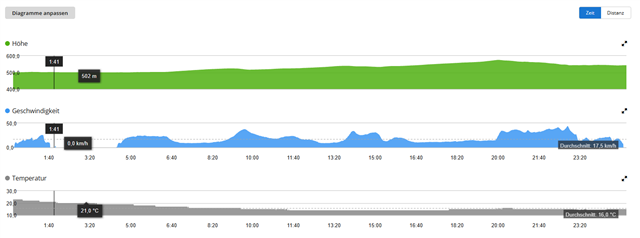
    the graph below is the same route with correct elevation graph

  • those holes are not the baro's holes, that is the speakers's, the baro's holes are on the "neck" of the mount, a very tiny flat gaps, if you remove the mount's 2 tiny screws, probably you will see it much better. did you catch rain in the previous days when this issue occured or it came with 31.30?

  • oh thank you...yes there were several hours in the rain (update and rain might have taken place at more or less the same days)

    I will try this

  • something is blocking the holes for sure, so need to clean that out, because i see now small movement up and down on the 1st GC pic, but very flattish (so not so good as on the 2nd pic), it comes from the clogged holes for sure.

  • Yes, it came! thx