
This discussion has been locked.
You can no longer post new replies to this discussion. If you have a question you can start a new discussion

Edge 530 Course line and Cursor

When using GPX courses that I have downloaded to my Edge 530, how do I make the course line and the cursor more obvious? I would like to have control over the brightness and thickness of the course line and cursor. This would make them to stand out better so they are easier to see while navigating on my MTB.

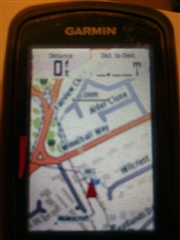
  • I had the problem of the cursor on my "800" being hard to see. I resolved it by sticking a triangular piece of Fluorescent red vinyl over the position of the cursor on the screen. It does not work when the map etc zooms in when approaching a turn but for normal navigation it worked a treat. It also did not mask any data field either as the cursor position is central to the borders of them etc.

    I also put a thin trip of the vinyl just off the edge of the screen to the left as a "Yard Stick". It starts level with the point of the cursor and extends the distance of the scale of the map. Then based on what the scale of the map is, I can see roughly etc how far for example 300' , 0.3 mile or 1.2 miles is from my position.

    The picture does not show how bright the Vinyl "glows" red as it is in the shadow of the camera.