
This discussion has been locked.
You can no longer post new replies to this discussion. If you have a question you can start a new discussion

Climbpro bug with elevation profile

Former Member
Former Member

Hi,

yesterday I was in a route following a track with several climbs and the first one appeared showing the image I attach. I liked the colourful image so I took a pic Slight smile  .After a while, the climbpro screen changed and showed an image like the second attach. I tried to reload several times the track but I got the same results.(Fw 4.10 and gps 2.50 installed)

Before the climb:
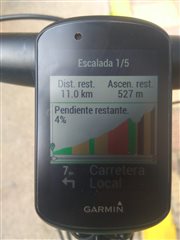
During the climb, several minutes after the other pic:

Anyone with this problem? It seems to me that the problem started when the device made a zoom after starting the climb.

  • Former Member
    0 Former Member

    I've had the same problem on the 3.55 beta software, but not anymore with the 4.1. 

  • Can you attach the course fit file you were using? It looks like that part of the course was missing elevation data.

  • Former Member
    0 Former Member in reply to aweatherall

    Here you are. If thats the problem, how is possible to show the preview correctly?

    thanks in advance

    rutacenicero_final_course.zip

  • How was that file produced, It contains no elevation data.

    Data 5 record timestamp 0 s position_lat 466202407 semicircles position_long -43182336 semicircles distance 0 m  
    Data 5 record timestamp 16 s position_lat 466211444 semicircles position_long -43185782 semicircles distance 88.01 m  
    Data 5 record timestamp 22 s position_lat 466214828 semicircles position_long -43187072 semicircles distance 120.56 m  
    Data 5 record timestamp 30 s position_lat 466218387 semicircles position_long -43190400 semicircles distance 161.78 m  
    Data 5 record timestamp 38 s position_lat 466222081 semicircles position_long -43193856 semicircles distance 204.49 m  
    Data 5 record timestamp 44 s position_lat 466224490 semicircles position_long -43197309 semicircles distance 238.09 m  
    Data 5 record timestamp 54 s position_lat 466228242 semicircles position_long -43202688 semicircles distance 290.44 m  
    Data 5 record timestamp 58 s position_lat 466230313 semicircles position_long -43204384 semicircles distance 313.39 m  
    Data 5 record timestamp 94 s position_lat 466247618 semicircles position_long -43218560 semicircles distance 504.52 m  
    Data 5 record timestamp 98 s position_lat 466249895 semicircles position_long -43220278 semicircles distance 529.17 m  
    Data 5 record timestamp 152 s position_lat 466276780 semicircles position_long -43240557 semicircles distance 819.95 m  
    Data 5 record timestamp 177 s position_lat 466288951 semicircles position_long -43249739 semicircles distance 951.65 m  
    Data 5 record timestamp 213 s position_lat 466306836 semicircles position_long -43263230 semicircles distance 1145.04 m  
    Data 5 record timestamp 229 s position_lat 466314982 semicircles position_long -43269376 semicircles distance 1233.13 m  
    Data 5 record timestamp 252 s position_lat 466326115 semicircles position_long -43277982 semicircles distance 1354.22 m  
    Data 5 record timestamp 262 s position_lat 466330879 semicircles position_long -43281664 semicircles distance 1406.06 m  
    Data 5 record timestamp 277 s position_lat 466338064 semicircles position_long -43288318 semicircles distance 1488.53 m  
    Data 5 record timestamp 289 s position_lat 466343595 semicircles position_long -43293440 semicircles distance 1552.15 m  
  • Former Member
    0 Former Member in reply to aweatherall

    generated from a gpx file that..., as you said , doesn't cointain any elevation data... how the preview gets the graph then?

    thanks a lot

  • Not sure. It may be using the local DEM data on the unit, but Garmin has not officially released support for using the local DEM data yet.