


Garmin has decades of experience innovating avionics and tailoring designs based on feedback from customers like you. In 1998, Garmin’s GNS 430 took the industry by storm by combining an IFR GPS and NAV/COM into one unit. At the time, this was a revolutionary change in the market and became one of the best-selling navigators of all time. The GNS 430 was the base on which Garmin Aviation was built and was followed up with the G1000 integrated flight deck in 2004, G600 flight display for retrofit in 2008, G3X for experimental aircraft in 2009, and GTN navigators in 2011. Garmin strives to build avionics with the pilot in mind first, bringing new capabilities to your aircraft that help you plan your flight effectively and arrive at your destination safely. Over 3 decades later we are still working to bring the next generation of avionics built on Garmin’s rich history of innovative design. To that end, Garmin is proud to introduce all of these technologies together in one product, AXIS.
AXIS reimagines the flight display, offering new technologies and an innovative design built from the ground up as an entirely new product. Garmin designed AXIS as an integrated PFD/MFD/EIS with optional built-in IFR GPS, NAV, COM, and a 4-place Audio Panel -- all within a single unit.
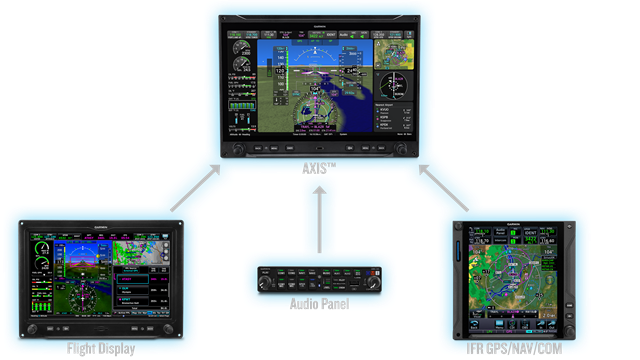
What previously required multiple LRUs in the past can now be accomplished with AXIS as a standalone product. AXIS is available for certified piston-powered singles, light twins, and experimental aircraft. Let’s take a look at what separates AXIS from previous flight displays, and how it can transform your panel.
Hardware Overview
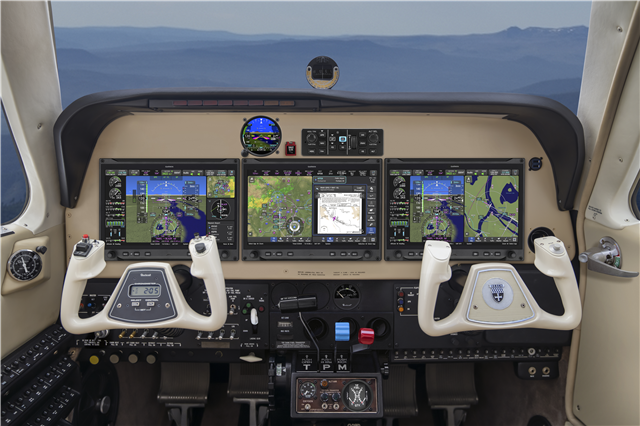
The Garmin DNA is evident at first glance. The LED back-lit display is brighter with higher resolution at twice the pixel density compared with G3X Touch, offering the pilot crisp and clear data at their fingertips. The landscape touchscreen displays include dual concentric knobs on either side for ease of use based on user preference or turbulence. AXIS is ergonomically designed to serve as an anchor for critical display controls in these same situations. “MENU” and “BACK” buttons are located at the bottom on either side along with an “EMER” button on the left and “Direct-to” button on the right. This button layout will be familiar to G3X Touch users with the main difference being we have expanded the “NRST” button and exchanged it with “EMER” giving each pilot quick access to the emergency information they might need for each phase of flight.
One of the first things you will notice is the speed of the power up. AXIS boasts increased processing speed due to a dual core processor that is faster than G3X Touch. That same speed can be noted throughout the flight, optimizing performance and response time which is noticed while panning/zooming the map, updating weather, or other tasks. The system leverages both Controller Area Network (CAN) and modern High Speed Data Bus (HSDB) interfaces, with HSDB offering speedy 100 mb/s for advanced applications like quickly transferring databases between displays.
User interface
AXIS leverages the user interface and architecture from Garmin’s newest line of integrated flight decks, the G3000/G5000 PRIME, to design a display that streamlines access to information while retaining the familiar Garmin ‘feel’. Apps create shortcuts for the pilot, alleviating extra button presses. Apps provide items you would typically see on an MFD: maps, waypoint information, flight plan, traffic, and more. They can be accessed on a PFD split-screen display or on a separate MFD, if configured and equipped.
AXIS includes Widgets which are pilot selectable inset display items on the PFD that are available once enabled from Menu settings. Once set, they provide a compact view of selected information. Widgets can display the map, flight plan, weather, traffic, or nearest items; giving pilots easy access to the information they need. Once enabled, three widgets are displayed.
Garmin brought over the radial menu from Garmin Pilot to the map screen allowing the pilot to drill down on additional details as needed (e.g., airport information, airspace details, or measuring distances). The radial menu can be placed on the moving map by simply touching the display, the menu will then give you options to learn more details about the underlying aeronautical features. One of the staples of the radial menu includes bearing/distance to information along with the terrain elevation of that location.
AXIS is packed with many of the Garmin's latest features. Runway Occupancy Awareness comes standard if equipped with a compatible ADS-B transponder, giving pilots additional situational awareness regarding traffic in relation to the runway. 3D SafeTaxi will come standard providing the pilot with an exocentric view of the aircraft as it taxis; 3D SafeTaxi also depicts taxiway/runway marking, airport signage, and structures giving the pilot extra situational awareness in the airport environment. AXIS will include synthetic vision as a standard feature. Garmin SurfaceWatch is also available as an enablement to help ensure you are landing on the correct runway, alerting the pilot if the aircraft is aligned with the wrong runway. Flight planning has been streamlined through AXIS. When paired with a GTN Xi or GPS navigator series, changes can be made directly from the AXIS display.
Connectivity has become vital to avionics in recent years and with built-in Bluetooth and native Wi-Fi AXIS does not disappoint. Database Concierge can be leveraged to update navigation and supplemental databases for each cycle and AXIS can sync that data to compatible LRUs throughout your panel. Flight plan transfers and aircraft flight data logs via Garmin Pilot are another benefit of AXIS connectivity, giving pilots/owners more convenient access to analytical data for maintenance or training purposes. This data can also be shared through flyGarmin integrations like Savvy Aviation or FlySto for further analysis.
For an overview of AXIS including a walk-through of available features see the video below.
All Displays and Sizes
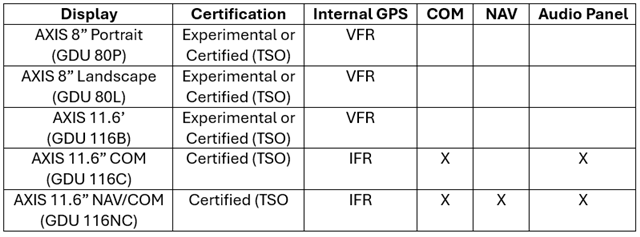
New Installation Considerations
Your ideal installation depends on what is right for your aircraft and your mission. Which AXIS layout you decide is right for your panel will likely depend on what other equipment you have installed in your aircraft. For example, a new installation might leverage two AXIS displays each with built-in IFR GPS/NAV/COM/Audio Panel, a GI 275/G5 standby, and coupled with a GFC 500 autopilot to greatly simplify your panel without losing functionality. You also may consider a single AXIS base display if your panel already includes a GTN Xi navigator, working NAV/COM radio, and audio panel. For more information about interfaces with AXIS flight display, see our webpage.
AXIS supports up to 3 displays in the following configurations:
1) Pilot PFD
2) Pilot PFD and MFD
3) Pilot PFD, MFD, and MFD
4) Pilot PFD and Co-pilot PFD
5) Pilot PFD, MFD, and Co-pilot PFD
- Configurations with both a Pilot PFD and a Co-Pilot PFD require a GSU 25D & GSU 75 ADAHRS and one AXIS PFD must be either the integrated IFR GPS/COM/Audio Panel or IFR GPS/NAV/COM/Audio Panel
- If Electronic Engine Indication (EIS) is selected as an option, the Pilot PFD is required to display a full-time EIS strip on either the left or right side, selected at the time of installation. Any remaining displays can support any combination of full-time or MFD display of EIS.
Upgrade from G3X Touch Certified
AXIS can leverage existing infrastructure and LRUs from legacy systems. The AXIS 11.6" display measures 0.15" wider edge-to-edge while maintaining the same panel cutout and mounting hole pattern. The AXIS 8” display maintains the same panel cutout and mounting hole pattern. The main connector retains most of the same wiring, while specific interfaces will require additional modification and connections. If you have multiple G3X Touch displays they all need to be replaced with AXIS.
If you have a G500 TXi flight display, you can rest assured Garmin is going to continue to invest in and develop our TXi line of flight displays; this includes continued best-in-class support. The TXi line offers strong compatibility with third-party avionics.
Panel Configurations
AXIS opens new possibilities for your panel; with so many capabilities housed in one display, AXIS keeps the wires inside the box, minimizing the wires behind your panel. It can simplify your panel in ways that were not possible in the past. Let’s take a look at some popular panel configurations made possible by AXIS.
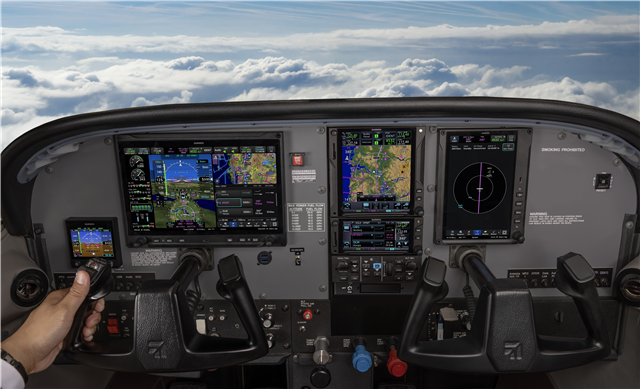
First let’s look at upgrading your existing panel from G3X Touch to AXIS. The Cessna 182 displayed below upgraded to AXIS PFD w/EIS & Copilot 8” Portrait MFD Display. The starting AXIS equipment list price as shown - $16,400.
Other options shown in the panel include: GTN 750Xi, GTN 650Xi, Remote Audio Panel, Remote ADS-B Transponder, Standby G5, GSB 15, & GFC 500 Autopilot.
Next let’s explore a panel upgrade that includes 2 AXIS 11.6” displays. The below panel includes AXIS PFD w/EIS, MFD, Dual IFR GPS/COM, single VHF NAV, Integrated Audio Panel. Starting AXIS equipment list price as shown - $50,675.
Other options shown in the panel include: Remote ADS-B Transponder, GSB 15, Standby G5, and GFC 500 Autopilot.
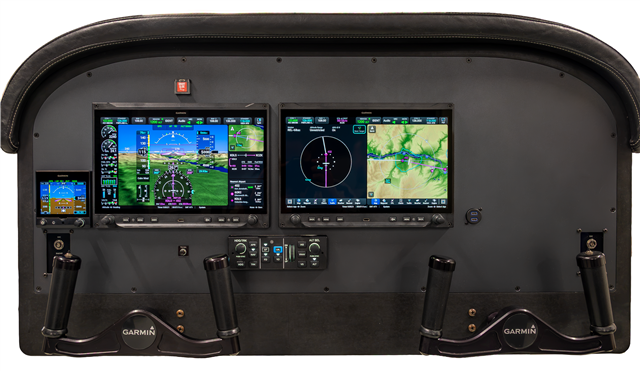
Finally, let’s look below at “All-in AXIS” – Clean slate panel upgrade to replace steam gauges and dated avionics. This installation includes AXIS Dual PFD w/EIS, MFD, Dual IFR GPS/COM, Single VHF NAV, Integrated Audio Panel, Starting AXIS equipment list price as shown - $71,625.
Other options shown in the panel include: Remote ADS-B Transponder, GSB 15, Standby GI 275, GFC 500 Autopilot.
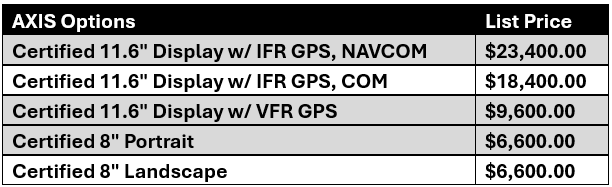
Pricing
Availability
All the 11.6” AXIS options are ready to order through your Garmin dealer today and will be shipping soon. We will be following our initial launch with support for piston twin EIS, compatibility with the GFC 600 autopilot, GFC 500 support for piston twins, checklists, SXM support, GDL 60 compatibility, SR20/22 % power support, and 8” display availability planned in early 2027. I will keep you up to date as we add new capabilities and features to AXIS. Don’t wait to add the latest Garmin technology to your panel and modernize the capabilities of your aircraft.
GTR 205R
We created a remote version of GTR 205 COM radio, designed as an ideal companion for your new AXIS installation and is available for $2,345. See our previous post announcing the GTR 205.
Training
To experience AXIS now, the Garmin training team has put together several resources to help you get up to speed on AXIS. See our resources and training offerings below.
PC Trainers and Apps
- AXIS iPad App (Coming Soon)
- AXIS PC Trainer
AXIS eLearning Course
AXIS Flight Display - In-person Training Events Held in Olathe
- August 31–September 1, 2026
- November 16–17, 2026
Head to your Garmin dealer today for installation considerations and a quote specific to your aircraft. AXIS Integrated Flight Display can be ordered now and will be shipping soon. If you missed the Garmin launch event, check out the launch video below that includes the AXIS announcement and more from the Garmin development team.
We would love your feedback. Let us know what you think!