


Hey,
I mentioned an issue I had with my Instinct 3 Solar in another thread yesterday:
Feature Request: Setting for triggering high refresh mode
---
What was it about? My watch did not turn off the backlight, even though I have the timeout set for all 3 profiles (during activity, general use, sleep mode).
Today it happened the second time: but this time not after a nap (where I might have pressed against the watch buttons), but at work.
And before anyone asks, no, I do not sleep at work 
Just as the last time I kept my wrist still and looked at the watch for 30s or more -> it went back to low refresh mode (not showing seconds), but the backlight was kept on.
Once I pressed the button for the backlight, the behavior went back to normal (meaning it times out after 8s according to my setting).
---
In order to have a bit more concrete evidence, I installed a watch battery app, in order to have a visual representation of my statements.
You will find 4 attached screenshots from my I3 Solar:
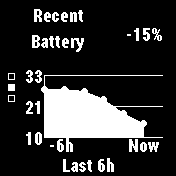
G3QE4307.BMP -> this is the battery graph of the last 6h, just after I noticed the issue... I would say the drop of 15% happened in the last 3h of that graph.
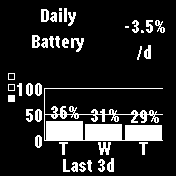
G3QE4629.BMP -> this is the battery percentage over the last 3 days... you can observe a daily drop of around 3.5%, which is more than acceptable.
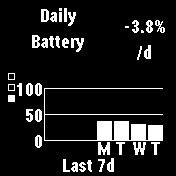
G3QE5122.BMP -> the same thing as the previous image, but for the last 7 days (only have the app running for 4 days)... around the same daily consumption.
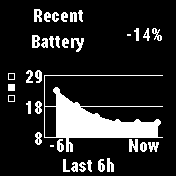
G3QH0456.BMP -> the battery graph over the last 6h, which I took a few hours after I fixed the issue by pressing the button again... usage went back to normal
---
I am rather unhappy with that situation as you might imagine - I really love that watch, but dropping 15% in around 3h is insane, just because the backlight is not turning off.
Before you ask: no, it is not possible that I accidentally changed the setting for the backlight to not time out (most of all since I describe it going back to normal behavior, once I press it manually).
Right now I am not sure if this is a firmware issue (I have read of other people having such situations with other watches), or if this is a hardware defect - I was not able to forcefully reproduce it at will, even when playing around with the button with evil intent (for example ever so slightly pushing the light button, but trying to avoid pushing it all the way in) .
Any ideas? I would like to avoid going for a warranty claim, if this really is a firmware issue, since nothing will change (besides losing out on a screen protector that is already on it).
Best regards.
