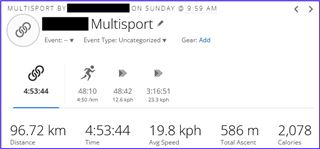
Multisport Activity won't sync

Hi there,

last Sunday I took part in a duathlon competition with a personal best as a result. This is the reason why the following question is important for me (it's not just a problem with an everyday workout...).

At the end of the race I stopped the multisport activity as always and a couple of minutes later I saved it. Having a look at the watch another couple of minutes later I didn't see the normal results screen with all the stats, but the starting screen of the duathlon activity... Something obviously went wrong...

Synchronisation with Garmin Connect Mobile didn't work.

So I tried to sync it via Garmin Express. Didn't work either. 

I tried to manually import the FIT file via browser. Didn't work.

I imported the file in TrainingPeaks. At least some general information (total time, total distance, TSS...) are there so the data seems to be in the file. 

My question is: is there a possible way to repair the obviously corrupt file? 

I attached the file. Maybe there is someone out there who has an idea how to solve this issue.

Thanks a lot in advance,
Gerd

2025-04-27-09-59-55.fit

Top Replies

  • Fit File Viewer was able to fix the file so Garmin Connect Web would accept it. However, the sessions don't look right for a duathlon activity.

    10 km run, 10 km transition, and a 77 km transition.

    2025…

All Replies

  • Fit File Viewer was able to fix the file so Garmin Connect Web would accept it. However, the sessions don't look right for a duathlon activity.

    10 km run, 10 km transition, and a 77 km transition.

    2025-04-27-09-59-55_fixed.fit 

    You can edit the sessions to have it match reality using the edit feature in Garmin Connect Web. Gear icon » edit » Edit Legs.

    Or if you want to post what the session types, time, and distance should have been, I can try to edit it for you.

  • Hi seilogramp,

    Thank you very much for spending your time to help me out with my problem. I really appreciate it!

    You are totally right. The sessions look kind of weird. By looking at the session details, I guess that all data is there but messed up in some kind of way. 

    My official results look like this:

    - 46:11 for 10 km run

    - 1:44 for transition 1

    - 1:37:25 für 60 km bike

    - 2:05 für transition 2

    - 49:06 für 10 km run

    That is 3:16:33 for 80 km (or about 76 - 77 km to be honest because the bike course is only about 56 - 57 km)

    To me it seems that all data points of the activity are saved in the FIT file but the assignment of these points to the different sessions is simply totally wrong. Is there a way to re-assign the original data points to the five sections of a duathlon (run - transition - bike - transition - run) by using the official results written before?

    Or do you have any other idea how to sort this mess out?

    Thanks again and best regards,
    Gerd

  • Is there a way to re-assign the original data points to the five sections of a duathlon

    Did you attempt this...

    You can edit the sessions to have it match reality using the edit feature in Garmin Connect Web. Gear icon » edit » Edit Legs.
  • Yes, I started it and didn't find the opportunity to join legs. The current break-up between transition 1 und transition 2 is in the middle of the bike part. Did I miss anything? 
    And I am a bit confused due to the wrong data. Why is the last part shown with a duration of 3:16 hours whereas the data only shows a duration of 2:2x... 

    At least I didn't find a way to solve the problem in an obvious way...

  • Through several editing, dividing, and changing of legs, I was able to do this. So at least it is possible to get it close to the official race results

    Unfortunately, I cannot export this for you as a repaired file, since Garmin exports the original .fit file. 

  • Good to know that it generally works and bummer that it cannot be exported. 

    I'll try again during the weekend and hope to find a similar result.

    Again, thanks a lot for your support!