GPSMAP H1i Plus 13.07 – Incorrect route line display when navigating with routing enabled

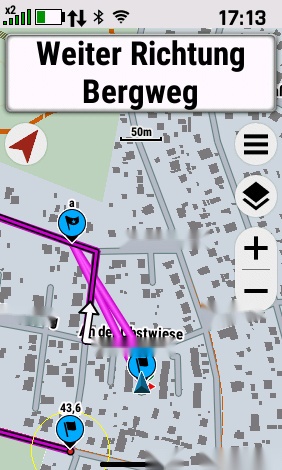
n this test, I used an activity with routing enabled. Two visual inconsistencies are apparent:

  1. Overlapping purple and magenta lines: The purple line is normally displayed when navigating without routing, whereas a magenta line is used when navigating with routing enabled. In this test, both lines are displayed simultaneously and overlap each other.

  2. Incorrect magenta routing line: The magenta line does not follow the road correctly. Instead, two separate magenta lines lead to the first waypoint. From that waypoint onwards, the magenta and purple lines overlap more or less for the remainder of the navigation.

This is the second test mentioned in my other posts and should be considered alongside the previously reported routing and navigation inconsistencies.
  • The first item is normal for Garmin devices.

    The purple line will be the planned course (or activity in your case). This planned path will be shown as drawn or recorded.

    With routing enabled the device will calculate a route based on the course and the active map and show this calculated path as a magenta line. Usually this is the same path as the purple line, but not always. For example when the map differs from how the course was planned, or due to routing settings. In this case the purple and magnet lines will deviate. 

    The second item is of course not as it should work.

    Personally I have given up on using routing when following a course. It simply isn’t usable and Garmin doesn’t seem to care.