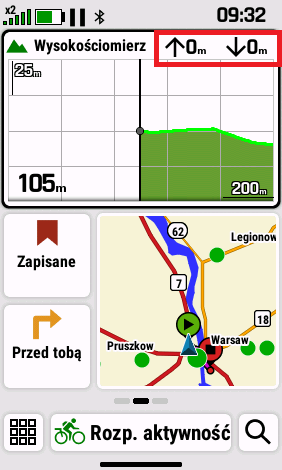
Altimeter with Software 9.05

Hello to all,

I recently tested the new 9.05 software during a short hike. Over the course of the 1.5-hour hike, I immediately noticed several things that aren’t working properly yet.
To compare the recorded data, I also turned on my Tactix 7 Pro. Most of the time, the H1 was just recording, and for short stretches I used the navigation to waypoints that I had marked on the map during the hike.  Unfortunately, the device also restarted once during that short time without me having made any inputs.
What bothered me the most was the altimeter’s performance. Therefore, I’d like to focus mainly on these issues for now.

As can be seen in the promotional photo of the device, the altimeter displays two areas: the elevation profile already covered is shown in green, and during active navigation, the upcoming elevation profile is shown in blue.

In fact, the blue area is just displayed for brief moments during navigation. Most of the time, however, it disappears for unknown reasons and reappears now and then (not reproducible).
I can understand that the blue section disappears when you leave the route and the device has to recalculate a new route.
At the latest after the recalculation, however, the upcoming elevation profile should be displayed again. But that doesn’t work.

The refresh rate of the altimeter on the screen still leaves something to be desired.
Every now and then, you have to shake the device or open the altimeter in full-screen mode to see the current data.
The display of the actual altitude seems very accurate, but the cumulative elevation gain is far too high when compared directly to my Tactix.
If you compare the elevation profiles of the two devices on Garmin Connect, you can quickly see that the recorded elevation profile of the H1 is very jagged.
I suspect that there is little or no smoothing applied here, resulting in too much cumulative elevation gain.

If you display the elevation profile in full-screen mode for a while, you’ll quickly notice that the scale of the x and y axes changes unintentionally for brief moments. Furthermore, parts of the profile—or the entire profile—disappear completely for brief moments as well.

In the image above, you can also see a turn-by-turn direction on the map. This feature is currently missing entirely.

Both devices were connected to a Garmin HRMPro+ during the short hike. However, the total calories burned differ significantly, and in my opinion, the H1’s reading is much too low.
In any case, it’s clear that Garmin uses a different calculation method for total calories burned on the H1 than on its outdoor watches and bike computers.

I hope these observations help to further improve the software.

Thanks for reading.

Top Replies

All Replies

  • Hi, I added the Altimeter widget to my glance view. In the top right corner, there are two fields: an up arrow and a down arrow, both showing 0.
    These values never change, even when I'm moving or using navigation. They remain at 0 regardless of whether I'm recording an activity or just wearing the watch.
    Is this a bug or am I missing something? Should these fields track daily elevation gain, or do they only work during a timed activity?

  • To be clear, this report is regarding the H1 (handheld), not a watch

  • I would expect that those two fields would show the total ascent and descent recording during an activity. So for that data to update you would need to be recording an activity.

    I haven't used this form of the altimeter glance myself yet, I'll try and see if the ascent and descent data is shown correctly on my device.

  • I tested this today during a bike trip, and it seems like a clear bug.
    I prepared a course on my device with approximately 100 meters of ascent and 100 meters of descent. Unfortunately, the data fields on the Altimeter widget are "dead" and completely useless.

    Regardless of the following conditions, the fields constantly show a value of 0:
    Whether an activity is currently being recorded or not.
    Whether I am actively navigating or not.
    Whether I am following a track (breadcrumb trail) or using "Direct To" (straight line) navigation.

  • When you complete a recorded activity, and sync the data through do you see elevation showing within the Garmin application? 

  • In my experience the total ascent and descent values are very often way higher than they should be, especially if you move over relatively flat terrain. This has been an issue with all GPSMAP models I've used: 66sr, 67 and now H1. In the past I've been in extensive contact with Garmin Support on this, but that hasn't resulted in any improvements. With other devices I haven't had this issue (Wahoo ELEMNT ACE, Apple Watch Ultra 2 and now Suunto Vertical 2).

    The indicated elevation is quite accurate though in my experience, so it's probably in the way the device measures elevation gain or loss. PS. the device indicates elevation (height of earth's surface above sea leve), not altitude (height above earth's surface).

    And indeed it seems that the map glance on the Home Screen does not display the distance to the next turn. Seems like one of those things that were "promised" in the marketing materials but never (or not yet?) delivered, like the Ascent Planning feature.

    Your observations on the altimeter I haven't noticed yet myself, I'll keep an eye out for that. Does it happen with the altimeter glance on a home screen only, or with the Altimeter App as well?

  • I live in a very hilly area and my only options are uphill or downhill. There’s practically no flat terrain here.
    So I can’t really say how the device performs on flat ground.

    And yes, my observations apply to both the altimeter glance and the altimeter app.
    Most of the observations can be triggered when you frequently change between glance and app.

  •  Has my bug report been acknowledged and added to the fix list? I'd appreciate an update. Thank you.

  • Can confirm that the large altimeter glance doesn't show total ascent and total descent, both values stay at 0. Data field glances for ascent and descent do show recorded values.