Software Version 6.04. Elevation dashboard does not update while moving.

Hello,

The Elevation Dashboard does not update your actual position while in Navigation Mode.
While moving, the dashboard and your position on the map will become out of sync. To sync them again, you need to close and reopen the view.

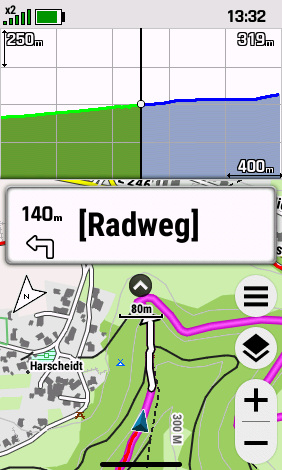
Picture shows map in sync with elevation dashbord:
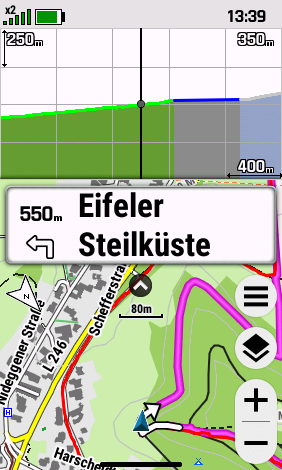
Picture shows map and elevation dahbord out of sync after moving a few meters.
The new Show/Hide buttons for the dashboard are too small to safely press on the touchscreen, especially the Show button.

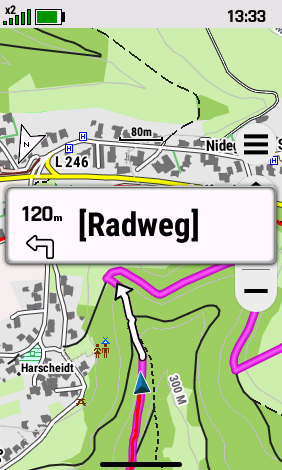
When hiding the dashboard by pressing the hide button, the navigation text does not move to the top of the screen as it does on other Garmin handhelds.
It stays in the middle of the screen like shown here.


  • Are you recording an activity? I noticed that when I navigate but do not record an activity, the altimeter dashboard (and app) do not update the position.

    And agree that the show dashboard button is way to small, it’s almost impossible to use.

  • I’ve been dealing with this elevation plot sync bug since the GPSMap 67 came out. The graph just freezes, and you have to toggle to a different screen and back just to get it to refresh. It’s honestly useless when you’re actually out there navigating.

    Also, let’s talk about the 'show/hide dashboard' button on the map – it’s practically broken. It’s almost impossible to actually click it, especially the 'show' function. To make matters worse, the nav data fields don’t even adjust their position when you hide the dashboard. They just stay stuck in the wrong spot. It’s incredibly frustrating.

    I’m honestly exhausted with this device. Between the bugs, the half-baked features, and the marketing fluff that doesn't hold up in reality (Ascent Planning, I’m looking at you), I don’t even want to take it out of the drawer anymore. It’s a real shame.

  • Yes, I am recording an activity.

    I know Garmin can do better because my Montana 700i doesn't have these issues.