I would like to activate the InReach for my 66i in Explore. It gives me the prices in GBP instead of Euros. I haven't registered the device in UK and am not resident there. How can I switch the currency?
The currency is based on the country of the billing address. This article has some more info: Unable to Purchase an Item Within the UK in a Currency Other Then GBP
Well, i am in Slovenia, my billing info is in Slovenia, nothing in UK.
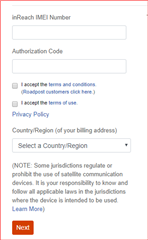
During the first step of the sign up process, which country did you choose as shown in this screenshot?
It is some time since I registered it. I am not sure, maybe I made a mistake. Is there a way to solve this problem?
Try signing into explore.garmin.com > Account > Select Edit Billing Info and ensure the correct country is selected. Then, select Edit to the right of the account name and ensure the correct Country/Region of Citizenship is selected which should be the same as the billing country. If your actual Country of Citizenship is different than that of your billing address, this may be what's causing the currency issue for you. Matching the two should give you the correct currency.
Account info is set to Slovenia. The billing info is set to Slovenia. When I want to proceed to step 2, entering the credit card information this window pops up
OK thank you for trying that. Contacting Billing was going to be my next suggestion and they can help you resolve this.
You are welcome, I'll closed this thread for now. Post again if you have other questions!