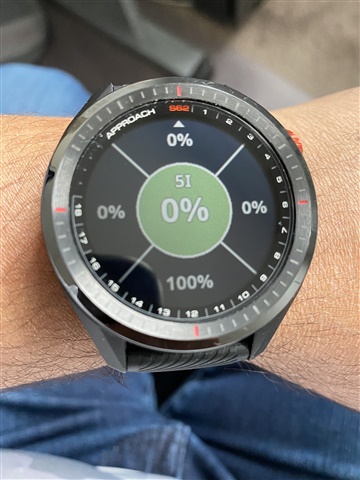
It's where you ended up relative to the green when approaching with your 5 iron - Short/Long/Left/Right/OnTheGreen. If you look at it via Garmin Connect on your PC, you can do a filter by specific club.
Hello, this is really helpful. How does it decide what an “approach” shot is - for example does the second shot on a par 5 count as an approach shot that was short of the green?
can I take shots as “not an approach” for more accurate results?
What kind of stats are you looking for exactly? "Approach" means anything outside of 100 yards. This picture is telling you that you are short 100% of the time and to probaby club up. That's my interpretation of why this was designed. Do you usually lay up with your 5i?
I don't know how to get to it on the watch. I usually just hit what the caddie recommends or adjust up or down a club. You probably can only access it during a round. If you want to look at stats in general load up the Garmin Golf app, go to performance stats and then shot overview. They have a section on approach shots and it filters a bit based on distance.